Eloquent Images by Gary Hart
Insight, information, and inspiration for the inquisitive nature photographer
The Method To My Madness
Posted on September 28, 2024

Lush, Onomea Falls, Hawaii
Sony α1
Sony 16-35 GM
1 second
F/16
ISO 400
Last Saturday I did a Zoom presentation for a camera club in Texas. My topic was seeing the world the way your camera sees it, a frequently recurring theme for me, but preparing for and delivering this presentation put it in the front of my mind as I processed this image from my recent Hawaii Big Island workshop.
Most of us know the feeling of coming across a scene that moves us to photograph it. And now that we all carry around powerful, pocket-size cameras, never has it been easier to fulfill that urge. For some, it’s enough to merely snap a quick shot that saves the memory—even if you never look at that picture again (many won’t), there’s genuine comfort in the knowledge that you can revisit that memory any time you want to.
For others, professional and closet photographers alike (if you can’t help pausing to photograph something that excites you, and aren’t satisfied until that photo is just so, you might be a photographer and not even know it), it’s important to convey something of the experience of being there, or the specialness that moved you to stop and pull out your camera. But if your results matter that much, you also know the feeling of disappointment when revisiting or sharing an image of an especially beautiful scene, only to find that it somehow fails to generate the enthusiasm you felt being there.
Disappointing results usually happen when we fail to fully appreciate that the camera sees the world differently than we do, and therefore fail to take the camera’s (from smartphone to large format) unique vision into account when crafting our image. So I thought I’d share my process in creating this Onomea Falls image from my recently completed Hawaii workshop, and how I attempted to leverage my camera’s vision to get the most from the scene.
I’ve visited the Hawaii Tropical Botanical Garden dozens of times in the 15 or so years I’ve been photographing Hawaii’s Big Island. From our hotel in Hilo, it’s just a 20 minute drive that winds along an wonderfully lush road. How lush? When the property that was to become the garden was purchased by Dan and Pauline Lutkenhouse in 1977, they didn’t even know it had a waterfall.
For the next 7 years, Dan and one helper labored with nothing but hand tools to clear dense foliage and carve paths in the hard black basalt, toiling 7 days a week until the garden was ready to open. Of course the work wasn’t done then, and in fact managing the dense, fast growing plants remains a year round effort. Dan passed in 2007, but the love that guided his meticulous care lives on, and is clearly visible in the garden’s every square inch.
The crown jewel of HTBG is Onomea Falls. Originating on the slopes of Mauna Kea, Onomea Stream stair-steps its way through the garden, forming one of the most beautiful waterfalls on the entire island. I’ve always been drawn to the tumbling water and lush foliage of Onomea Falls, and every time I visit work hard to overcome the challenges of photographing it. Some visits I succeed more than others, often getting “nice” images (it’s hard to go wrong here), but rarely getting something that thrills me.
This year I vowed to change that.
First, I’ll say a few words about the differences between camera and human vision that applied to this scene:
- Dynamic range: The dynamic range of digital sensors improves each year, but has not yet gotten close to human vision. Often shadow detail clearly visible to our eyes is rendered black in an image exposed to spare brilliant highlights; or clearly visible highlight detail is rendered white when we expose for the shadows. The problem is especially difficult when a densely shaded scene contains splashes of brilliant sunlight. There are many ways to overcome dynamic range shortcomings, such as blending multiple images (which I never do) or neutral density filters (which I rarely use anymore, and are useless in a shaded scene with random sunlight anyway). Complete shade is the great dynamic range equalizer, and I always try to photograph flowing water like Onomea Falls in overcast or full shade to soften the light and significantly reduce the scene’s dynamic range.
- Missing dimension: Photography attempts to render a 3-dimensional world in a 2-dimensional medium. And while that’s impossible, what is possible is creating the illusion of depth by ensuring that my composition has elements that draw or guide the eye throughout. Onomea Falls’ descending stair-step layout, and abundant surrounding plants, provide ample opportunity to create the depth illusion I seek.
- Depth of field: The human eye quickly adjusts focus from near to far, allowing us to view every aspect of the world in sharp focus (virtually) at once. While the camera can often achieve front-to-back focus throughout an entire scene, there are limitations to this capability, and achieving it often requires great care. That’s especially true in a scene like this, where I have important visual elements from just a few feet away all the way to the top of the hill at the back of the scene.
- Constrained view: While the human experience of any scene is 360 degrees and multi-sensory, a still image is always constrained by a rectangular box. Using a wide angle lens will include more of the world, but also shrinks everything in the scene. There’s a lot going on at this Onomea Falls view, and deciding what to include and exclude is an important part of the creative process here.
- Motion: Like photography’s missing dimension, our world’s continuous motion is impossible to duplicate in a still photo. The best we can hope to do is convey a sense of motion with our shutter speed choice. Of course many landscape scenes are completely stationary, rendering the motion problem irrelevant, but that isn’t the case at Onomea Falls, where the water’s motion is the scene’s primary focal point.
The afternoon I brought my group to the botanical garden was a mixture of clouds and sunlight. Since it was fairly cloudy when we arrived, I actually started here and got in a few frames with nice light before the direct sunlight returned. But it wasn’t until I returned at the end of our visit, once the sun had gone behind the hill above the fall, that I got the complete shade I wanted.
But that first visit wasn’t a complete loss because it gave me the opportunity to spend quality time with the scene and identify an approach for when I returned later. First and foremost, I wanted to take advantage of all the beautiful visual elements throughout the scene. I’ve always loved the lush, verdant feel down here, and found myself especially drawn to the moss-covered rock (in hindsight, this also could be an old tree stump—I have to remember to check the next time I’m there—but for now I’m going with rock) smothered in a variety of tropical plants right on the other side of the vista’s railing.
I decided to go for a wide composition using my 16-35 f/2.8 lens, putting the foreground plants front and center while shrinking Onomea Falls enough that the plants became the scene’s focal point. As I said earlier, there’s a lot going on in this scene, so even after my general decision to feature the nearby plants and shrink the fall, I still needed to determine what else to include and eliminate.
This is where the camera’s constrained view helps. I briefly considered a horizontal frame, but opted for a vertical frame that allowed me to excise lots of superfluous foliage around the perimeter, and minimize the relatively bland pool at the base of the fall, in favor of the scene’s most important elements: the foreground plant-covered rock and cascading Onomea Falls.
I knew that the lower and closer I got to the foreground plants, the more of my frame they would occupy. Getting my camera as low as possible required significant tripod contortions. I ended up with all three tripod legs splayed fairly wide—one on the pavement, one on the low wall (upon which the short rail was mounted), and one just out of sight among the plants. This put the closest plants about less than 3 feet from my lens.
I stopped down to f/16, framed up a general idea of what I was going for, and clicked. Each time I’d stand back to evaluate the latest result on my camera’s LCD, make small adjustments to my position and composition, and click again. My position relative to the various elements in my frame is key to the illusion of depth that’s so important, so my decision to reposition was solely based on the relationships the new position created, with special care taken to avoid merging elements at different distances (to the extent that was possible).
I ultimately ended up with this position because I liked the way the lowest section of the fall was framed with two fairly prominent bunches of leaves. I chose this camera height because any lower would have merged the fall with the foreground foliage, while higher created an unnecessary empty zone between the foliage and fall. (In a perfect world that small fern frond wouldn’t jut up into the bottom of the fall, but the world is rarely perfect.)
Through this click, evaluate, refine process, I took half dozen or so “draft” frames before I was satisfied with the overall relationships. Next I zeroed in on the important micro-elements in my frame, identifying how the various elements move the eye, and checking my borders to minimize potential distractions that might invite the viewer’s eye out of the frame. For example, I took great care not to cut off either of the framing leaf groups with the frame’s border. And at the bottom of the frame, while I knew I’d be cutting off something, I chose a spot that allowed me to include some of the nicely textured moss and a couple of red ferns, without cutting of the most prominent leaves.
The longer I worked the scene, I more I became aware that just above the fall, the foliage opened up and brightened quite a bit. Rather than hinting at the world beyond my scene, I chose to put the top of my frame just below the point where the foliage thinned out, creating the illusion that this lush world might continue for miles up the mountainside.
With my composition worked out, the next piece of the puzzle was ensuring front-to-back sharpness. My focal length was around 24mm, making my hyperfocal distance at f/16 around 4 feet (I verified this on my DOF app). But the hyperfocal point is an approximation based on “acceptable” sharpness (a notoriously fickle target based on an arbitrary definition of “acceptable”). In this case, I focused on the farthest of the foreground leaves (atop the rock), which I guessed were about 5 feet away. I chose to focus beyond the hyperfocal point to ensure more sharpness at the back of the scene, and because focusing closer would have given me foreground sharpness I didn’t need.
And finally, I needed to decide on the motion effect I wanted. With the sun behind the mountain, this always inherently shady scene was especially dark. Adding to that was the fact that I needed f/16 for depth of field, so at any reasonable ISO, my choice was how much motion blur rather sharply frozen splashing water drops. At ISO 100, a multi-second exposure was no problem, but by increasing my ISO up to around 1600, in 1 stop increments, I gave myself a range of shutter speeds up to 1/4 second. All created some amount of blur, but after closely scrutinizing all my frames on my computer, I chose this one that used 1 second at ISO 400, because it retained very subtle texture in the rushing water. Much faster than 1 second created a little bit of scratchiness in the water that I didn’t like; longer than 1 second completely smoothed out the water’s texture.
I should also add that polarizing this scene was an essential component of the final result. Scenes like this are filled with reflective sheen on the water, leaves, and wet rock. Polarizing it significantly reduces that sheen, greatly enhancing the rich green.
This picture doesn’t reproduce exactly what my eyes saw, nor does it attempt to. But by staying true to what my camera saw, I was able to more clearly convey the scene’s lushness.
Workshop Schedule || Purchase Prints || Instagram
Lush
Click any image to scroll through the gallery LARGE


Danger in Paradise
Posted on September 21, 2024
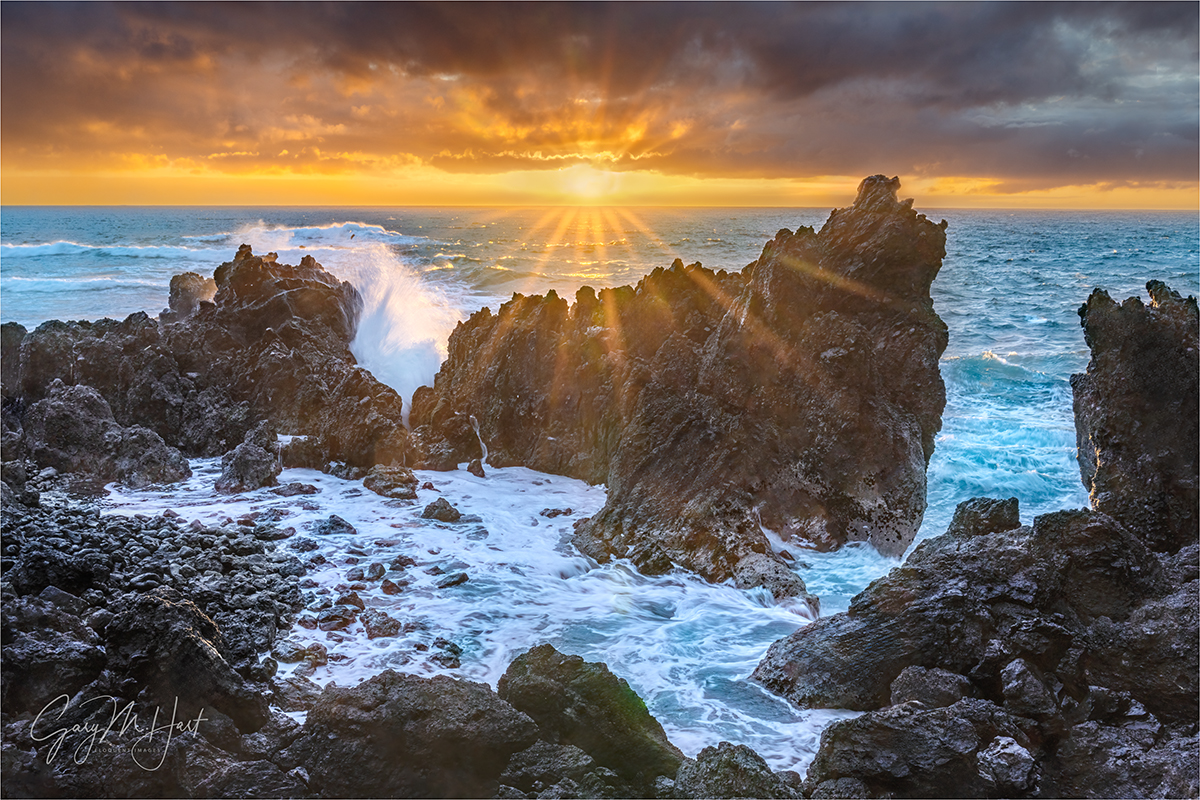
Sunrise, Laupahoehoe Point Sunstar, Hawaii
Sony a7R V
Sony 24-105 f/4 G
ISO 100
f/18
1/13 seconds
Battered for millennia by earthquakes, floods, volcanic eruptions, and tropical cyclones, it’s no wonder Hawaii’s residents keep one eye on the ocean, the other on the mountains—all while closely monitoring the sky overhead. I’ve visited each of Hawaii’s major islands many times (okay, so technically, on Oahu I haven’t been outside the airport, which is its own sort of disaster), and have personally experienced a veritable smorgasbord of these natural events. (Yet somehow I keep returning—go figure.)
The Hawaii earthquakes I’ve felt have been relatively minor jiggles to my earthquake-hardened California bones, but each served as a reminder that Hawaii has a history of large earthquakes, with magnitudes at least into the high 7s. Active volcanism makes the Big Island particularly vulnerable: as recently as 2018 it was shaken by a magnitude 6.9 earthquake; in 1975 a magnitude 7.7 quake rocked the Puna Coast just south and west of Hilo. Moving north, the Hawaiian Islands’ earthquake risk decreases: Maui has experienced a couple of magnitude 6 quakes in historic times (just offshore), while Oahu only gets a moderate jostling from time to time (but does get a pretty good jolt from the strongest Big Island quakes)—only Kauai, the oldest island, is (relatively) seismically stable.
Hawaii’s volcanoes are sexier than its earthquakes, actually attracting visitors (you don’t see too many people rushing toward an earthquake). I missed the recent Mauna Loa eruption, but have witnessed numerous Kilauea eruptions, in many forms: many time I’ve enjoyed standing on the rim at night to view the glow and smoke emanating from the lava lake bubbling just out of sight on the caldera floor far below; last year, I stood on the edge of (the recently seismically remodeled) Kilauea caldera with my workshop group and peered down at dozens of towering lava fountains less than a mile away. In 2010, Don Smith and I hiked close enough to a Kilauea lava flow that we felt its heat and heard trees explode. But despite their dramatic aesthetic appeal, Hawaii’s volcanoes are still too powerful to be taken lightly. While most of its eruptions lack the explosiveness of many more dangerous volcanoes around the world, as recently as 2018 Hawaii’s effusive lava flows have wiped out entire towns, destroying hundreds of homes on their way to the ocean.
And then there are the tropical cyclones that lash the islands several times each decade. By far the most significant storm damage to a Hawaiian island was inflicted by Hurricane Iniki in 1992, striking Kauai as a Category 4 storm with winds up to 140 miles per hour. While I’ve never experienced anything that extreme on my visits, in September of 2018, each of my two workshops was altered by a different hurricane: first on the Big Island when, a few days before that workshop started, a close brush with Category 5 Hurricane Lane deposited up to 58 inches of rain that flooded many of my locations. I departed Hawaii for Maui and my second workshop, only to have Hurricane Olivia (downgraded to a tropical storm just before landfall) force me to relocate the workshop’s two nights in Hana, and find replacement locations for those days.
I’ve also learned firsthand that it doesn’t take a hurricane to generate floods in Hawaii. In 2016 I was on Maui when just regular old torrential rainfall caused a 500-year flood in the Iao Valley and Central Maui, destroying homes and swamping cars. While driving through Central Maui after the water receded, I saw cars still mired in water to their doors.
Even given this history of disasters, compounded by my own personal experience with some of Hawaii’s most extreme natural elements, I would argue that Hawaii’s greatest natural risk is tsunamis. Despite their relative rarity, tsunamis have killed more people than all other Hawaiian natural disasters combined. The islands’ position smack in the middle of the Pacific Ring of Fire, which happens to be the source of nearly 3/4 of Earth’s tsunamis, means Hawaiians need to think in terms of when, not if, the next tsunami hits, and plan accordingly.
Unlike conventional waves, which are wind-generated and affect only the ocean’s surface, a tsunami is formed when a cataclysmic event displaces water from the ocean surface all the way down to the ocean floor. Potential ocean-moving events include submarine landslides, volcanic eruptions, and meteor impacts. But by far the most frequent force behind a tsunami is subduction earthquakes, when one tectonic plate thrusts beneath another and displaces the overlying plate and all the water above it.
In the simplest terms possible, the energy of an ocean wave is the product of its amplitude (maximum height) and wavelength (the distance between amplitudes). In the open ocean, with deep water and no obstructions, a tsunami’s energy is almost entirely committed to spreading outward at 400-600 miles per hour (around the speed of a commercial airliner). At those speeds, a tsunami’s wavelength could be 100 miles, with amplitudes of a foot or two. In fact, with an open ocean amplitude of just a foot or so, when a tsunami passes beneath a boat, the boat’s occupants feel nothing.
But as a tsunami approaches land, it starts dragging on the ocean floor, eventually slowing to around 30 miles per hour. Since the next waves in line are still racing through open ocean at hundreds of miles per hour, when the wave in front of them slams on the brakes, water begins piling up as most of the forward energy is suddenly transformed into wave-building energy: A massive wave is born.
As we’ve seen in recent, and not so recent, history, the power and suddenness of a tsunami can be catastrophic. The Indian Ocean tsunami of 2004 killed over 230,000 people, some as far away as 3,000 miles. The 2011 Japan tsunami killed 10,000 people in Japan, and was directly responsible for the meltdown at the Fukushima nuclear power plant. (It also caused some minor damage in Hawaii, among other places.)
Hawaii’s long tsunami history includes many small and moderate events, and a handful that can be labeled major (and tragic). Since the beginning of the 20th century, three especially significant tsunamis stand out:
- April 1, 1946: Generated by a magnitude 8.5 in the Aleutian Islands, this tsunami is considered as Hawaii’s most significant for the 159 lives it took, and the major damage dealt to every Hawaiian island.
- May 23, 1960: Generated by a magnitude 9.5 earthquake near Chile—the largest earthquake ever measured and more than 30 times stronger than the 1946 Aleutian earthquake. Despite the lessons of 1946, many lives were lost by Hilo residents who didn’t heed warnings.
- November 29, 1975: Generated by a magnitude 7.7 earthquake south of Hilo. on the east flank of Kilauea—though its damage was mostly limited to Hawaii’s southeast coast, this tsunami arrived too quickly following the quake for its victims to flea to safety.
I’m reminded of Hawaii’s tsunami history each time I visit Laupahoehoe Point on the Big Island’s east coast. This is where the 1946 tsunami took the lives of 24 residents, including 16 students and 5 teachers who were waiting at the local schoolhouse for school to start. Adding to the tragedy, warnings of the approaching peril were ignored as April Fools’ Day jokes.
Based on the inexplicable inability to warn people thousands of miles, and many hours, from the tsunami’s source, the US Tsunami Warning Center was formed. Another response to this tragedy was the significant upgrade of local building practices. For example, the 8-story Hilo Hawaiian Hotel, where my Big Island workshops are based, is right on Hilo Bay (you could literally hit the water with a rock from our balconies) and potentially ground-zero for the next tsunami. Constructed in 1975 atop (extremely reinforced) concrete columns, significant sections of the Hilo Hawaiian’s bottom two floors are completely open to the elements, with no walls on either side, designed specifically to allow any large wave to sweep right through rather than push against the structure. Throughout Hilo are tsunami warning sirens that are tested once each month, and evacuation routes are clearly signed.
In 2015 I actually got a firsthand look at how seriously tsunamis are taken in Hilo when, while there for a workshop, a magnitude 8.3 earthquake near Chile triggered a Pacific tsunami warning. Fortunately, today’s satellite technology and ocean buoy network enables much better tsunami tracking than was available in 1946 and 1960, so not only did we get many hours notice, by the time the wave reached Hawaii it was measured in inches and the warning had been long suspended (and I enjoyed a peaceful sleep rather than spending the night in an evacuation shelter).
About this image
Sunrise, Laupahoehoe Point Sunstar, Hawaii
In most of my workshops, our first sunrise is at Laupahoehoe Point. Before we start, I emphasize to my group the location’s tsunami history, and point out some of the tsunami damage still visible. In fact, the location where we photograph is just a few hundred feet from the location of the teachers’ cottages that were swept away in the 1946 tsunami.
You may (or may not) notice that I have several very similar images of this scene. That’s partly because it in fact provides a very nice composition that I always enjoy photographing, but mostly because we’re at Laupahoehoe at the beginning of the workshop, making it especially important that I stay tethered to my group. Which means the variety I get at Laupahoehoe Point is more about conditions than compositional inspiration.
This morning was especially nice for a couple of reasons: first, recent hurricane near-misses had seriously stirred up the Hawaiian surf; second, getting a break in the clouds right on the horizon isn’t especially common in Hawaii. Seeing the opening this morning, I was able to anticipate the opportunity for a nice sunstar and believed I was ready for it.
Unfortunately, I made a couple of mistakes because I’d spent most of the morning working with my group. The first was that I thought I was using my 16-35 f/2.8 lens that provides a much better sunstar than the 24-105 f/4 lens I was actually using. The second mistake was forgetting to remove the ND filter I’d been using earlier in the morning to smooth the waves. After helping people in my group prepare for their sunstar opportunity, I rushed to my camera and started clicking as soon as the sun appeared, realizing with the first click that I’d need to wait out the 20-second exposure my camera had started. Fortunately, it all worked out, and I was actually able to get a couple of frames like this one, capturing the instant of an explosive wave’s impact.
At the risk of stating the obvious, another thing I want to point out is how hard it is to photograph directly into the sun. When I got around to processing this image at home, not only did I have serious dynamic range problems to deal with, I also had tons of nasty lens flare blobs to clean up. Fixing lens flare was mostly just a tedious process with the Remove tool; the dynamic range was a matter of processing the sky and foreground separately. Since I no longer use graduated neutral density filters, and I never blend multiple exposures, my margin for exposure error was extremely small, but by monitoring my histogram and pushing my highlights to the limits of recoverability when I captured the image, I ended up with shadows that still contained enough clean detail to work with.
Workshop Schedule || Purchase Prints || Instagram
Lots More Sunstars


One Click Wonders
Posted on September 12, 2024

Milky Way Reflection, Puna Coast, Hawaii
Sony a7R V
Sony 14mm f/1.8 GM
ISO 6400
f/1.8
20 seconds
For as long as I can remember, I’ve gazed at the night sky in wonder. Around the age of 10, my wonder was augmented by inquisitive fascination that I pursued in books, magazines, and through the lens of my very own telescope. Throughout my adulthood, I longed to express that celestial wonder with my camera, but for years was thwarted by the camera’s inability to capture the night sky’s splendor. The Milky Way has long been a particular source of simultaneous attraction and frustration—two sides of the same coin.
Hawaii’s Big Island is the site of my first real Milky Way photography success. Starting with my first Hawaii workshop in 2011 (two workshops that year, actually), I could count on taking my groups to the Kilauea caldera rim and finding lava churning in Halemaʻumaʻu, the small crater on the caldera floor that had been active since 2008. Though the lava itself was usually (but not always) too low to be seen, its orange glow stood out brilliantly at night. Thanks to scouting prior to the first workshop, I located the spot on the rim where the Milky Way aligned with Halemaʻumaʻu, and for the first 8 years virtually every group (unless we were shut out by clouds) enjoyed Kilauea Milky Way success. So spectacular was the sight of the Milky Way’s luminous core above an active volcano, we’d often return 2 or 3 times.
I’d been attempting to photograph the Milky Way ever since my transition to digital in 2003, but for years found the technology not quite ready for prime time—there just wasn’t enough light for a usable foreground—and my one-click-only Milky Way foregrounds were either too dark or too noisy. Blending multiple images, one exposed for the foreground and the other for the sky, was against my personal rules, and I can’t stand light painting—it’s one-click, natural light only for me.
But Kilauea created its own foreground light that illuminated the caldera’s detail—natural light painting! I was in business.


Then in 2018, Kilauea’s continuous summit eruption ended in a blaze of glory when the magma chamber supporting it sprung a major leak that delivered devastating lava flows along the volcano’s East Rift Zone, before eventually draining into the Pacific and creating 875 acres of brand new oceanfront real estate. With its magma chamber drained, Kilauea’s summit crater (as we knew it at the time) collapsed, taking with it, among many things, Halemaʻumaʻu and my reliable volcano/Milky-Way photo opportunity.

Stairway to Heaven, Milky Way Over the Puna Coast, Hawaii (2021)
Of course, even without an eruption, the Big Island is (in my opinion) Hawaii’s most photo-worthy island, so I kept coming back. And fortunately, in the years I’d spent enjoying all that Kilauea Milky Way success, sensor technology (light capturing ability) evolved enough that a foreground light source was no longer necessary for a Milky Way foreground, greatly expanding my Milky Way horizons.
After a little research and exploration, in most of my post-2018 workshops, I still managed to give my Hawaii groups at least one night shoot. One year we drove to the summit of (nearly 14,000 foot) Mauna Kea and photographed the Milky Way above the giant telescopes up there, and a couple of other times we just happened to catch one of Kilauea’s many sporadic post-2018 eruptions, each more spectacular than the eruptions I’d seen on the pre-2018 trips.
For several reasons, Mauna Kea turned out to be an impractical long term Milky Way location, so on visits when Kilauea was quiet, I turned my eyes to the Puna Coast. With a rugged volcanic shoreline interspersed with still tide pools and black sand beaches, the Puna Coast is hands-down my favorite coastline in the world. But frequent clouds (usually a good thing) and air dense with moisture make night photography here a little trickier. But, as I learned in 2021, the reward of success justifies going for it despite the lack of certainty. In fact, despite its challenges, I’d have to rate the Puna Coast right up there with New Zealand and the Colorado River (at the bottom of Grand Canyon) as a favorite place to photograph the Milky Way.
Despite the improved light capturing capability of today’s digital sensors, and the quality of current wide, fast prime lenses, successful Milky Way photography requires many compromises: specifically, (much) less than ideal f-stops, ISOs, and shutter speeds. Not to mention, even when everything is as perfect as possible, you also need to lower your personal image quality standards.
Let’s Review
My Milky Way approach, excerpted and (significantly) updated from previous blog posts
Even though I’ve been fulltime digital for more than 20 years, and am not one of those photographers still pining for the days of film (not even close), I still approach my craft like a film shooter. Another way of looking at it would be that I want my creativity to happen in the camera, not the computer. That said, processing, though not my favorite part of photography, is an essential digital windfall that has enabled color shooters like me to extract results that were never possible with film. In fact, like every other digital photographer, I couldn’t succeed without processing. And processing is doubly important for Milky Way images.
But processing starts with the raw file, because the better the quality of the capture, the greater your processing options, flexibility, and ultimate result.
The method to my madness
I’ll start with my definition of a successful Milky Way image:
- One click—no blending. That doesn’t mean I think (honest) blending is wrong, it’s just not for me.
- Minimal noise with maximum detail: Since these two qualities are mutually exclusive in Milky Way image, my exposure, noise reduction, and processing efforts are always about finding the right balance. And the definition of “minimal” for a Milky Way image is not same as it is for a daylight image (see “compromise” reference above).
- Some foreground detail: The foreground doesn’t need to be daylight bright (shouldn’t be), but I want to be able to see something visually appealing/interesting there.
- The right sky color: As far as I’m concerned, the color of the sky in a Milky Way image is the photographer’s creative choice because no one knows what color it’s supposed to be (although I do hear from people who claim to know, and who aren’t shy about “educating” me—I mean, even if science says the sky should be green, I’m not going to make a green-sky Milky Way image, thankyouverymuch). If you look at my recent Milky Way images, you’ll see that I tend to avoid a blue/cyan sky in favor of something more blue/purple. And as time goes by, my sky-color preference has been trending closer to black, with a less saturated blue/purple tint. This just feels more night-like to me. But that’s just my opinion and I empower you to go with whatever color makes you happy.
- Uniform sky tone and hue (as much as possible): I don’t like a huge difference between the sky near the horizon and up toward the top of the frame, and usually try to even it out in processing.
- The stars should pop—within reason: I want the sky to be fairly dark, but the stars to stand out, but don’t overdo it (and be careful with Clarity and Texture).
- No part of the Milky Way should be blown out: While I want the stars bright, I don’t want them too bright.
The right gear
First, if you’re going to do it my way (one click, natural light), I can’t emphasize the importance of the right gear. Specifically relatively new full-frame camera model, a wide and fast lens, and a sturdy tripod.
In general, the newer your sensor technology, the better its low light performance will be. (A broad generalization that tends to be more true than not.) And a full frame sensor will almost always perform better in low light than a comparable-vintage APS-C sensor. I used to use whatever the current 12 megapixel Sony a7S body was (at this writing in September 2024, that would be the a7SIII), and while I’ll acknowledge that these are the best dark sky 35mm bodies in the world, I just couldn’t justify the marginal quality difference between my 12 megapixel Sony a7SIII, and my 61 megapixel Sony a7RV—so I sold the a7SIII and only use my a7RV.
For dark sky photography (it doesn’t have to include the Milky Way), light gathering is job-one. So you want to be using the fastest possible lens that’s wide enough to include the Milky Way and some foreground. My rule of thumb when advising my workshop students is 24mm or wider, but wider is better. And while f/2.8 is fast enough, faster is better. Because the quality of prime lenses is generally better than zooms, and you’ll likely be shooting wide open (usually the most problematic f-stop), I prefer primes for night.
While I have in my bag f/2.8 12-24 and 16-35 lenses, for night photography I use (in this order) my 14mm f/1.8, 20mm f/1.8, and 24mm f/1.4. And honestly, since getting the 14mm f/1.8 lens, I don’t think I’ve used the other two at all—the 14mm is the perfect combination of wide and fast (with excellent border-to-border quality). Before the release of the 14mm lens, I preferred wider view and compactness of the 20mm over the marginally faster (and arguably better quality) 24mm f/1.4. The only other lens in my bag I might use at night is the 12-24—but only if I thought the extra 2mm width would make a difference.
Exposure compromise
My processing choices depend a lot on my exposure choices, which as I said earlier, are all compromises. The real art of one-click Milky Way photography is balancing these compromises well enough that none ruin the image.
Capturing light usually trumps everything. For example:
- I generally go with the highest ISO that gives me a usable image. ISO 3200 is probably the lowest I’d recommend, but if you can pull off 6400 (or more), so much the better. And while any high ISO image will have borderline unusable noise that cleans up pretty well with noise reduction software (which has gotten pretty amazing), every camera has an ISO beyond which even the best noise reduction software can’t save. That ISO might vary depending on several factors—for example, since heat generate noise and long exposures generate heat, the longer your exposure, the more noise you’ll get. And I have a theory (that I haven’t tested yet) that my New Zealand Milky Way images are cleaner than my Grand Canyon and Hawaii Milky Way images because it’s winter (much colder) when I photograph in New Zealand.
- To avoid start motion I try to avoid 30 second exposures, something I can afford to do with my f/1.8 lens. Though some photographers resist a 30-second night exposure at all costs because of the slight star motion it creates, if you’re shooting with an f/2.8 (or slower) lens, I’d probably compromise a little star motion for the extra light 30 seconds provides—pinpoint stars are irrelevant if the image is too dark or noisy to use.
- While most lenses aren’t at their best wide open, unless the flaws of shooting wide open are egregious enough to render the image unusable, I’m always shooting wide open (or unless stopping down just 1/3 stop makes improves the quality significantly).
With my 14mm at f/1.8, I can usually keep my a7RV at ISO 6400, with a 15 or 20 second exposure time—all quality compromises, but my results are usually within the acceptable range. That’s typically where I start my Milky Way exposures, but when I find a composition I like and I know my focus is locked in, I almost always shoot a series of frames with a variety of exposure settings (e.g., maybe dropping my ISO to 3200 and bumping my shutter speed to 30 seconds) to give myself a range of choices when I can view the images on my computer.
Noise reduction
For all of my images, my standard noise processing is Topaz DeNoise AI plugin in Photoshop. But for my Milky Way photography (only), I start with Lightroom’s Denoise tool, paying close attention to the magnified view and experimenting with the reduce noise and save detail controls.
The balance you’re looking for is between reducing noise and sparing detail: we all know what too much noise looks like, but too much noise reduction can be even worse. As you make your adjustments, magnify the view to at least 100 percent and try to limit the amount of noise reduction to a point right before the scene starts to take on a smooth, plasticky texture. And examine multiple locations in the foreground, especially the darkest areas, because the amount of noise reduction and detail salvaging is not uniform across the scene.
Even though Lightroom does a great job, when I’m done processing my image in Lightroom, the first thing I do after opening the Lightroom-processed image in Photoshop is a very gentle application of the Topaz DeNoise plugin as well. For this step, again I magnify the view to 100% and apply as much noise reduction as I can without muddying the detail, taking extra care not to overdo it (not enough is usually better than too much). When my chosen amount of Topaz noise reduction works well for much of the scene, but still plasticizes a few areas, I often use the History brush at some opacity less than 100% (experiment) to recover the lost detail.
Processing
I’m frequently asked about my processing workflow for Milky Way images, and I’ve always been a little reluctant to share a lot because I don’t do any kind of image blending, I’m far from an expert, and my Milky Way workflow is always a work in process. Nevertheless, I get asked enough that I’ve decided it might still help for me to share my general mindset and approach. (Plus, it might help others to understand why my images, while more “real,” aren’t as necessarily more dazzling as the images of those that blend.)
This is where things start to get more vague, because my approach is less a recipe of processing steps, than it is a trial and error approach to finding the best way to achieve the results I want—steps that can vary a lot from image to image. Sometimes I can do most of what I want mostly in Lightroom, other times I lean more heavily on Photoshop—usually it’s some balance of the two.
When processing a Milky Way image, I make extensive use of Lightroom and Photoshop’s History panels. There’s no single best way to do anything, so I make a lot of “what-if?,” trial-and-error adjustments that I only stick with if I’m satisfied. That means you’re not going to get specific processing steps from me as much as you’ll get things to try and accept/reject. The other thing I want to emphasize (again) is the importance of magnifying the image to 100% (1:1) when you’re trying to decide whether or not to accept an adjustment.
Anyone viewing my Milky Way images over the years might notice how the color of my skies have changed. For years, whatever night sky color I’ve ended up with has entirely a function of the color temperature I choose when I process my raw file in Lightroom—no artificially changing the hue, saturation, or in any other way plugging in some artificial color. Since I do think the foreground (non-sky) of a night image looks more night-like (I don’t want a night image that looks like daylight with stars) with the bluish tint I get when the color temperature is cooled to somewhere in the 3000-4000 degrees range, for years I cooled the entire image with a single color temperature stroke—hence the blue night skies. But Lightroom now makes it super easy to process the sky and foreground separately and seamlessly, so I no longer cool my night skies nearly as much as before (or at all). Now my night skies tend to be much closer to black, less saturated and trending a little to the purple side of blue (avoiding the cyan side).
After Lightroom’s noise reduction, whether it’s the sky or foreground, I start with the Highlights/Whites/Shadows/Blacks sliders, performing lots of up/down trial-and-error adjustments to find the right balance (gotta love that History panel). The Lightroom Clarity and Texture sliders will make the stars pop (but don’t overdo it!), but will also exaggerate noise. And Dehaze will add contrast to the sky that really enhances the Milky Way, but like most Photoshop steps, overdoing it is usually worse than under-doing it.
For the foreground, a color temperature in the 3000-4000 degree range usually works, but specifying a temperature value isn’t an option for a Mask, so I just cool it to taste. To get the sky color I want, I play with both the temperature and tint sliders, usually going with something a little warmer than the foreground, with a slight nudge of the Tint slider toward red.
If I have to tweak the color in Photoshop (usually very minor adjustments on very small areas of the image), I select the area I want to adjust, Feather it fairly loosely (large Feather Radius), and adjust Color Balance and/or Saturation. I do lots of trial-and-error moves with Color Balance; with Saturation I almost always work on specific colors, and will adjust some combination of Hue, Saturation, and Lightness until I’m satisfied. Also, I find that some of the other adjustments I make in Lightroom and Photoshop pump up the color too much, so I often desaturate the sky a fair amount in Photoshop.
To make the Milky Way more prominent, a few passes with the Dodge brush set to Highlights can do wonders, brightening the stars without affecting the sky. I prefer multiple passes at low Opacity (<20). Probably the trickiest thing to contend with is a different hue near the horizon than I get in the rest of the sky. I can usually mitigate that somewhat with a feathered selection of the area and a Color Balance or Saturation layer, described above. And sometimes, if I’m really brave, I’ll select the offending area, Feather it, use the Eyedropper tool to pick the color I want from another part of the sky, and use the Paint Bucket tool to apply the color to the selected area. I usually get better results with Tolerance set fairly high (>50) and Opacity fairly low (<30), but not always, so experiment (like everything else, it can vary from image to image). If you do this, don’t expect it to work every time, and always examine the results at 100% because it can introduce some pretty nasty blotchiness that doesn’t jump right out at you on first glance at lower magnification.
With most of my images, the last thing I do before saving is sharpen. But since night images are rarely about fine detail, and sharpening exacerbates noise, I don’t usually sharpen my Milky Way images.
These tips are not intended to be the final word on Milky Way processing—I just wanted to give you some insight into my approach, both my goals and the steps I take to achieve them. I’ve been using Photoshop for a long time, but don’t consider myself a Photoshop expert, by any stretch. While there may be (and probably are) better ways to do many of these things, I’ve always been a simple-first photographer: Do things the simplest possible way, until you find some way that’s better, or until you encounter something you just can’t do. And if you take nothing else away from this, I hope you at least feel empowered to experiment until you achieve results that make you happy.
Back to the image at hand
Milky Way Reflection, Puna Coast, Hawaii
Based on the weather forecast for the Puna Coast, I wasn’t especially optimistic for Milky Way success in this year’s Hawaii workshop, but as I said earlier, the rewards of success always make it worth trying. I also had a backup location in mind for a couple of nights later—not as nice a foreground, but a greater likelihood of clear skies.
Despite the tremendous success of the Puna location I used in 2021 (the last two years, Kilauea was erupting and we did our night shoots up there), I decided not to return there because the precariousness of the location atop a 20-foot cliff above pounding surf made me nervous. So I decided to go to my favorite Puna “beach,” a wide spot on Kalapana-Kapoho Road with no real name—just a spot I stumbled upon years ago and have been bringing my groups to ever since.
As you can see from this image, my pessimism was unjustified and we enjoyed a spectacular shoot. I’d given everyone a Milky Way primer during the afternoon training, but it definitely helped that we could all set up in very close proximity, making it easy for Don Smith (who was helping me with this workshop) and me to get around and assist anyone who needed help.
The tide pool at our feet was a spectacular bonus, providing a mirror reflection of the stars and even a little Milky Way—a rare opportunity that I encouraged everyone to take full advantage of, even if it meant getting a little less Milky Way than they wanted. About 20 minutes into our shoot, a big black cloud moved in overhead and obliterated the stars, but within 10 minutes it moved on as quickly as it appeared—in this image you can see it exiting stage right.
The last point I want to make before (finally) ending this very long post is how much fun these Milky Way shoots are. Everyone was giddy with excitement for what they were seeing on the backs of their cameras, and that giddiness contributed to a party-like atmosphere with lots of conversation and laughter as we worked. One of my most memorable Milky Way shoots ever!
Join me in Hawaii next year!
Workshop Schedule || Purchase Prints || Instagram
More One-Click Wonders


Full Circle
Posted on September 7, 2024

Sunset Mirror, Lake Manly (Badwater), Death Valley
Sony a7R V
Sony 24-105 f/4 G
ISO 100
f/11
1/15 seconds
For many people of my generation, their earliest memories of landscape photography are some version of Dad pulling the family wagon up to an iconic vista and beelining (camera flapping around his neck) to the railed viewpoint to snap a few frames—if you were lucky, he’d take long enough for you to use the bathroom. In most cases these pictures would be quickly forgotten—until 50 years later when, while searching through Mom and Dad’s garage/attic/basement/closets arguing with siblings about what stays and goes, you come upon shoe boxes stuffed with prints or slides of scenes that you feel absolutely no connection to.
I think the fact that I became a landscape photographer has something to do with an intermediate step that most people missed: when my dad’s slides came back from the lab, he would meticulously peruse and purge, then label and organize the survivors, before sequestering the family in our darkened living room until the each Kodak Carousel had completed its cycle. Sometimes we’d have to sit through multiple shows of the same pictures as friends and family visited.
I won’t pretend that my brothers and I loved these shows, or (let’s be honest) that we enjoyed them in any way. But in hindsight, I think on some level the message came through each time we visited Yosemite, the beach, or drove across the country (have tent trailer — will travel), that the beauty we experienced was worth preserving.
Learning that pictures could possess an actual aesthetic value that others could enjoy also helped me register that a camera could be much more than a mere outdoor accessory. Which probably explains why, when I became old enough to start creating outdoor memories of my own, preserving on film the beauty that moved me just seemed the natural thing to do.
Of course when I first picked up a camera, I naively believed that the only ingredients necessary for a successful picture were a camera and a pretty scene. That might have something to do with the fact that Dad’s photo stops were rarely timed for light or conditions, because vacations and photography don’t mix: the best time for photography is the worst time to be outside. Despite prioritizing family over photography like the good father he was, I appreciate now that he really did know his way around a camera, and how to frame a scene.
(Like many blog posts, I started with a point I wanted to land on, and now have ended up following a most circuitous route getting there. But here we are.)
I’m thinking about the influences that got me to where I am today, and need to give Dad a twofer on this one: prioritizing family over photography, while still modeling a photographer’s aesthetic. My own pursuit of photography started after childhood, but long before I married and had children, and while it went somewhat dormant during my daughters’ formative years (limited mostly to snaps of family moments), the interest came roaring back when the girls spread their wings and rendered my wife and me empty nesters—an event that (fortuitously) coincided with the advent of digital capture.
Acquainting myself with the new digital paradigm, I couldn’t help reliving some of my father’s enthusiasm for photography and the cutting-edge technology of his time (autofocus, through-the-lens automatic metering), that (I realize now) coincided with my parents’ own sudden empty-nester status. Digital photography was perfect for me—similar enough to film photography that there wasn’t lots to relearn, but with an infusion of the technical world I’d spent nearly 20 years in. Also like my father’s experience, the new-found freedom to research, study, and explore taught me (among other things) the importance of light on the landscape, and that I must prioritize the conditions when scheduling my photo trips.
Since virtually every family vacation of my childhood was a camping trip somewhere scenic, it made sense that my first instinct was to return to the locations of my strongest childhood memories. While a few vacations were rigorously planned interstate adventures with a different stop each night (I’m having flashbacks to KOA campgrounds and AAA TripTiks), more frequently we’d pick a picturesque setting and set up camp for a week or two, relaxing and enjoying day-trips to nearby sights. These are the locations that especially drew me with my new digital camera.
My strongest childhood memories of vacations were our summer Yosemite trips, but a couple of times Dad got a week off during Christmas break and Death Valley was the logical destination. So after I’d harvested Yosemite’s low hanging visual fruit, Death Valley was the next logical step for my burgeoning photography aspirations.
As a kid I was more interested in Death Valley’s mining and ghost town attractions, but returning as a photographer, it was the uniquely beautiful geology that got my juices flowing. In my previous blog post, I wrote about the proximity of the highest point in the 48 contiguous United States (Mt. Whitney) to the lowest point in the Northern Hemisphere, so I guess it makes sense to circle back to Death Valley.
That lowest point is Badwater, which also happens to be a personal Death Valley favorite. So what’s going on here? When you’re lower than all surrounding terrain, not only does water tend to find you, it can only exit via evaporation. In an inherently arid environment like Death Valley, inundation usually outpaces evaporation, leaving behind only minerals carried by the water but too heavy to evaporate. The predominant residual mineral at Badwater is salt, with a little more accumulating with each evaporation. As the mud beneath the salt layer dries, polygonal cracks form, creating openings that can accumulate extra salt. Death Valley’s intense summer heat causes this salt to expand and form corresponding polygonal shapes that stretch for miles atop the otherwise flat surface.
Extending miles in the shadow of 11,000 foot Telescope Peak, Badwater is always photographable, but its year-to-year variation is a source of great angst and celebration. Some winters I find these shapes filled with water, sparkling like faceted jewels; or when dry their color can range from muddy brown to as white as a bleached sheet. But by far my favorite happens when recent rains have flooded Badwater Basin to form Lake Manly, a shallow ephemeral lake that turns the entire basin into a giant mirror. During my 2005 visit, I watched a kayaker glide across the lake.
To explain a little more about Lake Manly, here’s an excerpt from my February 14, 2024 blog post:

Sweet Sunset, Lake Manly and Badwater Basin, Death Valley
The origins of Lake Manly in Badwater Basin date back nearly 200,000 years. In its earliest millennia, Lake Manly was much deeper, far more expansive, and persisted year-round. But in recent millennia, it has become an ephemeral lake, usually dry and filling only when rare intense storms generate enough runoff. The life of these recent versions of Lake Manly is measured in weeks or months.
The current version of Lake Manly formed when Tropical Storm (and former hurricane) Hilary saturated Death Valley with more than a year’s worth of rain (2.2 inches) in one day. Because Death Valley isn’t equipped to handle so much water at once, Hilary brought flooding that washed out roads, displaced rocks, carved new channels, and reshaped canyons. And with no outlet for all this water, after doing its damage, this runoff had to come to rest somewhere—and where better than the lowest place in North America?
At its peak volume last August, the newest incarnation of Lake Manly was 7 miles long and 4 miles wide, but no more than 2 feet deep. By late January its surface area had shrunk to half its original size, and the lake’s depth was measured in inches.
Despite its diminished size, Lake Manly was more than big enough to provide spectacular, valley-wide reflections for my workshop group. In addition to photographing mountain and sky reflections from the valley floor, we also enjoyed beautiful sunset reflections from Dante’s View, more than 5000 feet above Badwater.
I captured today’s blog image on the same evening as the image I shared in that February post. Because the sky is important as the foreground in a landscape image, my compositions this evening followed the rapidly scooting clouds, capturing the changing color as I went. I shifted my position on the lakeshore (and have the muddy boots to prove it) to ensure the best foreground/clouds relationship, and continued moving and tracking the clouds until they encountered a nearly full moon rising above the looming Amargosa Range.
On those childhood visits to these special places, rolling my eyes Dad’s goofy obsession and the inevitable boring slideshow in store, I had no appreciation for the foundation that was being laid, or for the full circle journey I was embarking on.
2026 Death Valley Winter Moon Photo Workshop
Workshop Schedule || Purchase Prints || Instagram
Death Valley


 Eloquent Images by Gary Hart