Eloquent Images by Gary Hart
Insight, information, and inspiration for the inquisitive nature photographer
It’s All a Blur: Deer Creek Fall
Posted on May 26, 2019

On the Rocks, Deer Creek Fall, Grand Canyon
Sony a7RIII
Sony 16-35 f/2.8 GM
Breakthrough 6-stop ND
5 seconds
F/11
ISO 100
Do I have a favorite place to in the Grand Canyon? Difficult to say, but I definitely have a shortlist, and Deer Creek Fall is on it. Of course this beautiful waterfall is right on the river and far from a secret, so it’s often overrun by other rafting trips (in general the bottom of the Grand Canyon is wonderfully not crowded, but people do tend to congregate at certain spots). Having done this trip six times now, I (with the help of my guides) have learned the timing to minimize or eliminate the people at these popular spots.
This year we found one other group enjoying Deer Creek Fall, but it wasn’t long before they pushed off and we had it to ourselves. In addition to many nice views at river level, there are some great scenes above the fall. The trail to the slot canyon that feeds the fall is steep, with a few spots that require a little non-technical climbing to get to the next level, but the payoff makes the effort worth it. The view of the river and Grand Canyon is (cliché alert) breathtaking, and from there a short trek through a beautiful slot canyon opens to an emerald oasis called “The Patio.” I’ve made the hike to the Patio once, but was kind of unnerved by a 20-foot stretch of 2-foot wide trail carved into a vertical wall and vowed not to do it again (give me something to hold onto and I could stand on top of Mt. Everest, but Alex Honnold I’m not).
Despite the threat of rain, I joined a handful of hikers in my group who followed a couple of our guides through the creek and up the trail. My plan was to stick with them to the view right before the slot canyon entrance, but after stopping briefly to photograph this scene, I climbed up nearby rocks to chase the group and immediately found more photo-worthy scenes overlooking the fall. The cloud cover created such wonderful light, I decided to forego the hike in favor of new photo opportunities.
After 30-minutes photographing Deer Creek Fall from a series of elevated ledges, I scrambled back down to my original river level scene. I’d rushed it earlier and wanted more quality time here. I worked it for another half hour before moving to other views of the fall. Here I used a 5-second exposure that blurred the water in the fall and nearby cascade, and which also captured a small swirl of foam near the rocks.
Full disclosure: My shutter speed options were limited by the fact that I’d departed for this trip thinking that my 82mm polarizer was in its normal place, affixed to my Sony 16-35 GM lens, but it turned out that what I thought was a polarizer was actually my Breakthrough 6-stop neutral density polarizing filter—the polarizer was in a pocket back home. Oops. So to get the polarization I wanted, I had no choice but to use the ND filter, which prevented me from capturing anything but extreme motion blur.
Workshop Schedule || Purchase Prints
Here’s my just-updated Photo Tips article on photographing motion
Motion

Fern Cascade, Russian Gulch Fall, Russian Gulch State Park (Mendocino), California
True story
I once had a photographer tell me that he didn’t like blurred water images because they’re “not natural.” The conversation continued something like this:
Me: “So how would you photograph that waterfall?”
Misguided Photographer: “I’d use a fast shutter speed to freeze the water.”
Me: “And you think that’s more natural than blurred water?”
Misguided Photographer: “Of course.”
Me: “And how many times have you seen water droplets frozen in midair?”
Misguided Photographer: “Uhhh….”
Photographic reality
The truth is, “natural” is a target that shifts with perspective. Humans experience the world as a 360 degree, three-dimentional, multi-sensory reel that unfolds in an infinite series of connected instants that our brain seamlessly processes as quickly as it comes in. But the camera discards 80 percent of the sensory input, limits the view to a rectangular box, and compresses those connected instants into a single, static frame. In other words, it’s impossible for a camera to duplicate human reality—the sooner photographers get that, the sooner they can get to work on expressing the world using their camera’s very different but quite compelling reality.
Despite the creative opportunities in their hands (or on their tripod), many photographers expend a great deal of effort trying to force their cameras closer to human reality (HDR, focus blending, and so on)—not inherently wrong, but in so doing they miss opportunities to reveal overlooked aspects of our complex natural world. Subtracting the distractions from the non-visual senses, controlling depth of focus, and banishing unwanted elements to the world outside the frame, a camera can distill a scene to its overlooked essentials, offering perspectives that are impossible in person.
Motion
A still image can’t display actual motion, but it can convey the illusion of motion that, among other things, frees the viewer’s imagination and establishes the scene’s mood. While nothing like our experience of the world, a camera can freeze the extreme chaos of a single instant, or combine a series of instants into a blur that conveys a pattern of motion.
Combining creative vision and technical skill, a photographer chooses where on the continuum that connects these extremes of motion will fall: The sudden drama of a crashing wave, or the soothing calm of soft surf; the explosive power of a plunging river, or the silky curves of tumbling cascades. Or perhaps someplace in the midrange of the motion continuum, stopping the action enough that discrete elements stand out, but not so much that a sense of flow is lost.
Blurred water
One question I’m quite frequently asked is, “How do I blur water?” And while there’s no magic formula, no shutter speed threshold beyond which all water blurs, blurring water isn’t that hard (as long as you use a tripod). In fact, when you photograph in the full shade or cloudy sky conditions I prefer, it’s usually more difficult to freeze moving water than it is to blur it (which is why I have very few images of water drops suspended in midair).
In addition to freezing motion or revealing a pattern of motion, an often overlooked opportunity is the smoothing effect a long exposure has on choppy water. I photograph at a lot of locations known for their reflections, but sometimes I arrive to find a wind has stirred the water into a disorganized, reflection-thwarting frenzy. In these situations a long exposure can smooth the chop, allowing the reflection to come through. Rather than the mirror reflection I came for, I get an ethereal, gauzy effect that still captures the reflection’s color and shape.
The amount of water motion blur you get depends on several variables:
- The water’s speed—the faster the water, and (especially) the more whitewater (green water, no matter how fast it’s moving, doesn’t usually display a lot of motion blur), the greater the blur
- Your focal length—the longer the focal length, the greater the blur
- Your distance from the water—the closer the water, the greater the blur
- And of course, the shutter speed—the longer your shutter is open, the greater the blur
Of these variables, it’s shutter speed that gets the most attention. That’s because focal length and subject distance are compositional considerations, and we usually don’t start thinking about blurring the water until after we have our composition. (This is as it should be—when composition doesn’t trump motion, the result is often a gimmicky image without much soul.)
You have several tools at your disposal for reducing the light reaching your sensor (and thereby lengthening your shutter speed), each with its advantages and disadvantages:
- Don’t even think about any kind of subject blur without a sturdy tripod. For help selecting the right tripod, read the Tripod Selection article in my Photo Tips section.
- Reducing ISO: Since you’re probably already at your camera’s native ISO (usually 100), this option often isn’t available. Some cameras allow you to expand the ISO below the native value, usually down to ISO 50. That extra stop of shutter duration you gain comes with a (very) slight decrease in image quality—most obvious to me as about 1/3 stop of dynamic range lost.
- Shrinking your aperture (larger f-stop value): A smaller aperture also buys you more depth of field, but it also increases diffraction. Also, lenses tend to be less sharp at their most extreme apertures, so as a general rule, I resist going with an aperture smaller than f11 unless it’s necessary. That said, I often find myself shooting at f16 (and only very rarely smaller), but it’s always a conscious choice after eliminating all other options for reducing light (or it’s a mistake, something I’m not immune to).
- Adding a polarizing filter: In addition to reducing reflections, a polarizer will subtract 1 to 2 stops of light (depending on its orientation). When using a polarizer you need to be vigilant about orienting it each time you recompose (especially if you change your camera’s horizontal/vertical orientation), and monitoring its effect on the rest of your scene.
- Adding a neutral density filter: A neutral density filter is, as its name implies, both neutral and dense. Neutral in that it doesn’t alter the color of your image; dense in that it cuts the amount of light reaching your sensor. While a dark enough ND filter might allow you to blur water on even the brightest of days, it does nothing for the other problems inherent to midday, full sunlight shooting. ND filters come in variable and fixed-stop versions—the flexibility of variable NDs (the ability to dial the amount of light up and down) means living with the vignetting they add to my wide angle images.

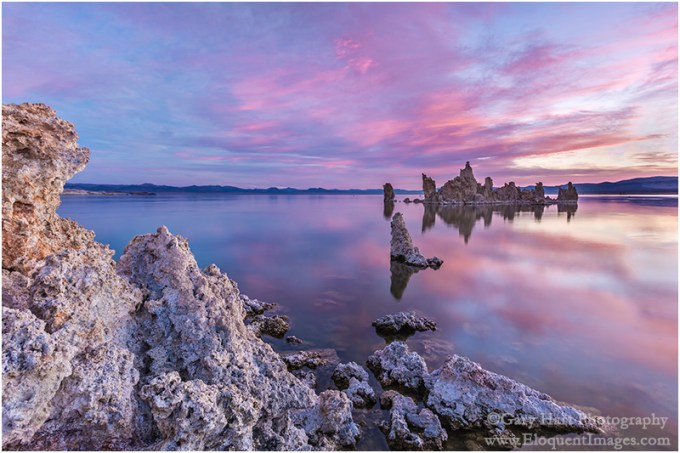
Before Sunrise, South Tufa, Mono Lake
Here a 3-second exposure smoothed a wind-induced chop and restored the reflection.
Because blurring water depends so much on the amount of light reaching your sensor, I can’t emphasize too much the importance of actually understanding metering and exposure, and how to manage the zero-sum relationship between shutter speed, aperture (f-stop), and ISO.
Read my Exposure basics Photo Tips article
Bracketing for motion
Back in the film days, we used to bracket (multiple clicks of the same scene with minor adjustments) for exposure. But in today’s world of improved dynamic range and pre- and post-capture histograms, exposure bracketing is (or at least should be) limited to photographers who blend multiple exposures. Today I only bracket for scene changes that will give me a variety of images to choose between later.
Often my scene bracketing is for depth of field, as I run a series of clicks with a range of f-stops, then decide later whether I want a little or a lot of DOF. But my most frequent use of scene bracketing is to capture a variety of water motion effects. I start by finding a composition I like, then adjust my shutter speed (compensating for the exposure change with ISO and/or f-stop changes) to get different motion blur.
River and stream whitewater is usually (but not always) fairly constant, so my adjustments are usually just to vary the amount of motion blur. But when I’m photographing waves, the timing of the waves is as important as the motion blur. It helps to stand back and observe the waves for a while to get a sense for any patterns. Watching the direction of the waves and the size of the approaching swells not only allows me to time my exposures more efficiently, it also keeps me safe (and dry).
Star motion
Few images validate the power of the camera’s unique vision better than a scene etched with the parallel arcs of rotating stars (yes, I know it’s not actually the stars that are rotating). Nothing like human reality, the camera’s view of the night sky is equal parts beautiful and revealing. (Can you think of a faster, more effective way to demonstrate Earth’s rotation than a star trail image?)
Here are the factors that determine the amount of stellar motion:
- Exposure duration: The longer your shutter is open, the more motion your sensor captures.
- Focal length: Just as it is with terrestrial subjects, a longer focal length shrinks the range of view and magnifies the stars that remain.
- Direction of composition: Compositions aimed toward the North or South Poles will display less star motion than compositions aimed toward the celestial equator. That’s because, due to Earth’s rotation on its axis (an imaginary, infinite line skewering our North and South Poles), everything in the sky rotates 360 degrees in, around the poles, in 24 hours. But even though every star rotates the same number of degrees in any given period (seconds, minutes, hours, or whatever), the stars travel different distances in that same period: The farther a star is from the axis of rotation (the North or South Pole), the more visual distance covers to complete its circuit (it appears to move faster). This is clear to see when you realize that the farther a star is from one of the poles, the longer its arc is in a star trail image.

Star Trails, Desert View, Grand Canyon National Park
As with water motion, you can choose between a long exposure that exaggerates stellar motion, or a shorter exposure that freezes the stars in place to display a more conventional night sky (albeit with more stars than our eyes can discern).
Read more in my Starlight photography Photo Tips article
Freezing motion
The other end of the motion continuum is stopping it in its tracks with an exposure of extremely short duration. Sometimes simply to avoid blurring something that should be stationary, like flowers or leaves. But just as a long exposure can blur water to reveal patterns in its motion that aren’t visible to the unaided eye, using a short exposure to freeze a fast moving or ephemeral subject freezing can reveal detail that happens too fast for the unaided eye to register.
Stopping motion in an image often requires exposure compromises, such as a larger than ideal aperture or ISO, or removing a polarizer. In my landscape world, f-stop rules all, so I won’t compromise my f-stop unless it’s truly irrelevant—for example, when everything in the scene is at infinity at all f-stops. And I’m reluctant to remove a polarizer because its effect, even when small, can’t be duplicated in Photoshop. Fortunately, compromising ISO is relatively painless given today’s digital cameras stellar high ISO capabilities.
Wind-blown leaves, breaking surf, and plummeting waterfalls examples of detail that can be frozen in the act, but my favorite example of an instant frozen in time is a lightning strike. Lightning comes and goes so fast that the human experience of it is always just a memory—it’s gone before we register its existence. Read how to photograph lighting in my Lightning article in the Photo Tips section of my blog.
So what’s the point?
In the static world of a photograph, it’s up to the photographer to to create a sense of motion. Sometimes we achieve this with lines that lead the eyes through the scene, but even more powerful is an image that uses motion to tap its viewers imagination. Whether it’s freezing an instant, or connecting a series of instants in a single frame, the way you handle motion in your scene is a creative choice that’s enabled by your creative vision and technical skill.
Workshop Schedule || Purchase Prints
A gallery of motion
Click an image for a closer look, and a slide show. Refresh the screen to reorder the display.


The Evolution of a Stargazer
Posted on May 19, 2019

Dark Sky, Milky Way Above the Colorado River, Grand Canyon
Sony a7SII
Sony 24 f/1.4 GM
20 seconds
F/1.4
ISO 6400
In the Beginning
I grew up in a camping family. My dad was a minister, so pricey airline/hotel/restaurant vacations were out of the question for the five of us, as of course were weekend camping trips. But for as far back as I can remember, each summer my family went camping somewhere. Usually it was a week or two in Yosemite, Sequoia/Kings Canyon, the California coast, or some other relatively close scenic destination, but every few years we’d hook up the tent trailer, pile into the station wagon, and take a road trip.
The one constant in this numbing succession of summer campsites was the dark sky far from city lights, and the vast sprinkle of stars that mesmerized me. I soon learned that stargazing is the one thing a child can do for as long as he wants after bedtime without getting in trouble. I enjoyed playing connect-the-dots with the stars, identifying named constellations, or making up my own. It turned out all this scanning was a great way to catch shooting stars, and soon my goal was to stay awake until one flashed across my vision. And satellites were still something of a novelty back then, so another camping bedtime exercise was to slowly scan the sky looking for a “star” that moved; when I found one, I’d track it across the until it disappeared behind the horizon—or my eyelids.
At some point I became aware of a hazy band of light stretching across my night sky. On the darkest nights, when my vantage point faced the right direction, the widest and brightest part of this band reminded me of sugar spilled on pooled ink. But the Milky Way wasn’t as dramatic some of the other stuff in my night skies, so the childhood Me was oblivious to its inherent coolness for many years.
On these nightly scans I was more interested in the apparent randomness in the patterns overhead—the consistency of certain stellar arrangements, while a few bright “stars” would be in different positions each night relative to these recognizable patterns. Someone explained to me the difference between stars and planets, that stars were far and planets were close, and that was good enough for me. For a while.
Then, when I was about ten, my best friend and I did a science project on comets, which ignited a sudden and intense interest in all things astronomical. I was gifted a second-hand telescope by a friend of my dad, which we’d set up in my best friend’s front yard on summer nights. Through the telescope the stars remained (boring) points of light, no matter how much I magnified them, but the planets became fascinating disks, each with its own personality. I learned that Venus and Mercury were actually crescents of varying size, just like a mini moon. After searching in vain for the canals on Mars, I was thrilled to (barely) see Saturn’s rings, and to watch the nightly dance of the four pin-prick Galilean moons.
All this stargazing helped me develop a rudimentary understanding of celestial relationships, the vastness of space, the sun’s dominant role in our solar system, and its utter insignificance in the Universe. And the more I learned about astronomy, the more fascinating our home galaxy became. Rather than just passively observing it, the Milky Way became a catalyst for pondering the mysteries of the Universe and my favorite night sky feature.
Fast forward…
Then came college, marriage, family, jobs, cameras (lots of cameras) until I found myself at the bottom of the Grand Canyon on this moonless night in May. It was the second night of my annual Grand Canyon Raft Trip for Photographers, a highlight in a year full of highlights, and my first opportunity each year to reconnect with my favorite celestial feature. After night one hadn’t worked out, I told myself that we still had four more chances, but at bedtime on night two I was a little more pessimistic.
The prescription for a successful Milky Way photograph includes a clear view of the southern sky with a nice foreground. There’s no shortage of foreground in the Grand Canyon, but southern sky views are not quite so plentiful. The first night had been spectacularly clear, but our otherwise spectacular campsite was on an east/west trending section of river (I try to select each campsite for its astrophotography potential, but the sites can’t be reserved, and sometime there are other factors to consider), which placed the rising galactic core behind a towering canyon wall. On our second day we’d scored prime real estate on a north/south section of river a few miles upstream from Desert View, but now thin clouds threatened to spoil the show.
In May the Milky Way doesn’t usually crest the canyon walls until 2:00 or 3:00 a.m. (depending on the location), but as we prepared for bed that second day, only a handful of stars smoldered in the gauzy veil above. But with six hours for conditions to improve, I prepared anyway, identifying my foreground, setting up my tripod next to my cot, and mounting my Sony a7SII body and Sony 24mm f/1.4 lens with ISO, f-stop, and shutter speed set.
Waking a little before 3:00, I instantly saw far more stars than had been visible at bedtime. But more importantly, there was the Milky Way, directly overhead. I sat up and peered toward the river—the soft glow of several LCD screens told me others were already shooting, so I grabbed my tripod and stumbled down to the river’s edge in the dark (to avoid illuminating the others’ scene). It’s quite amazing how well you can see by the light of the Milky Way once your eyes adjust.
After a few frames I saw that a few thin clouds remained, creating interesting patterns against the starry background. By about 4 a.m., an hour-and-a-half before sunrise, loss of contrast in my images that wasn’t visible to my eyes told me the approaching sun was already starting to brighten the sky. I photographed for about an hour that morning, then managed to catch another 45 minutes of contented sleep before the guides’ coffee call got me up for good.
Workshop Schedule || Purchase Prints
I continue updating my Photo Tips articles—here’s my just-updated Milky Way article,
with all you need to know to locate and photograph our home galaxy
How to photograph the Milky Way
See the Milky Way
Look heavenward on a moonless (Northern Hemisphere) summer night far from city light. The first thing to strike you is the shear volume of stars, but as your eyes adjust, your gaze is drawn to a luminous band spanning the sky. Ranging from magnificently brilliant to faintly visible, this is the Milky Way, home to our sun and nearly a half trillion other stars of varying age, size, and temperature.
Size and shape
Though every star you’ve ever seen is part of our Milky Way galaxy, stargazers use the Milky Way label more specifically to identify this river of starlight, gas, and dust spanning the night sky. As you feast your eyes, appreciate that some of the Milky Way’s starlight has traveled 25,000 years to reach your eyes, and light from a star on one edge of the Milky Way would take 100,000 years to reach the other side.

Milky Way look-alike spiral galaxy: This is what our galaxy would look like from the outside, looking in. (The individual stars visible here are “local” and not part of the spiral galaxy depicted here.) Earth would be between two of the spiral arms, about halfway out from the center.
The rest of the sky appears to be filled with far more discrete stars than the region containing the Milky Way, but don’t let this deceive you. Imagine that you’re out in the countryside where the lights of a distant city blend into a homogeneous glow—similarly, the stars in the Milky Way’s luminous band are simply too numerous and distant to resolve individually. On the other hand, the individual pinpoints of starlight that we name and mentally assemble into constellations are just closer, much like the lights of nearby farmhouses. And the dark patches in the Milky Way aren’t empty space—like the trees and mountains that block our view of the city, they’re starlight-blocking interstellar dust and gas, remnants of exploded stars and the stuff of future stars.
Just as it’s impossible to know what your house looks like by peering out a window, it’s impossible to know what the Milky Way looks like by simply looking up on a dark night. Fortunate for us, really smart people have been able to infer from painstaking observation, measurement, reconstruction, and comparison with other galaxies that our Milky Way is flat (much wider than it is tall) and spiral shaped, like a glowing pinwheel, with two major arms and several minor arms spiraling out from its center. Our solar system is in one of the Milky Way’s minor arms, a little past midway between the center and outer edge.
Blinded by the light
Sadly, artificial light and atmospheric pollution have erased the view of the Milky Way for nearly a third of the world’s population, and eighty percent of Americans. Worse still, even though some part of the Milky Way is overhead on every clear night, many people have never seen it.
Advances in digital technology have spurred a night photography renaissance that has enabled the Milky Way challenged to enjoy images of its splendor from the comfort of their recliner, but there’s nothing quite like viewing it in person. With just a little knowledge and effort, you too can enjoy the Milky Way firsthand; add the right equipment and a little more knowledge, and you’ll be able to photograph it as well.
Horizon to Horizon
Understanding that our Solar System is inside the Milky Way’s disk makes it easier to understand why we can see some portion of the Milky Way on any night (assuming the sky is dark enough). In fact, from our perspective, the plane of the Milky Way forms a complete ring around Earth (but of course we can only see half the sky at any given time), with its brightness varying depending on whether we’re looking toward our galaxy’s dense center or sparse outer region.
Where the action is

The Milky Way’s brilliant center, its “galactic core,” radiates above Kilauea on Hawaii’s Big Island
Though the plane of the Milky Way stretches all the way across our sky, when photographers talk about photographing the Milky Way, they usually mean the galactic core—the Milky Way’s center and most densely packed, brightest region. Unfortunately, our night sky doesn’t always face the galactic core, and there are many months when this bright region is not visible at all.
To understand the Milky Way’s visibility in our night sky, it helps to remember that Earth both rotates on its axis (a day), and revolves around the sun (a year). When the side of the planet we’re on rotates away from the sun each day, the night sky we see is determined by our position on our annual trip around the sun—when Earth is between the sun and the galactic core, we’re in position to see the most brilliant part of the Milky Way; in the months when the sun is between earth and the galactic core, the bright part of the Milky Way can’t be seen.
Put in terrestrial terms, imagine you’re at the neighborhood playground, riding a merry-go-round beneath a towering oak tree. You face outward, with your back to the merry-go-round’s center post. As the merry-go-round spins, your view changes—about half of the time you’d rotate to face the oak’s trunk, and about half the time your back is to the tree. Our solar system is like that merry-go-round: the center post is the sun, the Milky Way is the tree, and in the year it takes our celestial merry-go-round to make a complete circle, we’ll face the Milky Way about half the time.
Finding the Milky Way
Just like every other celestial object outside our solar system, the Milky Way’s position in our sky changes with the season and time of night you view it, but it remains constant relative to the other stars and constellations. This means you can find the Milky Way by simply locating any of the constellations in the galactic plane. Here’s an alphabetical list of the constellations* through which the Milky Way passes (with brief notes by a few of the more notable constellations):
- Aquila
- Ara
- Auriga—faintest
- Canis Major—faint
- Carina
- Cassiopeia—faint; its easily recognized “w” (or “m”) shape makes Cassiopeia a good landmark for locating the Milky Way in the northern sky
- Cepheus
- Circinus
- Crux
- Cygnus—bright
- Gemini
- Lacerta
- Lupus
- Monoceros
- Musca
- Norma
- Ophiuchus
- Orion—faint; another easy to recognize constellation that’s good for finding the galactic plane
- Perseus—faint
- Puppis
- Pyxis
- Sagitta
- Sagittarius—brightest, galactic core
- Scorpius—bright
- Scutum
- Serpens
- Taurus—faint
- Triangulum
- Vela
- Vulpecula
* Constellations are comprised of stars that only appear connected by virtue of our Earth-bound perspective—a constellation is a direction in the sky, not a location in space.
If you can find any of these constellations, you’re looking in the direction of some part of the Milky Way (if you can’t see it, your sky isn’t dark enough). But most of us want to see the center of the Milky Way, where it’s brightest, most expansive, and most photogenic. The two most important things to understand about finding the Milky Way’s brilliant center are:
- From our perspective here on Earth, the galactic core is in Sagittarius (and a couple of other constellations near Sagittarius)—when Sagittarius is visible, so is the brightest part of the Milky Way (assuming you can find a dark enough sky)
- Earth’s night side most directly faces Sagittarius in the Northern Hemisphere’s summer months (plus part of spring and autumn)
Armed with this knowledge, locating the Milky Way’s core is as simple as opening one of my (too many) star apps to find out where Sagittarius is. Problem solved. Of course it helps to know that the months when the galactic core rises highest and is visible longest are June, July, and August, and to not even consider looking before mid-March, or after mid-October. If you can’t wait until summer and don’t mind missing a little sleep, starting in April, Northern Hemisphere residents with a dark enough sky can catch Sagittarius and the galactic core rising in the southeast shortly before sunrise. After its annual premier in April, the Milky Way’s core rises slightly earlier each night and is eventually well above the horizon by nightfall.
People who enjoy sleep prefer doing their Milky Way hunting in late summer and early autumn, when the galactic core has been above the horizon for most of the daylight hours, but remains high in the southwest sky as soon as the post-sunset sky darkens enough for the stars to appear. The farther into summer and autumn you get, the closer to setting beneath the western horizon the Milky Way will be at sunset, and the less time you’ll have before it disappears.
Into the darkness
The Milky Way is dim enough to be easily washed out by light pollution and moonlight, so the darker your sky, the more visible the Milky Way will be. To ensure sufficient darkness, I target moonless hours, from an hour or so after sunset to an hour before sunrise. New moon nights are easiest because the new moon rises and sets (more or less) with the sun and there’s no moon all night. But on any night, if you pick a time before the moon rises, or after it sets, you should be fine. Be aware that the closer the moon is to full, the greater the potential for its glow to leak into the scene from below the horizon.
Getting away from city lights can be surprisingly difficult (and frustrating). Taking a drive out into the countryside near home is better than nothing, and while it may seem dark enough to your eyes, a night exposure in an area that you expect to be dark enough reveals just how insidious light pollution is as soon as you realize all of your images are washed out by an unnatural glow on the horizon. Since the galactic core is in the southern sky in the Northern Hemisphere, you can mitigate urban glow in your Milky Way images by heading south of any nearby population area, putting the glow behind you as you face the Milky Way.
Better than a night drive out to the country, plan a trip to a location with a truly dark sky. For this, those in the less densely populated western US have an advantage. The best resource for finding world-class dark skies anywhere on Earth is the International Dark-Sky Association. More than just a resource, the IDA actively advocates for dark skies, so if the quality of our night skies matters to you, spend some time on their site, get involved, and share their website with others.
Photograph the Milky Way
Viewing the Milky Way requires nothing more than a clear, dark sky. (Assuming clean, clear skies) the Milky Way’s luminosity is fixed, so our ability to see it is largely a function of the darkness of the surrounding sky—the darker the sky, the better the Milky Way stands out. But because our eyes can only take in a fixed amount of light, there’s a ceiling on our ability to view the Milky Way with the unaided eye.
A camera, on the other hand, can accumulate light for a virtually unlimited duration. This, combined with technological advances that continue increasing the light sensitivity of digital sensors, means that when it comes to photographing the Milky Way, well…, the sky’s the limit. As glorious as it is to view the Milky Way with the unaided eye, a camera will show you detail and color your eyes can’t see.
Knowing when and where to view the Milky Way is a great start, but photographing the Milky Way requires a combination of equipment, skill, and experience that doesn’t just happen overnight (so to speak). But Milky Way photography doesn’t need to break the bank, and it’s not rocket science.
Equipment
Bottom line, photographing the Milky Way is all about maximizing your ability to collect light: long exposures, fast lenses, high ISO.
Camera
In general, the larger your camera’s sensor and photosites (the “pixels” that capture the light), the more efficiently it collects light. Because other technology is involved, there’s not an absolute correlation between sensor and pixel size and light gathering capability, but a small, densely packed sensor almost certainly rules out your smartphone and point-and-shoot cameras for anything more than a fuzzy snap of the Milky Way. At the very least you’ll want a mirrorless or DSLR camera with an APS-C (1.5/1.6 crop) size sensor. Better still is a full frame mirrorless or DSLR camera. (A 4/3 Olympus or Panasonic sensor might work, but as great as these cameras are for some things, high ISO photography isn’t their strength.
Another general rule is that the newer the technology, the better it will perform in low light. Even with their smaller, more densely packed sensors, many of today’s top APS-C bodies outperform in low light full frame bodies that have been out for a few years, so full frame or APS-C, if your camera is relatively new, it will probably do the job.
If you’re shopping for a new camera and think night photography might be in your future, compare your potential cameras’ high ISO capabilities—not their maximum ISO. Read reviews by credible sources like DP Review, Imaging Resource, or DxOMark (among many others) to see how your camera candidates fare in objective tests.
An often overlooked consideration is the camera’s ability to focus in extreme low light. Autofocusing on the stars or landscape will be difficult to impossible, and you’ll not be able to see well enough through a DSLR’s viewfinder to manually focus. Some bodies with a fast lens might autofocus on a bright star or planet, but it’s not something I’d count on (though I expect within a few years before this capability will become more common).
Having photographed for years with Sony and Canon, and working extensively with most other mirrorless and DSLR bodies in my workshops, I have lots of experience with cameras from many manufacturers. In my book, focus peaking makes mirrorless the clear winner for night focusing. Sony’s current mirrorless bodies (a7RII/RIII, a7S/SII) are by far the easiest I’ve ever used for focusing in the dark—what took a minute or more with my Canon, I can do in seconds using focus peaking with my Sony bodies (especially the S bodies). I use the Sony a7SII, but when I don’t want to travel with a body I only use for night photography, the Sony a7RIII does the job too. Of the major DSLR brands, I’ve found Canon’s superior LCD screen (as of 2019) makes it much easier to focus in extreme low light than Nikon. (More on focus later.)
Lens
Put simply, to photograph the Milky Way you want fast, wide glass—the faster the better. Fast to capture as much light as possible; wide to take in lots of sky. A faster lens also makes focus and composition easier because the larger aperture gathers more light. How fast? F/2.8 or faster—preferably faster. How wide? At least 28mm, and wider is better still. I do enough night photography that I have a dedicated, night-only lens—my original night lens was a Canon-mount Zeiss 28mm f/2; my current night lens is the Sony 24mm f/1.4.
Tripod
It goes without saying that at exposure times up to 30 seconds, you’ll need a sturdy tripod and head for Milky Way photography. You don’t need to spend a fortune, but the more you spend, the happier you’ll be in the long run (trust me). Carbon fiber provides the best combination of strength, vibration reduction, and light weight, but a sturdy (albeit heavy) aluminum tripod will do the job.
An extended centerpost is not terribly stable, and a non-extended centerpost limits your ability to spread the tripod’s legs and get low, so I avoid tripods with a centerpost. But if you have a sturdy tripod with a centerpost, don’t run out and purchase a new one—just don’t extend the centerpost when photographing at night.
Read my tips for purchasing a tripod here.
Other stuff
To eliminate the possibility of camera vibration I recommend a remote release; without a remote you’ll risk annoying all within earshot with your camera’s 2-second timer beep. You’ll want a flashlight or headlamp for the walk to and from the car, and your cell phone for light while shooting. And it’s never a bad idea to toss an extra battery in your pocket. And speaking of lights, never, never, NEVER use a red light for night photography (more on this later).
Getting the shot
Keep it simple
There are just so many things that can go wrong on a moonless night when there’s not enough light to see camera controls, the contents of your bag, and the tripod leg you’re about to trip over. After doing this for many years, both on my own and helping others in workshops, I’ve decided that simplicity is essential.
Simplicity starts with paring down to the absolute minimum camera gear: a sturdy tripod, one body, one lens, and a remote release (plus an extra battery in my pocket). Everything else stays at home, in the car, or if I’m staying out after a sunset shoot, in my bag.
Upon arrival at my night photography destination, I extract my tripod, camera, lens (don’t forget to remove the polarizer), and remote release. I connect the remote and mount my lens—if it’s a zoom I set the focal length at the lens’s widest—then set my exposure and focus (more on exposure and focus below). If I’m walking to my photo site, I carry the pre-exposed and focused camera on the tripod (I know this makes some people uncomfortable, but if you don’t trust your tripod head enough to hold onto your camera while you’re walking, it’s time for a new head), trying to keep the tripod as upright and stable as possible as I walk.
Flashlights/headlamps are essential for the walk/hike out to to and from my shooting location, but while I’m there and in shoot mode, it’s no flashlights, no exceptions. This is particularly important when I’m with a group. Not only does a flashlight inhibit your night vision, its light leaks into the frame of everyone who’s there. And while red lights may be better for your night vision and are great for telescope view, red light is especially insidious about leaking into everyone’s frame, so if you plan to take pictures, no red light! If you follow my no flashlight rule once the photography begins, you’ll be amazed at how well your eyes adjust. I can operate my camera’s controls in the dark—it’s not hard with a little practice, and well worth the effort to learn. If I ever do need to see my camera to adjust something, or if I need to see to move around, my cell phone screen (not the phone’s flashlight, just its illuminated screen) gives me all the light I need.
Composition
A good Milky Way image is distinguished from an ordinary Milky Way image by its foreground. Simply finding a location that’s dark enough to see the Milky Way is difficult enough; finding a dark location that also has a foreground worthy of pairing with the Milky Way usually takes a little planning.
Since the Milky Way’s center is in the southern sky (for Northern Hemisphere observers), I look for remote (away from light pollution) subjects that I can photograph while facing south (or southeast or southwest, depending on the month and time of night). Keep in mind that unless you have a ridiculous light gathering camera (like the Sony a7S or a7S II) and an extremely fast lens (f/2 or faster), your foreground will probably be more dark shape than detail. Water’s inherent reflectivity makes it a good foreground subject as well, especially if the water includes rocks or whitewater.
When I encounter a scene I deem photo worthy, not only do I try to determine its best light and moon rise/set possibilities, I also consider its potential as a Milky Way subject. Can I align it with the southern sky? Are there strong subjects that stand out against the sky? Is there water I can include in my frame?
I’ve found views of the Grand Canyon from the North Rim, the Kilauea Caldera, and the bristlecone pines in California’s White Mountains that work spectacularly. And its hard to beat the dark skies and breathtaking foreground possibilities at the bottom of the Grand Canyon. On the other hand, while Yosemite Valley has lots to love, you don’t see a lot of Milky Way images from Yosemite Valley because not only is there a lot of light pollution, and Yosemite’s towering, east/west trending granite walls give its south views an extremely high horizon that blocks much of the galactic core from the valley floor.
The last few years I’ve started photographing the Milky Way above the spectacular winter scenery of New Zealand’s South Island, where the skies are dark and the Milky Way is higher in the sky than it is in most of North America.
To maximize the amount of Milky Way in my frame, I generally (but not always) start with a vertical orientation that’s at least 2/3 sky. On the other hand, I do make sure to give myself more options with a few horizontal compositions as well. Given the near total darkness required of a Milky Way shoot, it’s often too dark to see well enough to compose that scene. If I can’t see well enough to compose I guess at a composition, take a short test exposure at an extreme (unusable) ISO to enable a relatively fast shutter speed (a few seconds), adjust the composition based on the image in the LCD, and repeat until I’m satisfied.
Focus
Needless to say, when it’s dark enough to view the Milky Way, there’s not enough light to autofocus (unless you have a rare camera/lens combo that can autofocus on a bright star and planet), or even to manually focus with confidence. And of all the things that can ruin a Milky Way image (not to mention an entire night), poor focus is number one. Not only is achieving focus difficult, it’s very easy to think you’re focused only to discover later that you just missed.
Because the Milky Way’s focus point is infinity, and you almost certainly won’t have enough light to stop down for more depth of field, your closest foreground subjects should be far enough away to be sharp when you’re wide open and focused at infinity. Before going out to shoot, find a hyperfocal app and plug in the values for your camera and lens at its widest aperture. Even though it’s technically possible to be sharp from half the hyperfocal distance to infinity, the kind of precise focus focusing on the hyperfocal point requires is difficult to impossible in the dark, so my rule of thumb is to make sure my closest subject is no closer than the hyperfocal distance.
For example, I know with my Sony 24mm f/1.4 wide open on my full frame Sony a7SII, the hyperfocal distance is about 50 feet. If I have a subject that’s closer (such as a bristlecone pine), I’ll pre-focus (before dark) on the hyperfocal distance, or shine a bright light on an object at the hyperfocal distance and focus there, but generally I make sure everything is at least 50 feet away. Read more about hyperfocal focus in my Depth of Field article.
By far the number one cause of night focus misses is the idea that you can just dial any lens to infinity; followed closely by the idea that focused at one focal length means focused at all focal lengths. Because when it comes to sharpness, almost isn’t good enough, if you have a zoom lens, don’t even think of trying to dial the focus ring to the end for infinity. And even for most prime lenses, the infinity point is a little short of all the way to the end, and can vary slightly with the temperature and f-stop. Of course if you know your lens well enough to be certain of its infinity point by feel (and are a risk taker), go for it. And that zoom lens that claims to be parfocal? While it’s possible that your zoom will hold focus throughout its entire focal range, regardless of what the manufacturer claims, I wouldn’t bet an entire shoot on it without testing first.
All this means that the only way to ensure night photography sharpness is to focus carefully on something before shooting, refocus every time your focal length changes, and check focus frequently by displaying and magnifying an image on your LCD. To simplify (there’s that word again), when using a zoom lens, I usually set the lens at its widest focal length, focus, verify sharpness, and (once I know I’m focused) never change the focal length again.
While the best way to ensure focus is to set your focal length and focus before it gets dark, sometimes pre-focusing isn’t possible, or for some reason you need to refocus after darkness falls. If I arrive at my destination in the dark, I autofocus on my headlights, a bright flashlight, or a laser 50 feet or more away. And again, never assume you’re sharp by looking at the image that pops up on the LCD when the exposure completes—always magnify your image and check it after you focus.
For more on focusing in the dark, including how to use stars to focus, read my Starlight Photo Tips article.
Exposure
Exposing a Milky Way image is wonderfully simple once you realize that you don’t have to meter—because you can’t (not enough light). Your goal is simply to capture as many photons as you can without damaging the image with noise, star motion, and lens flaws.
Basically, with today’s technology you can’t give a Milky Way image too much light—you’ll run into image quality problems before you overexpose a Milky Way image. In other words, capturing the amount of light required to overexpose a Milky Way image is only possible if you’ve chosen an ISO and/or shutter speed that significantly compromises the quality of the image with excessive noise and/or star motion.
In a perfect world, I’d take every image at ISO 100 and f/8—the best ISO and f-stop for my camera and lens. But that’s not possible when photographing in near total darkness—a usable Milky Way image requires exposure compromises. What kind of compromises? The key to getting a properly exposed Milky Way image is knowing how far you push your camera’s exposure settings before the light gained isn’t worth the diminished quality. Each exposure variable causes a different problem when pushed too far:
- ISO: Raising ISO to increase light sensitivity comes with a corresponding increase in noise that muddies detail. The noise at any particular ISO varies greatly with the camera, so it’s essential to know your camera’s low-light capability(!). Some of the noise can be cleaned up with noise reduction software (I use Topaz DeNoise 6)—the amount that cleans up will depend on the noise reduction software you use, your skill using that software, and where the noise is (is it marring empty voids or spoiling essential detail?).
- Shutter speed: The longer the shutter stays open, the more motion blur spreads the stars’ distinct pinpoints into streaks. I’m not a big fan of formulas that dictate star photography shutter speeds because I find them arbitrary and inflexible, and they fail to account for the fact that the amount of apparent stellar motion varies with the direction you’re composing (you’ll get less motion the closer to the north or south poles you’re aimed). My general shutter-speed rule of thumb is 30-seconds or less, preferably less—I won’t exceed 30 seconds, and do everything I can to get enough light with a faster shutter speed.
- F-stop: At their widest apertures, lenses tend to lose sharpness (especially on the edges) and display optical flaws like comatic aberration (also called coma) that distorts points of light (like stars) into comet shaped blurs. For many lenses, stopping down even one stop from wide open significantly improves image quality.
Again: My approach to metering for the Milky Way is to give my scene as much light as I can without pushing the exposure compromises to a point I can’t live with. Where exactly is that point? Not only does that question require a subjective answer that varies with each camera body, lens, and scene, as technology improves, I’m less forgiving of exposure compromises than I once was. For example, when I started photographing the Milky Way with my Canon 1DS Mark III, the Milky Way scenes I could shoot were limited because my fastest wide lens was f/4 and I got too much noise when I pushed my ISO beyond 1600. This forced me compromise by shooting wide open with a 30-second shutter speed to achieve even marginal results. In fact, given these limitations, despite trying to photograph the Milky Way from many locations, when I started the only Milky Way foreground that worked well enough was Kilauea Caldera, because it was its own light source (an erupting volcano).
Today (mid-2019) I photograph the Milky Way with a Sony a7S II and a Sony 24mm f/1.4 lens. I get much cleaner images from my Sony at ISO 6400 than got a ISO 1600 on my Canon 1DSIII, and the night light gathering capability of an f/1.4 lens revelatory. At ISO 6400 (or higher) I can stop down slightly to eliminate lens aberrations (though I don’t seem to need to with the Sony lens), drop my shutter speed to 20 or 15 seconds to reduce star motion 33-50 percent, and still get usable foreground detail by starlight.
I can’t emphasize enough how important it is to know your camera’s and lens’s capabilities in low light, and how for you’re comfortable pushing the ISO and f-stop. For each of the night photography equipment combos I’ve used, I’ve established a general exposure upper threshold, rule-of-thumb compromise points for each exposure setting that I won’t exceed until I’ve reached the compromise threshold of the other exposure settings. For example, with my Sony a7SII/24mm f/1.4 combo, I usually start at ISO 6400, f/1.4, and 20 seconds. Those settings will usually get me enough light for Milky Way color and pretty good foreground detail. But if I want more light (for example, if I’m shooting into the black pit of the Grand Canyon from the canyon rim), my first exposure compromise might be to increase to ISO 12800; if I decide I need even more light, my next compromise is to bump my shutter speed to 30 seconds. Or if I want a wider field of view than 24mm, I’ll put on my Sony 16-35 f/2.8 G lens and increase to ISO 12800 and 30 seconds.
These thresholds are guidelines rather than hard-and-fast rules, and they apply to my preferences only—your results may vary. And though I’m pretty secure with this workflow, for each Milky Way composition I try a variety of exposure combinations before moving to another composition. Not only does this give me a range of options to choose between when I’m at home and reviewing my images on a big monitor, it also gives me more insight into my camera/lens capabilities, allowing me to refine my exposure compromise threshold points.
One other option that I’ve started applying automatically is long exposure noise reduction, which delivers a noticeable reduction in noise for exposures that are several seconds and longer.
* In normal situations the Sony a7SII can handle ISO 12,800 without even breathing hard, but the long exposure time required of night photography generates a lot of heat on the sensor with a corresponding increase in noise.
It’s time to click that shutter
You’re in position with the right gear, composed, focused, and exposure values set. Before you actually click the shutter, let me remind you of a couple of things you can do to ensure the best results: First, lower that center post. A tripod center post’s inherent instability is magnified during long exposures, not just by wind, but even by nearby footsteps, the press of the shutter button, and slap of the mirror (and sometimes it seems, by ghosts). And speaking of shutter clicks, you should be using a remote cable or two-second timer to eliminate the vibration imparted when your finger presses the shutter button.
When that first Milky Way image pops up on the LCD, it’s pretty exciting. So exciting in fact that sometimes you risk being lulled into a “Wow, this isn’t as hard as I expected” complacency. Even though you think everything’s perfect, don’t forget to review your image sharpness every few frames by displaying and magnifying and image on your LCD. In theory nothing should change unless you changed it, but in practice I’ve noticed an occasional inclination for focus to shift mysteriously between shots. Whether it’s slight temperature changes or an inadvertent nudge of the focus ring as you fumble with controls in the dark, you can file periodically checking your sharpness falls under “an ounce of prevention….” Believe me, this will save a lot of angst later.
And finally, don’t forget to play with different exposure settings for each composition. Not only does this give you more options, it also gives you more insight into your camera/lens combo’s low light capabilities.
The bottom line
Though having top-of-the-line, low-light equipment helps a lot, it’s not essential. If you have a full frame mirrorless or DSLR camera that’s less than five years old, and a lens that’s f/2.8 or faster, you probably have all the equipment you need to get great the Milky Way images. Even with a cropped sensor, or an f/4 lens, you have a good chance of getting usable Milky Way images in the right circumstances. If you’ve never photographed the Milky Way before, don’t expect perfection the first time out. What you can expect is improvement each time you go out as you learn the limitations of your equipment and identify your own exposure compromise thresholds. And success or failure, at the very least you’ll have spent a magnificent night under the stars.
Workshop Schedule || Purchase Prints
A Milky Way Gallery
Click an image for a closer look and slide show. Refresh the window to reorder the display.


Finding Focus in the Grand Canyon
Posted on May 12, 2019

Sky Reflection, Blacktail Canyon, Grand Canyon
I returned Friday from my annual Grand Canyon Raft Trip for Photographers and am playing catch-up on all aspects of my photography life. I’ve barely looked at the my raft trip images, but chose this one for a couple of reasons: first, because I think it perfectly conveys the intimate serenity that always catches me by surprise in this landscape known mostly for it’s broad vistas; and second, because it’s the only image I’ve processed so far.
This is Blacktail Canyon, one of hundreds (thousands?) of narrow slot canyons cutting into the Grand Canyon’s towering walls. Most of them we just float past, sometimes because of the physical challenges required to explore their depths, but usually because there just isn’t time to stop at every slot canyon. On my trips we pick our slots for their photo opportunities, and this year Blacktail Canyon was a particular highlight.
With tall, tightly spaced walls, Blacktail Canyon spends most of its daylight hours in full shade, ideal for photography on sunny days. It doesn’t always have water, but this year’s wet winter meant water in lots of places that don’t always get it. We found the little creek that splits the canyon carrying just enough water to create a series of reflective pools before disappearing into the stream bed, only to reappear farther downstream.
What first drew my eye to this scene was a tiny sapling sprouting from an overhanging ledge, but I soon realized that the tree would best serve me as a visuall element to hold the top of my frame rather than the primary subject. The most interesting thing, I decided, was the blue sky reflection like a jewel embedded in the creek bed.
To create this composition, I dropped my tripod to about a foot above the canyon floor and positioned myself so the lines connecting my primary focal points (the sky reflection, the pair of boulders, and the green tree) created a triangle. Fitting all this into the frame required a vertical orientation of my Sony a7RIII, using virtually the entire width of my Sony 16-35 f/2.8 G lens. Even at this wide focal length, the smooth pebbles at my feet were only about a foot away; getting both the nearby pebbles and glowing (from bounced sunlight) sandstone above the tree sharp, meant choosing my exposure settings and focus point very carefully. My hyperfocal app told me that at f/16, by focusing two feet away, I could achieve my sharpness goal. Watching the rapidly changing sky, I timed my click for the best blend of clouds and sky filling the reflection.
To better understand focus technique, below is an updated version of my Depth of Field article from my Photo Tips section
Finding Focus
What’s the point?
It seems like one of photography’s great mysteries is achieving proper focus: the camera settings, where to place the focus point, even the definition of sharpness are all sources of confusion. If you’re a tourist just grabbing snapshots, everything in your frame is likely at infinity and you can just put your camera in full auto mode and click away. But if you’re a photographic artist trying to capture something unique with your mirrorless or DSLR camera and doing your best to have important visual elements objects at different distances throughout your frame, you need to stop letting your camera decide your focus point and exposure settings.
Of course the first creative focus decision is whether you even want the entire frame sharp. While some of my favorite images use selective focus to emphasize one element and blur the rest of the scene, most (but not all) of what I’ll say here is about using hyperfocal techniques to maximize depth of field (DOF). I cover creative selective focus in much greater detail in another Photo Tip article: Creative Selective Focus.
Beware the “expert”
I’m afraid that there’s some bad, albeit well-intended, advice out there that yields just enough success to deceive people into thinking they’ve got focus nailed, a misperception that often doesn’t manifest until an important shot is lost. I’m referring to the myth that you should focus 1/3 of the way into the scene, or 1/3 of the way into the frame (two very different things, each with its own set of problems).
For beginners, or photographers whose scene doesn’t include subjects from near to far, the 1/3 technique may be a useful rule of thumb. But taking the 1/3 approach to focus requires that you understand DOF and the art of focusing well enough to know when 1/3 won’t work, and how to adjust your focus point and settings. And once you achieve that level of understanding, you may as well do it the right way from the start. Focus control becomes especially important in those scenes where missing the focus point by just a few feet or even inches can make or break and image.
Where to focus this? Of course 1/3 of the way into a scene that stretches for miles won’t work. And 1/3 of the way into a frame with a diagonal foreground won’t work either.
Back to the basics
Understanding a few basic focus truths will help you make focus decisions:
- A lens’s aperture is the opening that allows light to reach your sensor—the bigger this opening, the more light gets in, but also the smaller your DOF.
- Aperture is measured in f-stops, which is the lens’s focal length divided by the aperture’s diameter; the higher the f-number, the smaller the aperture and the greater the DOF. So f/8 is actually a bigger aperture (with less DOF) than f/11. This understanding becomes second nature, but if you’re just learning it’s helpful to think of f/stops this way: The higher the f-number, the greater the depth of field. Though they’re not exactly the same thing, photographers usually use f-stop and aperture interchangeably.
- Regardless of its current f-stop setting, a DSLR camera maximizes the light in its viewfinder by always showing you the scene at the lens’s widest aperture. All this extra light makes it easier to compose and focus, but unless your exposure is set for the widest aperture (which it shouldn’t be unless you have a very specific reason to limit your depth of field or maximize light), the image you capture will have more DOF than you see in the viewfinder. The consequence is that you usually can’t see how much of your scene is in focus when you compose. Most cameras have a DOF preview button that temporarily closes the lens down to the f-stop you have set—this shows the scene at its actual DOF, but also darkens the viewfinder considerably (depending on how small your aperture is), making it far more difficult to see the scene.
- For any focus point, there’s only one (infinitely thin) plane of perfect sharpness, regardless of the focal length and f-stop—everything in front of and behind the plane containing your focus point (and parallel to the sensor) will be some degree of less than maximum sharpness. As long as the zone of less than perfect sharpness isn’t perceptible, it’s considered “acceptably sharp.” When that zone becomes visible, that portion of the image is officially “soft.” Acceptable sharpness varies with the display size and viewing distance.
- The zone of acceptable sharpness extends a greater distance beyond the focus point than it does in front of the focus point. If you focus on that rock ten feet in front of you, rocks three feet in front of you may be out of focus, but a tree fifty feet away could be sharp. I’ll explain more about this later.
- While shorter focal lengths may appear to provide more depth of field, believe it or not, DOF doesn’t actually change with focal length. What does change is the size of everything in the image, so as your focal length increases, your apparent DOF decreases. So you really aren’t gaining more absolute DOF with a shorter focal length, the softness just won’t be as visible. When photographers talk about DOF, they’re virtually always talking about apparent DOF—the way the image looks. (That’s the DOF definition I use here too.)
- The closer your focus point, the narrower your DOF (range of front-to-back sharpness). If you focus your 24mm lens on a butterfly sunning on a poppy six inches from your lens, your DOF is so narrow that it’s possible parts of the poppy will be out of focus; if you focus the same lens on a tree 100 feet away, the mountains behind the tree are sharp too.

Moonset, Mt. Whitney and Whitney Arch, Alabama Hills, California
With subjects throughout my frame, from close foreground to distant background, it’s impossible to get everything perfectly sharp. Here in the Alabama Hills near Lone Pine, California, I stopped down to f/16 and focused at the at the most distant part of the arch. This ensured that all of the arch would be perfectly sharp, while keeping Mt. Whitney and the rest of the background “sharp enough.”
Defining sharpness
Depth of field discussions are complicated by the fact that “sharp” is a moving target that varies with display size and viewing distance. But it’s safe to say that all things equal, the larger your ultimate output and closer the intended viewing distance, the more detail your original capture should contain.
To capture detail a lens focuses light on the sensor’s photosites. Remember using a magnifying glass to focus sunlight and ignite a leaf when you were a kid? The smaller (more concentrated) the point of sunlight, the sooner the smoke appeared. In a camera, the finer (smaller) a lens focuses light on each photosite, the more detail the image will contain at that location. So when we focus we’re trying to make the light striking each photosite as concentrated as possible.
In photography we call that small circle of light your lens makes for each photosite its “circle of confusion.” The larger the CoC, the less concentrated the light and the more blurred the image will appear. Of course if the CoC is too small to be seen as soft, either because the print is too small or the viewer is too far away, it really doesn’t matter. In other words, areas of an image with a large CoC (relatively soft) can still appear sharp if small enough or viewed from far enough away. That’s why sharpness can never be an absolute term, and we talk instead about acceptable sharpness that’s based on print size and viewing distance. It’s actually possible for the same image to be sharp for one use, but too soft for another.
So how much detail do you need? The threshold for acceptable sharpness is pretty low for an image that just ends up on an iPhone or an 8×10 calendar on the kitchen wall, but if you want that image to fill the wall above the sofa, acceptable sharpness requires much more detail. And as your print size increases (and/or viewing distance decreases), the CoC that delivers acceptable sharpness shrinks correspondingly.
Many factors determine the a camera’s ability to record detail. Sensor resolution of course—the more resolution your sensor has, the more important it becomes that to have a lens that can take advantage of that extra resolution. And the more detail you want to capture with that high resolution sensor and tack-sharp lens, the more important your depth of field and focus point decisions become.
Hyperfocal focus
The foundation of a sound approach to maximizing sharpness for a given viewing distance and image size is hyperfocal focusing, an approach that uses viewing distance, f-stop, focal length, and focus point to ensure acceptable sharpness.
The hyperfocal point is the focus point that provides the maximum depth of field for a given combination of sensor size, f/stop, and focal length. Another way to express it is that the hyperfocal point is the closest you can focus and still be acceptably sharp to infinity. When focused at the hyperfocal point, your scene will be acceptably sharp from halfway between your lens and focus point all the way to infinity. For example, if the hyperfocal point for your sensor (full frame, APS-C, 4/3, or whatever), focal length, and f-stop combinition is twelve feet away, focusing there will give you acceptable sharpness from six feet (half of twelve) to infinity—focusing closer will soften the distant scene; focusing farther will keep you sharp to infinity but extend the area of foreground softness.
Because the hyperfocal variable (sensor size, focal length, f-stop) combinations are too numerous to memorize, we usually refer to an external aid. That used to be awkward printed tables with long columns and rows displayed in microscopic print, the more precise the data, the smaller the print. Fortunately, those have been replaced by smartphone apps with more precise information in a much more accessible and readable form. We plug in all the variables and out pops the hyperfocal point distance and other useful information
It usually goes something like this:
- Identify the composition
- Determine the closest thing that must be sharp (right now I’m assuming you want sharpness to infinity)
- Dig the smartphone from one of the 10,000 pockets it could be in
- Open the hyperfocal app and plug in the sensor size (usually previously set by you as the default), f-stop, and a focus distance
- Up pops the hyperfocal distance (and usually other info of varying value)
You’re not as sharp as you think
Since people’s eyes start to glaze over when CoC comes up, they tend to use the default returned by the smartphone app. But just because the app tells you you’ve nailed focus, don’t assume that your work is done. An often overlooked aspect of hyperfocal focusing is that app makes assumptions that aren’t necessarily right, and in fact are probably wrong.
The CoC your app uses to determine acceptable sharpness is a function of sensor size, display size, and viewing distance. But most app’s hyperfocal tables assume that you’re creating an 8×10 print that will be viewed from a foot away—maybe valid 40 years ago, but not in this day of mega-prints. The result is a CoC three times larger than the eye’s ability to resolve.
That doesn’t invalidate hyperfocal focusing, but if you use published hyperfocal data from an app or table, your images’ DOF might not be as ideal as you think it is for your use. If you can’t specify a smaller CoC in your app, I suggest that you stop-down a stop or so more than the app/table indicates. On the other hand, stopping down to increase sharpness is an effort of diminishing returns, because diffraction increases as the aperture shrinks and eventually will soften the entire image—I try not to go more than a stop smaller than my data suggests.
Keeping it simple
As helpful as a hyperfocal app can be, whipping out a smartphone for instant in-the-field access to data is not really conducive to the creative process. I’m a big advocate of keeping photography as simple as possible, so while I’m a hyperfocal focus advocate in spirit, I don’t usually use hyperfocal data in the field. Instead I apply hyperfocal principles in the field whenever I think the margin of error gives me sufficient wiggle room.
Though I don’t often use the specific hyperfocal data in the field, I find it helps a lot to refer to hyperfocal tables when I’m sitting around with nothing to do. So if I find myself standing in line at the DMV, or sitting in a theater waiting for a movie (I’m a great date), I open my iPhone hyperfocal app and plug in random values just to get a sense of the DOF for a given f-stop and focal length combination. I may not remember the exact numbers later, but enough of the information sinks in that I accumulate a general sense of the hyperfocal DOF/camera-setting relationships.
Finally, something to do
Unless I think I have very little DOF margin for error in my composition, I rarely open my hyperfocal app in the field. Instead, once my composition is worked out and have determined the closest object I want sharp—the closest object with visual interest (shape, color, texture), regardless of whether it’s a primary subject.
- If I want to be sharp to infinity and my closest foreground object (that needs to be sharp) is close enough to hit by tossing my hat, I need a fair amount of DOF. If my focal length is pretty wide, I might skip the hyperfocal app, stop down to f/16, and focus a little behind my foreground object. But if I’m at a fairly long focal length, or my closest object is within arm’s reach, I have very little margin for error and will almost certainly refer to my hyperfocal app.
- If I could hit my foreground object with a baseball and my focal length is 50mm (or so) or less, I’ll probably go with f/11 and just focus on my foreground object. But as my focal length increases, so does the likelihood that I’ll need to refer to my hyperfocal app.
- If it would take a gun to reach my closest object (picture a distant peak), I choose an f-stop between f/8 and f/11 and focus anywhere in the distance.
Of course these distances are very subjective and will vary with your focal length and composition (not to mention the strength of your pitching arm), but you get the idea. If you find yourself in a small margin for error focus situation without a hyperfocal app (or you just don’t want to take the time to use one), the single most important thing to remember is to focus behind your closest subject. Because you always have sharpness in front of your focus point, focusing on the closest subject gives you unnecessary near sharpness at the expense of distant sharpness. By focusing a little behind your closest subject, you’re increasing the depth of your distant sharpness while (if you’re careful) keeping your foreground subject within the zone of sharpness in front of the focus point.
And finally, foreground softness, no matter how slight, is almost always a greater distraction than slight background softness. So, if it’s impossible to get all of your frame sharp, it’s usually best to ensure that the foreground is sharp.
Some examples

A hat’s toss away: The closest pool was about 6 feet from my lens. I stopped down to f/20 (smaller than I generally like to go) and focused on the back of the pool on the left, about 10 feet away.

A baseball throw away: The little clump of wildflowers (lower right) was about 35 feet away and the trees started another 35 feet beyond that. With a focal length of 55mm, I dialed to f/11 and focused on the most distant foreground tree, getting everything from the flowers to Half Dome sharp.
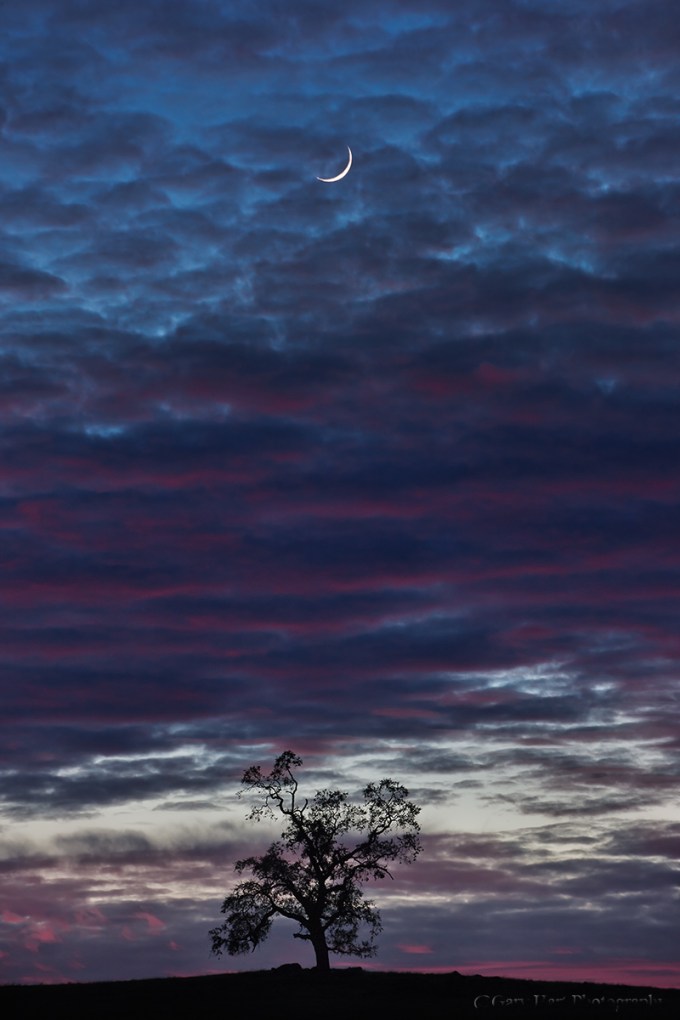
Honey, fetch my rifle: With everything here at infinity I knew could focus on the trees or moon confident that the entire frame would be sharp. In this case I opted for f/8 to minimize diffraction but still in my lens’s sharpest f-stop range, and focused on the tree.
Why not just automatically set the aperture to f/22 and be done with it? I thought you’d never ask. Without delving too far into the physics of light and optics, let’s just say that there’s a not so little light-bending problem called “diffraction” that robs your images of sharpness as your aperture shrinks—the smaller the aperture, the greater the diffraction. Then why not choose f/2.8 when everything’s at infinity? Because lenses tend to lose sharpness at their aperture extremes, and are generally sharper in their mid-range f-stops. So while diffraction and lens softness don’t sway me from choosing the f-stop that gives the DOF I want, I try to never choose an aperture bigger or smaller than I need.
Now that we’ve let the composition determine our f-stop, it’s (finally) time to actually choose the focus point. Believe it or not, with this foundation of understanding we just established, focus becomes pretty simple. Whenever possible, I try to have elements throughout my frame, often starting near my feet and extending far into the distance. When that’s the case I stop down focus on an object slightly behind my closest subject (the more distant my closest subject, the farther behind it I can focus).
When I’m not sure, or if I don’t think I can get the entire scene sharp, I err on the side of closer focus to ensure that the foreground is sharp. Sometimes before shooting I check my DOF with the DOF preview button, allowing time for my eye to adjust to the limited light. And when maximum DOF is essential and I know my margin for error is small, I don’t hesitate to refer to the DOF app on my iPhone.
A great thing about digital capture is the instant validation of the LCD—when I’m not sure, or when getting it perfect is absolutely essential, after capture I pop my image up on the LCD, magnify it to maximum, check the point or points that must be sharp, and adjust if necessary. Using this immediate feedback to make instant corrections really speeds the learning process.
Sometimes less is more
The depth of field you choose is your creative choice, and no law says you must maximize it. Use your camera’s limited depth of field to minimize or eliminate distractions, create a blur of background color, or simply to guide your viewer’s eye. Focusing on a near subject while letting the background go soft clearly communicates the primary subject while retaining enough background detail to establish context. And an extremely narrow depth of field can turn distant flowers or sky into a colorful canvas for your subject.
 In this image of a dogwood blossom in the rain, I positioned my camera to align Bridalveil Fall with the dogwood and used an extension tube to focus extremely close. The narrow depth of field caused by focusing so close turned Bridalveil Fall into a background blur (I used f/18 to the fall a little more recognizable), allowing viewers to feast their eyes on the dogwood’s and raindrop’s exquisite detail.
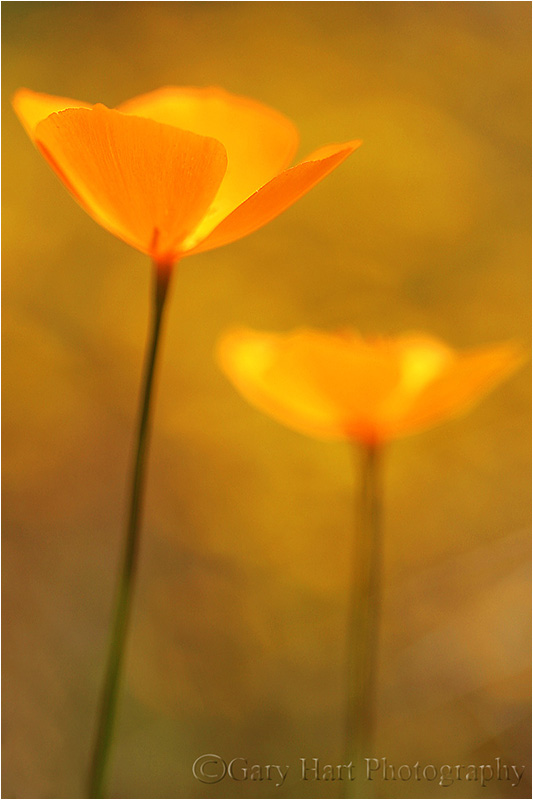 An extension tube on a macro lens at f/2.8 gave me depth of field measured in fractions of an inch. The gold color in the background is more poppies, but they’re far enough away that they blur into nothing but color. The extremely narrow depth of field also eliminated weeds and rocks that would have otherwise been a distraction.
There’s no substitute for experience
No two photographers do everything exactly alike. Determining the DOF a composition requires, the f-stop and focal length that achieves the desired DOF, and where to place the point of maximum focus, are all part of the creative process that should never be left up to the camera. The sooner you grasp the underlying principles of DOF and focus, the sooner you’ll feel comfortable taking control and conveying your own unique vision.
About this image

Floating Autumn Leaves, Valley View, Yosemite
Yosemite may not be New England, but it can still put on a pretty good fall color display. A few years ago I arrived at Valley View on the west side of Yosemite Valley just about the time the fall color was peaking. I found the Merced River filled with reflections of El Capitan and Cathedral Rocks, framed by an accumulation of recently fallen leaves still rich with vivid fall color.
To emphasize the colorful foreground, I dropped my tripod low and framed up a vertical composition. I knew my hyperfocal distance at 24mm and f/11 would be 5 or 6 feet, but with the scene ranging from the closest leaves at about 3 feet away out to El Capitan at infinity, I also knew I’d need to be careful with my focus choices. For a little more margin for error I stopped down to f/16, then focused on the nearest rocks which were a little less than 6 feet away. As I usually do when I don’t have a lot of focus wiggle room, I magnified the resulting image on my LCD and moved the view from the foreground to the background to verify front-to-back sharpness.
Workshop Schedule || Purchase Prints
Playing with Depth: A Gallery of Focus
Click an image for a closer look and slide show. Refresh the screen to reorder the display.


 Eloquent Images by Gary Hart