Eloquent Images by Gary Hart
Insight, information, and inspiration for the inquisitive nature photographer
Customize your camera
Posted on April 6, 2014
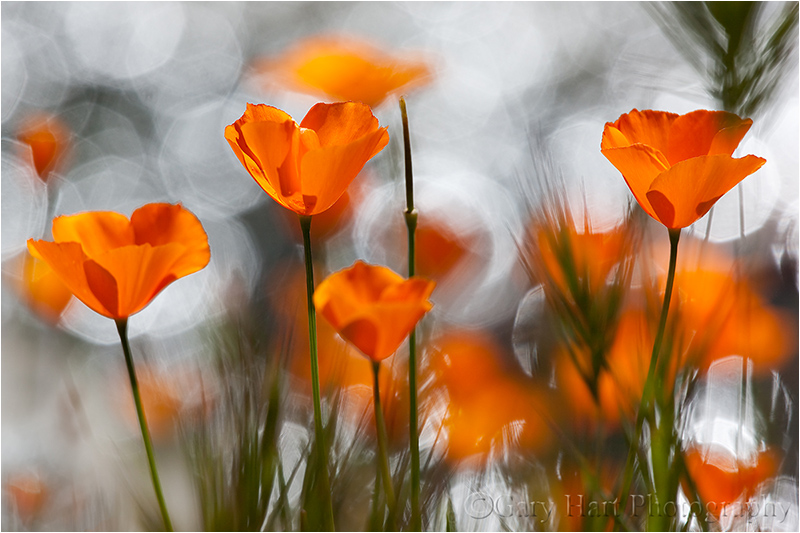
Sparkling Poppies, Merced River Canyon
Canon EOS-1Ds Mark III
1/200 second
F/8
ISO 200
200 mm
A recent mishap forced me to replace my Canon 5D Mark III (a story for a different day). A quality backup and good equipment insurance made my accident no more than a minor inconvenience, but setting up my new camera this morning reminded me of a few camera settings I consider equal parts essential and obscure (or taken for granted). So essential that I set them once and they simply become part of my in-the-field workflow; so obscure that I have to hunt to find many of them in the menu system. What I share here is specific to Canon in general, and the 5DIII in particular, but much of it will apply to Nikon and other DSLR cameras as well. Some of my suggestions may seem obvious, but you may find some surprises too.
For everyone
- Set Date/Time and keep it accurate: Okay, maybe this one isn’t too obscure, but I think the time and date are important to get and keep right, rather than something set once and forget. In fact, when Daylight Saving Time starts/ends, I (try to) make a point of going in and making the appropriate adjustment. The same applies to travel through time zones. Why is all this important? Because often I like to know what time the Rainbow starts on Bridalveil fall in April, or when the light leaves Delicate Arch in October—when my calendar and clock is right, all I need to do is return to a past image and check its capture date/time. I can also figure the altitude (angle above the horizon) of any location by checking the time of an image of the sun or moon rising/setting at that location on a given date, then refer to an app or website for the sun’s/moon’s altitude at that time.
- Enable Highlight Alert (“blinking highlights” that flash when blown): I can think of no reason to not turn Highlight Alert on, but remarkably, on many cameras it’s off by default. Blown highlights are death to an image, but sometimes we overlook them until it’s too late. And sometimes whatever’s blown is too small to even register on the histogram—not a big deal if it’s a patch of snow on a distant peak, but a huge deal if blown highlights are in the rising full moon that’s the focal point of your entire scene. Not sure your whether your Highlight Alert is turned on? Take an extremely overexposed image and replay it on your camera’s LCD (don’t forget to cycle through all possible views)—if you don’t see any flashing, Highlight Alert is off.
- Disable Release shutter without card (or whatever it’s called on your camera): This is another no-brainer that comes set backward on all the Canon cameras I’ve owned (your results may vary). All it took for me to learn this lesson was losing an entire shoot with a new camera because I forgot to put a card in (true story). Maybe you have a reason to click your shutter with no card, but for most of us those times are few and far between.
- Reduce LCD brightness (and turn off auto-brightness): We all like our LCDs to be super bright because it makes our images easier to see in full sunlight, and images just look better when they’re brighter. The problem with a max-bright LCD is, no matter how well we understand histograms and tell ourselves to check it with every shot, there’s a natural tendency to base exposure decisions on the way the image looks on the LCD. A bright LCD fools us into thinking a too-dark image is just right. Not only do I see workshop participants doing this (all the time), I catch myself making this unconscious mistake too. So, if you’re frequently frustrated by images that look much darker on your monitor than they did on your LCD (don’t increase your monitor brightness!), it’s probably because your camera’s LCD is too bright. I actually believe that a too-bright LCD is the source of many “My prints are too dark” complaints—the LCD tells you an image is bright enough (because you didn’t check the histogram), but when you put it on the computer at home, it’s too dark. Rather than fixing the real problem by giving your images more light at capture (something the histogram would tell you, BTW), you simply make your monitor brighter. Of course the best solution is to always check and trust your histogram—if you train yourself to do this, your LCD can be whatever brightness you like.
- Turn image rotation on for the monitor, off for the camera LCD: I like to use my camera’s entire LCD to view my images (long side of the image, whether horizontal or vertical, matches the long side of the LCD), but Canon (and maybe Nikon and the rest) must think nobody ever turns their camera vertically, because my camera’s default behavior is to rotate a vertical image so its top aligns with the top of the camera (where view-finder is). While Canon’s default rotation is great for my always horizontal monitor, I can and do flip my camera quite easily. Turning off rotation for the camera’s LCD ensures that the long side of horizontal and vertical images always aligns with the LCD’s long side.
- Download the manual’s PDF and put in on your smartphone: Okay, not a camera menu option, but definitely one of the first things you should do when you get a new camera. For years I’ve loaded my camera’s manual onto my computer, but with my Dropbox app I can also access it on my iPhone. Because manuals are big, and often the times I most need it I’m in an area with poor or no wifi or cell service, I use the Dropbox Favorites selection to ensure that the manual is always with me.
- Save your custom settings: On the Canon cameras I’ve used there’s an option to save and restore all of your menu settings to/from a media card. Do it (you can use one of those old, small capacity cards rattling around in the bottom of your camera bag), then mark the card containing the settings and set the card aside. Not only will this make recovery easier the next time you drop your camera in a creek on Maui (for example), it’ll save lots of frustration when you get your camera back from a repair and find everything back to factory default.
For the serious landscape shooter
- Set back-button autofocus (and remove autofocus from the shutter button): For stationary subjects, there’s little reason to connect focus and the shutter click (if your subjects are in motion, for example if you shoot sports or wildlife shooting, you can make a strong case for keeping the autofocus connected to the shutter button). By removing autofocus from my shutter button and moving it to a different button on the back of my camera, I can completely separate the act of focus from the act of clicking a frame. When I want to autofocus, I simply point my camera’s focus point at the place in the scene on which I want to focus, press my focus button, compose, and click. (Setting this up is less than intuitive on Canon bodies—each time I get a new camera I have to figure it out again.) Here’s a primer on back-button focus, including instructions for the 1D and 5D bodies.
- Turn on Mirror Lock-up (to reduce vibration induced by the mirror snapping out of the way when you click your shutter): I suspect that modern damping mechanisms make mirror lock-up much less essential than it once was, and mirror vibration really is a problem only in the 1/10 to 1 second shutter speed range. But since Canon makes it a pain to turn mirror lock-up on and off, and I’m always on a tripod (if you’re hand-holding mirror lock-up is a total pain), I see no reason not to just leave it on and get used to clicking my shutter button twice (once to lock-up the mirror, and again to trip the shutter). Of course when you’re in Live-View mode, the mirror is already locked up, so this setting doesn’t matter if you always use Live-View.
- Write to two cards simultaneously (if your camera is among the majority without two card slots, you can skip this one): I’m kind of obsessive about backups, so when I got my 1DSIII, rather than use the second media card slot to store more images, I opted to write each image to both cards. And when I learned that the 5DIII would come with two slots, I was pleased that I wouldn’t have to compromise my peace of mind to save $3500. Has this feature saved me? I don’t use cheap media cards, so I’ve never had a complete card failure (it does happen), but I have lost a few images on one card due to localized corruption. The solution? Just pop in the second card with duplicates of all the day’s captures. My capture workflow goes something like this: In camera, write each image to a 32 GB CF and a 32 GB SD card. At the end of the day (this assumes on the road), I upload the day’s images from my SD card to my laptop hard disk and a to a portable external drive. I don’t delete anything until I run out of space; since I’m not a high volume shooter (on my nine-day trip to Maui, I filled less than half of a 32 GB card), an entire trip’s images usually stay on both media cards in my camera. In the rare event that I do fill a card, I clear the SD and replace the CF with a fresh one.
- Turn on ISO expansion: By default my camera’s ISO range is 100-12800. ISO 100 is my camera’s “native” (best) ISO, but when I want to slow my shutter, I like the option of dropping to ISO 50 before using a smaller (less than optimal) aperture. Unlike the film days, when ISO 50 gave you less noise, a DSLR’s ISO 50 is emulated and therefore not quite as good as its native ISO. I find that I lose about 1/3 stop of dynamic range at ISO 50. Expanding my ISO above 12800 is of little general value to me, but there are times when I find an extremely high ISO invaluable. For example, when photographing in the near absolute darkness of a moonless night, the meter, Live-View LCD, and viewfinder are of little value. Even though maxing my ISO gives me unsellable images, I can take sample frames that are clear enough to aid my exposure, focus, and composition choices.
- Turn on the RGB Histogram: Since the RGB (the three-color) histogram gives you three times as much info as the standard (luminosity) histogram, it’s the histogram you should be looking at. Fortunately, if you know how to read a luminosity histogram, you can read an RGB histogram (trust me). A luminosity histogram tells you whether or not you’ve lost detail in your image; the RGB histogram also tells you whether you’ve lost a color channel. For example, a luminosity histogram will tell you everything’s fine even if you’ve blown (clipped) two of the three color channels, leaving you to wonder later why your lovely blue sky or yellow poppy looks washed out.
- Set up the Custom Menu: My 5DIII has a custom menu screen that will hold all of the most commonly used menu selections so you don’t have to go hunting for them. When I press my menu button, this is always the first menu that appears. On my custom menu I have Battery Status, Format Card, Sensor Clean, VF grid display, Date/Time/Zone (see my very first point), and LCD brightness (to override my default setting when I want to check an image in bright sunlight). Many other cameras offer something similar. Since setting up my Custom Menu, I find that I do/check things I should be doing/checking much more frequently than I did when they required a hunt through my camera’s menu maze.
These are my settings, but I think they’ll benefit most landscape shooters. Do they make me a better photographer? Perhaps not, but they do reduce distractions that might make me a worse photographer. There are lots of other settings in your menus that might surprise you and benefit the way you shoot—the next time you have an hour or so, grab your camera and manual and go through the menus.
* * *
About this image
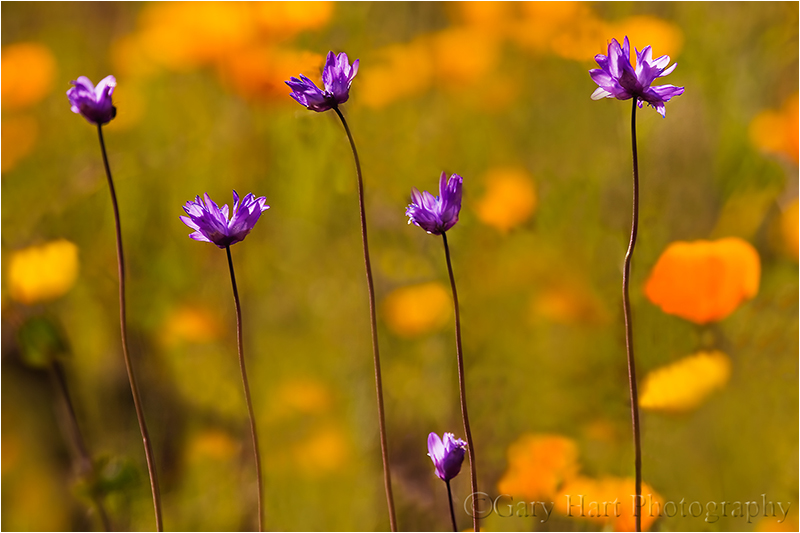
Over the years I’ve accumulated a number of go-to poppy spots scattered about the Sierra foothills. This location in the Merced River Canyon west of Yosemite, where a small creek drains into the river, I don’t get to as often as I’d like. But a couple of years ago I happened to hit it right at the peak of the poppy bloom and took full advantage of the opportunity. Bright sunlight and a breeze made exposure and composition tricky, but I soon became comfortable with my surroundings and started concentrating on tight compositions using my 70-200 with extension tubes.
As I generally do with poppies, my goal was extremely narrow depth of field that highlights a prominent poppy (or two or three) and blurs background poppies and other wildflowers to smudges of color. But, noticing reflecting sunlight creating ephemeral reflections on the creek’s rippling surface, I wondered how my camera would capture sparkling water.
Dropping to poppy level, I used a trio of poppies on about the same focal plane as my foreground and experimented with different f-stops to change the size of each glistening facet. The larger my aperture, the larger and less defined the sparkle. I loved the effect on my LCD, but it wasn’t until I processed my images at home that I decided on this f8 frame that more or less split the size/definition continuum in the middle.
My photography essentials, part 2
Posted on March 17, 2014
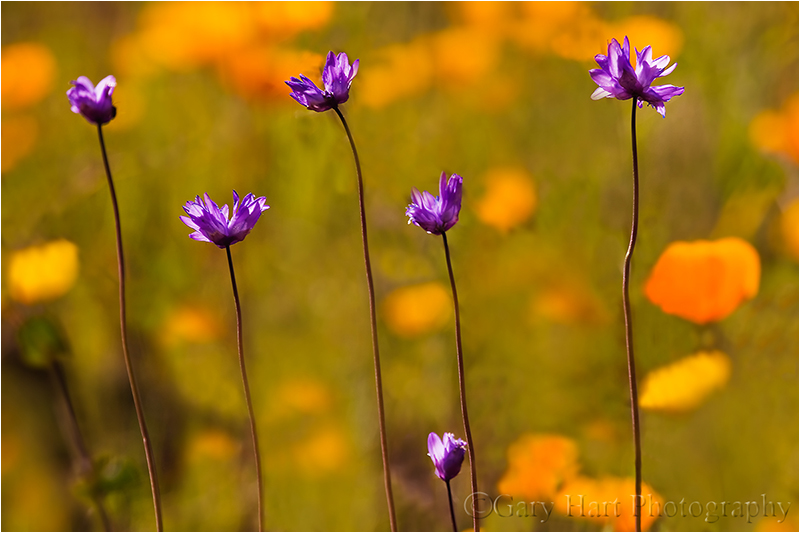
Spring Potpourri, Sierra Foothills, California
Canon EOS-1Ds Mark III
1/125 second
F/7.1
ISO 200
340 mm
A couple of weeks ago the editors at “Outdoor Photographer” magazine asked me (and a few other pros) to contribute to an upcoming article on photography essentials, and it occurs to me that my blog readers might be interested to read my answers.Here’s my answer to the second of their three questions:
What are your three most important non-photo pieces of gear that you rely on for making your photographs and why do you rely on each of the three?
- How did I ever get by without a smartphone? Among other things, and in no particular order, it keeps me company on long trips (that are often far off the grid), informs, entertains, guides, provides essential sun and moon rise/set time and location, helps me choose the best f-stop, allows me to manage by business from any location, and even gives me traffic and weather warning. My iPhone (there are many similarly great Android and Windows phones) is 64GB (the largest available) to allows plenty of room to store maps, more podcasts than I can listen to on a single trip, and a lifetime worth of music. Of course a smartphone is be of little value without its apps. When choosing apps, a primary requirement is usability without Internet connectivity. My favorite connection-independent apps are: Focalware, for sun/moon info for any location on Earth; Depth of Field Calculator by Essence Computing, for hyperfocal info; and Theodolite, for general horizon and direction angles (among other things). I also make frequent use of the Dropbox Favorites option, which allows me to pre-download any file for review when I’m not connected.
- My dash-top GPS is compact enough to slip into any suitcase (there are many viable options; while I use Garmin, interface frustrations stop me short of endorsing it). Because I visit many distant locations that I’m not able to return to as frequently as I’d like, I save every potential photo spot in my dash-top GPS. For example, there are usually many months between my Hawaii visits. Over the years I’ve found far more incredible spots to photograph than my feeble brain can retain. But traveling with a GPS, I don’t have to re-familiarize myself with anything—I just pop it on my dash before driving away from the airport and instantly navigate to my locations like a native. (Or to the nearest Starbucks.)
- Here’s a just-discovered non-photo essential that didn’t get passed on to “Outdoor Photographer”: After many, many years of trying to find a hands-free way to communicate on my long drives in the middle of nowhere, my new Plantronics Voyager Legend bluetooth earpiece feels like a godsend. Wired earbuds get tangled and have lousy noise cancellation; sound quality makes bluetooth radio connections virtually unusable. And I’ve lost track of the number of earpieces I’ve discarded for some combination of discomfort, poor receiving sound quality, poor sending sound quality, and lousy battery life. I can wear my Voyager Legend for hours and forget it’s there; I can answer calls without taking my eyes off the road; and most importantly, I can hear and be heard as if I’m sitting in a quiet room.
About this image
My GPS guided me to this remote, wildflower-dotted hillside, discovered the previous spring and now a regular destination on my annual spring foothill forays. The wildflower bloom varies greatly each year, so without the GPS sometimes it’s impossible to know whether I’ve found a spot that thrilled me the year before. In this case I found the bloom everything I dared to hope.
Rather than pull out my macro lens, I twisted an extension tube onto my 100-400 lens and went to work. Since there were virtually no shadows, the dynamic range wasn’t a problem, despite the bright, direct sunlight. Metering on the brightest part of the scene and underexposing by about one stop (about 2/3 stop above a middle tone) prevented the brightest highlights from washing out and saturated the color.
Most of my attention that afternoon went to the poppies, but here I concentrated on a group of small, purple wild onions and let the limited depth of field blur the poppies into the background. Clicking the same composition at a half dozen or so f-stops from f5.6 to f16 allowed me to defer my depth of field selection until I could view my images on my large monitor.
A rite of spring
Posted on February 26, 2014

Backlit Poppies, Folsom, California
Canon EOS 10D
1/30 second
F/3.5
ISO 100
100 mm
Today it’s gray and wet in Sacramento, a refreshing break from our ridiculously warm and dry winter (sorry, pretty-much-everywhere-else-in-the-U.S.). Usually by the end of February my thoughts have turned to spring, but this year I find myself feeling a cheated of winter (and wishing the rest of you would have shared). As miserable as it can be, I’ve always loved winter photography—not just snow (which I have to travel to see), but rain, clouds, bare trees, and the low angle of the sunlight.
Another aspect of winter I like is the precipitation that rejuvenates our creeks and rivers and nourishes the wildflowers. It’s hard to know what combination of winter conditions will make a good wildflower spring, but I do know that ample rainfall is an important component. Which makes me a little nervous about the wildflowers’ prospects this spring. But that won’t stop me from what has become an annual ritual, meandering through the foothills east of town, Spring Training baseball on the radio (go Giants!), photographing poppies. I have several go-to poppy spots, but I’m easily distracted and often never make it to my original destination.
The image here is from one of my earliest spring excursions, nearly ten years ago. On my way home, I detoured at the last minute to a spot I knew I’d find a few nice poppies—(believe it or not) the Intel parking lot in Folsom. The poppies were in an elevated bed atop a retaining wall, allowing me to easily drop low and capture them backlit by the setting sun. The sun, distorted and dulled by horizon haze, was a throbbing orange ball that I blurred beyond recognition with an extension tube and a large aperture on my 100mm macro lens. Without wind, focus through my viewfinder on the center poppy’s leading edge was pretty easy (today I’d have used live-view focus). The translucent petals caught the fading sunlight, igniting the flowers like orange lanterns. I underexposed slightly to save the highlights and color, and to turn the shaded background into a black canvas.
One other thing I remember about this shoot was my brief brush with the law. Apparently my activity aroused the interest of Intel Security—after just a few minutes of shooting I was visited by an officer who clearly took his job quite seriously. It took me a few minutes, but I was finally able to convince him that, despite my sinister appearance, I was in possession of no explosive device, nor was I an AMD (Advanced Micro Devices, Intel’s leading competitor) spy seeking the secrets of Intel’s fertile flower bed. After making a theatrical display of checking of my license plate (that clearly communicated, “We know who you are”), and in a tone that made let me know he wasn’t quite convinced and would be watching me, he allowed me to finish.
-

- Backlit Poppies, Folsom, California
-

- Poppy Hillside, Sierra Foothills
-
- Spring, California Gold Country, Sierra Foothills
-

- Poppies and Oak, Big Sur
-

- Brilliant Poppy, American River Parkway, Sacramento
-
- Poppies, Hite Cove Trail, Merced River Canyon
-

- Sparkling Poppies, Merced River Canyon
-
- Poppy and Surf, Point Reyes National Seashore
-

- Poppy Pastel, Sierra Foothills, California
-

- Poppy Lanterns, Merced River Canyon
-
- Raindrops on Poppy, California Gold Country
-

- Champagne Glass Poppies, Merced River Canyon, California
Fire at will
Posted on May 20, 2013

Poppy Pastel, Sierra Foothills, California
Canon EOS 5D Mark III
1/125 second
F/4.0
ISO 400
100 mm with 12mm extension tube added
Maximize your investment
I clicked 54 versions of this scene (I just counted). I’m usually a pretty low volume shooter, sometimes not taking 54 pictures on an entire trip. And I have to admit, after years as a film shooter, the whole digital “fire at will” paradigm took some getting used to. But I’ve finally reached a place where I have no problem firing 54 frames in 30 minutes when the scene calls for it. The light came on for me when I realized that, while in my film days every single click cost money, with a digital camera, every click increases the return on my investment (the more images I have, the less per image my camera cost).
For example
These poppies were just a small handful of the thousands coloring a steep hillside near the Mokelumne River in California’s Gold Country. I’d been working the area for a couple of hours, using various combinations of macro, telephoto, and extension tubes to isolate and selectively focus poppies with various foreground/background relationships. I spent about an hour futzing around with compositions, occasionally stumbling upon something decent, but more often than not moving on to something else after a handful of mediocre frames. But the longer I worked, the more productive I became and the more I started seeing things the way my camera saw them.
The late afternoon sun that I’d been working with (and around) had just about left the scene when I decided to shift from one patch of poppies to similar patch about twenty feet away. I’d been concentrating on extremely close shots (inches from my subject) with at least 36mm of extension on my 100mm macro and 70-200 lenses, but when I saw this trio of poppies on (more or less) the same plane, I immediately pictured a slightly wider scene featuring this group sharp against a blurred background of poppies and grass.
Cutting back to a 12mm extension tube on my macro lens, I started with a wide aperture to limit the depth of field and spread the grass into a textured green canvas. With a slight breeze intermittently nudging the poppies, I switched to ISO 400 (in the few frames where I went smaller than f5.6, I bumped up to ISO 800). The preliminaries out of the way, I went to work refining my composition, framing the more or less centered foreground (sharp) poppies with the soft orange background poppy splashes.
Given the minuscule margin for error, I can’t imagine shooting something like this without a tripod. With my tripod I was able to use live-view to ensure precise focus, after each click evaluating everything from sharpness to exposure to composition, all with the security of knowing that the shot I’m reviewing is still sitting right there in my viewfinder, just waiting for whatever refinement I deem necessary.
Fifty-four frames later….
They don’t all have to be winners
Not only should you not be shy about shooting, your goal for each shot doesn’t necessarily need to be a “keeper” image. Often the purpose of a frame is to simply move you toward that keeper image. Sometimes that means a tangible improvement, but many times it’s just an education because nothing fosters creativity better than taking an “I wonder what happens if I do this” approach (followed by an effort to actually understand what happened). On the other hand, indiscriminate clicking (“The more I shoot, the better the chance I’ll find a keeper when I get home”) will wear out your camera faster than it improves your photography. In other words, shoot a lot, but make each shot serve a purpose.
Each frame that afternoon was a little different from the one before it: nearer, farther, up, down, left, right, more DOF, less DOF. While each wasn’t necessarily an improvement over the preceding frame, at the very least it advanced my understanding of the scene and gave me ideas for the next frame. And each gave me a variety of options from which to select when I could review and compare everything on a 27″ monitor. It was also lots of fun.
A Poppy Gallery
Click an image for a closer look and slide show. Refresh the window to reorder the display.


A background check we can all agree on
Posted on April 20, 2013
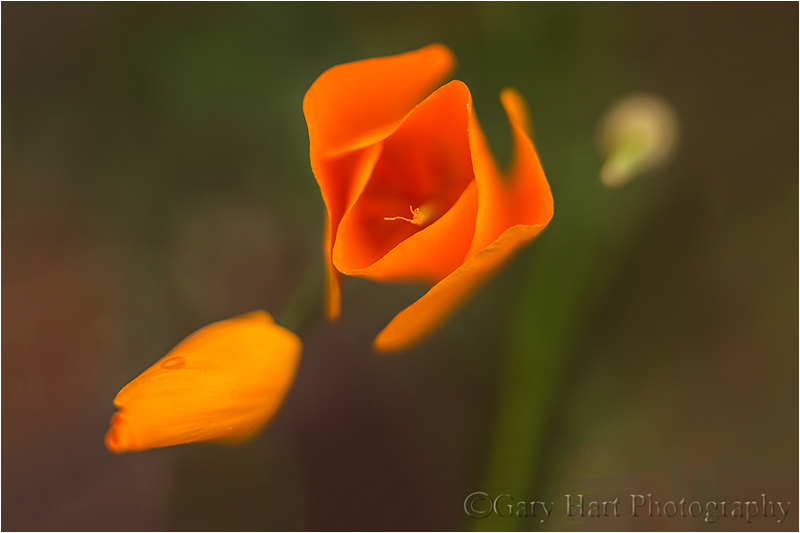
Evolution, Gold Country Poppies, Sierra Foothills
Canon EOS 5D Mark III
1/400 second
F/2.8
ISO 800
100 mm
* * * *
Distractions
We photographers often concentrate our attention so closely on our primary subject that we’re oblivious to the subject’s surroundings, forgetting that everything in our frame potentially competes for attention with our subject. Eye-pulling distractions frequently skulk about the frame’s edges, but for most photographers a more insidious problems is the stuff lurking in the background.
Regardless of the problem, careful attention to the entire frame can turn these potential problems into advantages. For example, sometimes merely tightening the composition will eliminate offending elements. For objects not so easily eliminated, we can position the camera and orient the image so potential distractions actually frame the subject and hold the eye in place. Or we can create virtual lines that connect secondary and tertiary elements in a way that guides the eye to our subject.
Background check
But what about a busy background that creates visual noise throughout the frame? In large scenes repositioning can usually rearrange the foreground/background relationship enough to eliminate the problem. But in macro scenes the foreground and background are usually so closely tied that repositioning has little effect, or completely changes the view of the macro subject.
My favorite solution in these images is to soften my background, sometimes only enough to reduce the background’s visual weight, other times blurring it beyond the point of recognition. Take a look at all of my macro and close-focus images—virtually all use a narrow depth of field with very careful attention to what’s behind my subject, no matter how blurred.
For example
Photographing recently in the Sierra foothills, I was drawn to a trio of poppies in varying stages of evolution, from tight bud to partially open mature bloom (poppies open for sun and calm air, and close for shade/overcast and wind). I particularly wanted to capture the sensual curves of the unfurling poppy, but weeds and rocks in the background were both harsh and disorganized. Depth of field sufficient to allow sharpness along the poppy’s stamen from tip to base would have also sharpened the background enough that it would surely compete with the poppy. Instead, I chose to minimize my depth of field and emphasize only the outer fringe of the main poppy’s delicate petals.
The depth of an image’s range of sharpness varies with the closeness of the focus point and the size of the aperture: the closer the focus point (achieved by moving physically closer and/or by zooming tighter) and the larger the aperture, the thinner the plane of sharpness. In this case I minimized the distance of my focus point by moving close with my 100mm macro; to get even closer, I added a 36mm extension tube. Focusing this close at my lens’s widest aperture, f2.8, gave me a razor thin plane of sharpness with virtually no margin for error.
In images with a thin range of focus, the point of focus (that will hold all of the image’s visual weight) is the difference between success and failure. Here even the slightest twist of the lens’s focus ring brought radically different planes of the poppy into sharp focus (I can’t even imagine attempting something like this without a tripod). To ensure essential precision, after framing my composition I switched into live-view mode and magnified the inner petal’s outer edge, then waited for the pauses in the breeze before clicking.
To hedge my bets, I bracketed for depth of field, clicking several more frames at apertures progressively smaller, in one stop increments. As I suspected, the sleight increase in the region of poppy-sharpness wasn’t enough to justify the detail added to the background and what you see here is my original f2.8 frame. I love the way the individual weeds and rocks so clear to my eye blur into a homogenized canvas of soft color and texture, a perfect background that elevates my poppies to prominence—a potential fatal flaw turned into an essential feature. (BTW, despite the slight breeze I probably could have gotten by with ISO 400 and 1/200 here, but my 5DIII is so good at ISO 800, rather than constantly having to remember to adjust the ISO as my aperture and the light changed, I just went ahead and did most of this shoot at 800—sometimes simple is better than perfect.)
Closer than the eye can see
Posted on April 15, 2013
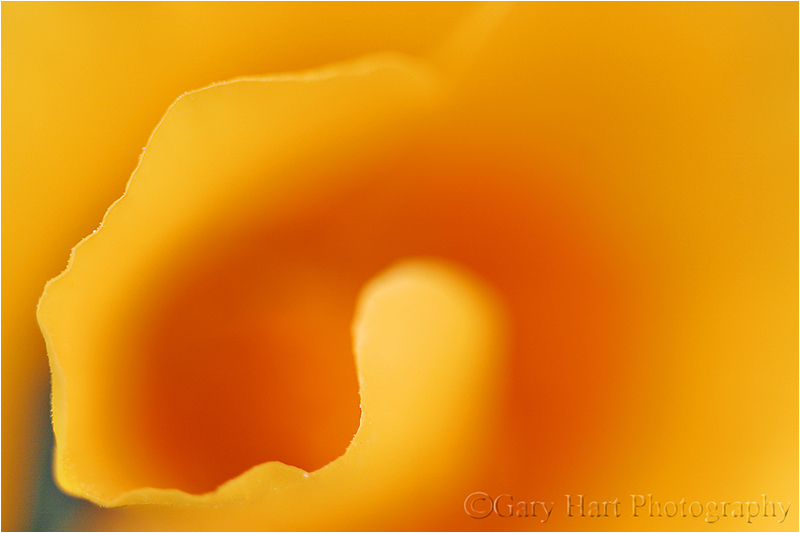
Intimate Poppy, Point Reyes National Seashore
Canon EOS 10D
1/125 second
F/2.8
ISO 100
100 mm
* * * *
Photography’s gift isn’t its ability to show the world we already know, photography’s gift is its ability to reveal a world we haven’t imagined.
I found this poppy on a visit to Point Reyes about nine years ago, just one of thousands sprinkled among a collage of swaying wildflowers. Before this day I’d aborted any attempt to photograph poppies that hadn’t yet opened to the sun, but with the fog showing no sign of lifting, I dropped to my knees for a closer look at this poppy furled tightly against the morning chill. Despite all the visual activity to distract my eyes, my camera distilled the scene’s kaleidoscope of color a single poppy’s buttery swirl.
With an extension tube and 100mm macro lens, my camera provided a far more intimate view than my eyes were capable of. Setting my aperture wide open, I focused on the poppy’s outer edge and blurred the rest of the poppy to liquid gold. The resulting image was nothing like what I saw on my hike that morning, but because my camera’s reality is no less valid than my own, I now know poppies just a little better than I did before this image.
Chomping at the bit
Posted on March 26, 2012
Spring, California Gold Country, Sierra Foothills
It’s been over a week since my last post. I have 350 Maui images on my hard disk, calling my name, but I’ve been so busy since coming home that I haven’t touched them. To give you an idea how busy I’ve been, last Tuesday my new 5D MarkIII arrived and I haven’t clicked the shutter once. That will change in a few days (if it kills me).
I love being a photographer, but it’s an unfortunate reality that turning your passion into your profession risks robbing photography of all the pleasure it once offered. Suddenly earning money takes priority over taking pictures, especially in this day when images just don’t sell the way they used to.
When I decided to make photography my livelihood, it was only after observing other very good digital photographers who, lured by the ease of digital photography, had taken the same path without recognizing that running a photography business requires far more than taking good pictures. Rather than becoming further immersed in their passion, they found themselves forced to photograph things not for love, but because it was the only way to put food on the table. And with the constant need for marketing, collections, bookkeeping, and just plain keeping customers happy, they soon realized that there was no time left to do what caused them to become photographers in the first place. Sigh.
So when I decided to change from photographer to Photographer, it was with a pretty good idea of what I was risking. I vowed that I’d only photograph what I want to photograph, that I’d never photograph something simply because I thought I could sell it. In my case that meant sticking landscapes: no people or wildlife–in other words, pretty much nothing that breathes.
But how to make money? My previous life in technical communications–I’d been a technical writer for a (very) large high tech company and before that had spent many years doing tech support, training, testing, and writing for a small software company–combined with a lifetime of camping, hiking, backpacking, and (of course) photographing throughout the American West, made conducting photo workshops a very easy (and enjoyable) step for me. Supplementing the workshops with writing and print sales has allowed me to pay the bills, visit the locations I’ve always loved, and explore new locations. And most importantly, it has allowed me to keep photographing only the things I love photographing.
One of the things I love photographing most is spring in Northern California. March is a month of bipolar weather swings, a time when blue skies with puffy clouds turn into gray, frog-drowning downpours with alarming suddenness. March is also when our hills reach a crescendo of pupil-dilating green, the oaks leaf out with new life, and poppies start to appear everywhere.
One of my favorite diversions on these spring afternoons is driving into the Sierra foothills east town to photograph the poppies. With the window down, Spring Training baseball on the radio (go Giants!), and doing my best to get lost in the maze of narrow, twisting foothill roads, I’m in photography heaven. I found the above scene a couple of years ago on a quiet hillside beside the Cosumnes River in the Gold Country of the Sierra foothills. But this scene could be just about anywhere in California’s ubiquitous rolling, oak-studded hills.
Despite the current busy schedule, there’s comfort in the knowledge that our spring conditions will persist into June. Next month I’ll find poppies and other wildflowers mixed with redbud in the many canyons roaring with Sierra snowmelt. And come May, it’s dogwood time….
Bracketing in the digital age
Posted on April 23, 2011

Poppy With a View, Point Reyes National Seashore, California
Canon EOS 10D
1/90 second
F8
ISO 100
24 mm
Remember the uneasy days of film, when we never knew whether we had exposed a scene properly until the film was processed? As insurance we’d bracket our exposures, starting with the exposure we believed to be right, then hedge our bets by capturing the same composition at lighter and darker exposure values. Today digital capture gives us instant exposure confirmation, yet the practice of exposure bracketing persists among inexperienced photographers.
Film shooters carefully budget their shutter clicks because they pay for film and processing by the exposure; digital photographers paid for their exposures when they purchased their camera. In other words, while every film click costs you money, every digital click increases the return on your investment. This means that using a digital camera, you can shoot to your heart’s content with little to no added cost, a great opportunity get the most out of your significant hardware investment and grow as a photographer. These “free” captures may also explain the persistence of exposure bracketing by so many digital photographers who think nothing of tripling the number of shutter clicks. But unless you plan to blend images later, exposure bracketing is a waste of time, shutter-cycles (the shutter is often the first thing to wear out on digital SLRs), and storage. Instead, trust your histogram and spend your extra shutter clicks on a more productive approach: composition bracketing.
Composition bracketing is “working” a scene by capturing composition and camera-setting variations to be decided upon later, when you review your images on a large screen. If you shoot your scenes both horizontally and vertically, you already composition bracket. But don’t stop there: Before looking for something else to shoot, shoot the current scene wider and tighter, move around to change the foreground or background, experiment with depth of field and motion blur, and so on.
For example, a few years ago I spent a couple of days photographing wildflowers in Point Reyes. Visualizing a solitary poppy with the coastline soft in the background, I was pleased to find this fearless subject clinging to Chimney Rock’s precipitous west slope. From my vantage point above the poppy, the background was a mix of dirt and weeds, but dropping down to poppy-level instantly juxtaposed it against the ocean. A blue ocean was better than dirt and weeds, but I wanted coastline so I rotated (with one eye on the cliff) until the poppy was framed by the curving shore. To fill the frame with the poppy and achieve the narrow depth of field I sought, I added an extension tube to my wide (24-70) lens.

Here I am refining my composition for this poppy. I ended up dropping lower and closer before bringing in my tripod. (The slope was as steep as it looks here.)
Dropping low enough to place the entire poppy against the surf put me too low for the tripod I was carrying. But since nailing the focus point is particularly essential these shallow depth of field images, I don’t even consider hand-holding close focus shots. In this case I placed my tripod on its side and carefully rested the lens on one of the legs, using my bunched jacket to cushion against vibration and my remote release to click without disturbing the precarious equilibrium. As you might imagine, because this was in the days before live-view, composing was an exercise in contortion and patience.
Exposure was easy, a fact confirmed by my histogram. But after going to all this trouble to set up my shot, I wasn’t about to fire off a single frame and move on. So I bracketed my compositions, timing several exposures for different background wave action, a surprisingly significant frame-to-frame change. And even though I believed minimal DOF was best, I knew that my postage stamp sized LCD wouldn’t tell me if I’d achieved the best DOF. So I followed my initial wide-open shot with several frames at a variety of smaller f-stops (and a correspondingly slower shutter speeds). Good thing, because the background in the original f4 exposure was far too soft–the frame I ended up choosing was at f8. While the exposure was identical for each frame, I attribute my satisfaction with this image to the choices due to my calculated composition bracketing.
Is it spring yet?
Posted on March 6, 2011
Poppy Lantern, Merced River Canyon, California
Canon EOS-1Ds Mark II
1/50 second
F/4
ISO 200
100 mm
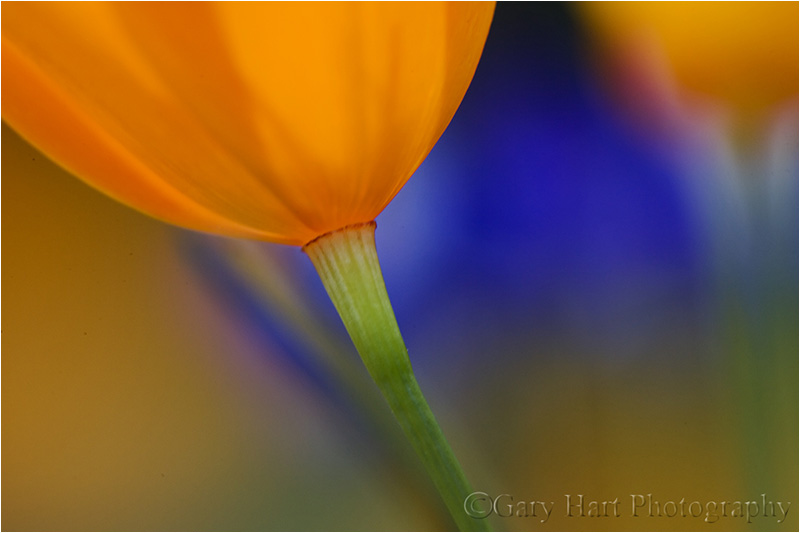
March 3, 2011
With all the recent snow posts, it’s kind of hard to believe that spring has arrived in California. We’re still getting rain here in the Central Valley (and snow in the Sierra), but Northern California skies are more blue than gray, and colorful blossoms are popping up everywhere. While the soon-to-be-ubiquitous foothill poppies haven’t quite kicked in, I know by the end of the month my camera and I will be enjoying leisurely drives through the Gold Country to photograph my favorite wildflower. My foothill drives have become quite a treat for me, not just for the photography, but for the opportunity to meander quiet country roads with the window down and baseball on the radio.
On these drives I often find entire hillsides blanketed with poppies beneath billowing cumulus pillows. Sometimes a spring shower sprinkles the blossoms, closed tight against the weather, with glistening water jewels. When I’m fortunate enough to find the sun diffused by a veneer of translucent clouds, I like to sprawl in the dirt for a bugs-eye view of the tissue-thin, backlit petals that light up as if they have their own internal light source like colorful little lanterns.
I found the poppy in this image at one of my favorite spots near the Merced River west of Yosemite. An extension tube on my 100mm macro lens enabled me to get close enough to smooth the background lupine into a blur of purple. I chose this tight composition of just the base of the closest backlit poppy for the way it emphasized the glowing lantern effect I love so much. Believe it or not, the color was so vivid that I actually had to desaturate it a bit in Photoshop.
-
- Wildflower Collage, Sierra Foothills, California
-
- Sparkling Poppies, Merced River Canyon
-
- Poppy Lanterns, Merced River Canyon
-
- Intimate Poppy, Point Reyes National Seashore
-
- Poppy and Surf, Point Reyes National Seashore
-
- Poppies, Hite Cove Trail, Merced River Canyon
-
- Poppy Hillside, Sierra Foothills
-
- Lupine and Poppies, California Gold Country
-
- Champagne Glass Poppies, Merced River Canyon, California
-
- Poppy Hillside, Sierra Foothills
-
- Lupine and Poppies, California Gold Country
-
- Champagne Glass Poppies, Merced River Canyon, California
-
- Poppies, Hite Cove Trail, Merced River Canyon
-
- Poppy Lanterns, Merced River Canyon
-
- Poppy and Surf, Point Reyes National Seashore
-
- Intimate Poppy, Point Reyes National Seashore
-
- Sparkling Poppies, Merced River Canyon
-
- Wildflower Collage, Sierra Foothills, California
Simple
Posted on February 8, 2011

Champagne Glass Poppies, Merced River Canyon
Canon EOS 10D
1/1000 second
F/2.8
ISO 100
100 mm
Yesterday NPR and Jazz24.org released their Jazz 100, “the 100 quintessential jazz songs of all time.” Topping the list was one of my jazz favorites, the Dave Brubeck Quartet’s “Take Five.” Listening to “Take Five” this morning I was particularly struck by the simplicity of its sound, and it occurred to me that simplicity is an essential and often overlooked element in photography.
Spend a little time on photography websites and it’s easy to come away feeling visually assaulted. Saturated sunsets, crashing waterfalls, and swirling clouds can make wonderful photographs, but some of nature’s most divine beauty is best revealed by subtracting elements we’ve been brainwashed into thinking are necessary. Just as many of the pieces on the Jazz 100 are quite complex, simplicity is certainly not necessary for a successful image. But it seems many photographers have forgotten how effective a simple image can be. As my parents used to advise (shout), louder is not necessarily better. And neither is a lot of activity in a frame. To be effective, a scene’s elements (shape, color, lines, texture) need to work together; if they can’t, it’s better to isolate the most compelling aspect and remove distractions, no matter how beautiful they are.
Case in point: A poppy-covered hillside is a beautiful thing, but so are the graceful curves and translucent gold of a single poppy. The poppy in the foreground of this image was just one of thousands blanketing a hidden hillside in the Merced River Canyon just west of Yosemite Valley. After photographing the entire scene I gradually moved closer until I found myself sprawled on my stomach beneath this one poppy. Conveying its simple elegance was all about removing distractions: rocks, weeds, and yes, even the thousands of other beautiful poppies in the background. In this case I used selective focus, attaching an extension tube and dialing up a wide aperture to limit the depth of field. Focusing on the poppy’s leading edge turned everything else in the frame to a smear of color.
Did I achieve Brubeck’s mastery of my world? I think not—but it’s nice to have something to aspire to.

 Eloquent Images by Gary Hart