Eloquent Images by Gary Hart
Insight, information, and inspiration for the inquisitive nature photographer
Vive la Différence
Posted on August 30, 2020
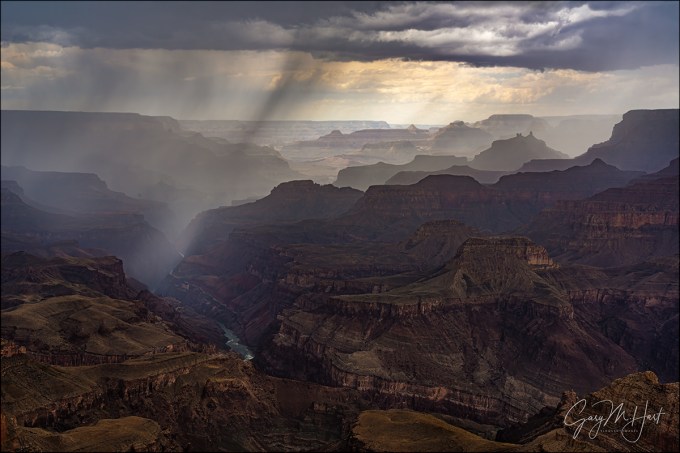
Summer Storm, Lipan Point, Grand Canyon
Sony a7RIV
Sony 24-105 G
1/8 second
F/16
ISO 50
Distinct Perspectives
The feel at the Grand Canyon is expansive, while standing amidst Yosemite’s towering monoliths, the feel is more intimate
I love photographing weather, and because Yosemite’s and the Grand Canyon’s distinctions affect the way their weather is experienced, their weather very much factors into the way I photograph them. In Yosemite Valley I feel like I’m actually in the weather, which is why, for better or worse, when a storm rages in Yosemite, I like to venture out into it. From swirling clouds to fresh snow, these adventures are the source of many of my favorite Yosemite images
At the Grand Canyon, on the other hand, the best photography happens when I feel like I’m photographing someone else’s weather, so when a storm approaches, I try to retreat to a place where I can observe it from a distance. Even when lightning doesn’t make this a safety choice, I like to stand back and observe the weather. Standing on the rim, I can be high and dry beneath bland skies while photographing some of the most exquisite beauty I’ve ever seen. Often that’s lightning, rainbows, or a vivid sunrise/sunset, but sometimes it’s just the play of clouds and light in and around the layered red rocks and tributary canyons.

Summer Storm, Lipan Point, Grand Canyon
Last month my brother and I traveled to the Grand Canyon, primarily to photograph lightning and Comet NEOWISE. NEOWISE came through wonderfully, but the lightning not so much. I lost track of the number of times I trained my camera on a promising cell that didn’t deliver, but thankfully lightning is not a prerequisite for great Grand Canyon photography.
This image is the product of one such disappointing lightning shoot. I’d watched the cell move toward the rim from the south and would have bet money that it was bringing lightning with it. I set up my tripod, mounted my Sony a7RIV and Lightning Trigger, and waited with my eyes locked on the rain curtain, willing with all the effort I could muster the lightning to manifest. But alas, as happened far too frequently on this trip, the lightning fizzled. But lightning or not, I couldn’t help appreciate the drama unfolding when a band of heavy rain sped across the canyon. It only took about four minutes for this rain band to span the width of my frame and fizzle as it approached Wotan’s Throne on the North Rim (just out of the frame on the right).
I’d be lying if I said I rushed back to my room and instantly downloaded and processed this image, but working on the images from this trip, this moment stuck in the back of my mind. After I’d gone through the lightning images (exactly one worthy of processing), and the NEOWISE shoots (far more productive), I did another pass looking for some of the beautiful clouds and light that had blessed us, including this wet cell’s brief sprint across the canyon. When I found it I was pleased to see that the moment was indeed as dramatic as my memory.
Workshop Schedule || Purchase Prints || Instagram
Vive la différence
Click an image for a closer look, and to view a slide show.


California Burning
Posted on August 23, 2020

Oaks and Smoke, Sierra Foothills, California
Sony a7RIV
Sony 100-400 GM
1/30 seconds
F/6
ISO 100
That my hometown topped 110 degrees several days last week isn’t especially newsworthy—100+ degrees happens maybe 20 times in an average Sacramento summer, and we hit 110 for a day or two every two or three years. But adding thunderstorms to the extreme temperatures is indeed unprecedented for California. And with the thunderstorms came the fires that have filled the sky with thick smoke and given the state an end of days vibe.
The fires are still burning, torching our forests and hills to the tune of 1,000,000+ acres burned, with no end in sight. I’m fortunate to live near the Sacramento–San Joaquin River Delta, where we don’t really need to worry about fire (but you might want to check on me if you hear about floods in Sacramento). Even though the closest fire is about 30 miles away, the smoke here is oppressive, at times so thick that it’s not safe to go outside.
To say this year has been a challenge for all of us would be an understatement. We each have our own way of coping, and one thing that has helped me maintain my sanity during the pandemic is getting out and walking the neighborhood several times each day. I’ll start a typical day with a pretty brisk 3 to 5 mile walk, then throughout the day, whenever I start to feel a little cabin fever setting in, I’ll take a more leisurely 1 or 2 mile walk—by the end of most days I’ve logged 8 to 10 miles, then I go to bed, wake up, and do it again.
But with the heat and smoke driving me inside 24×7, by the middle of last week I was beginning to feel a little crazy. So on one particularly smoky day (they all run together), I loaded my camera gear into the car, put the AC on recirculate, and headed to the hills. I had no illusions that I’d escape the smoke, but I just needed to see something different. The plan was to find some oaks against the sky and make some pictures of the orange sun.
I’d hoped to find trees far enough from the road that I could supersize the sun with my Sony 200-600, but after driving around a bit searching for elevated trees that I could align with the sun, I settled for this pair that was maybe 100 yards away. There was no parking here, and the rutted shoulder dipped steeply and only offered about a foot more than a car-width between the pavement and barbed-wire fence, but I squeezed in, thankful for my Outback’s AWD.
The smell of smoke hit me the second I opened my door, but I ignored the burning in my eyes and throat and got to work (I’m blessed to be in good health, with no respiratory problems). I grabbed my tripod from the back of the car, attached my Sony a7RIV, mounted my Sony 100-400, and crossed the road to set up as far from the trees as possible. It was about 45 minutes before sunset, but already the light felt like twilight. I thought I’d have about 30 minutes of shooting before the sun dipped below the hill, but framing up my first shot I realized that the sun was being swallowed by the smoke. Less than three minutes after I took this picture the sun was gone without a trace, not even a bright patch in the smoke, and I was done.
Workshop Schedule || Purchase Prints || Instagram
California feels like ground-zero for climate change, so when I hear people’s indefensible explanations for why it’s not real (or why humans aren’t responsible), I get a little irritated. From many of the comments I’ve heard, it’s pretty clear that some people just don’t understand it well enough to have an opinion, so a couple of years ago I wrote a blog explaining climate change in the simplest terms possible. I updated and re-shared this blog on my Facebook page a few days ago, and while the response was largely positive, I did get some pushback from a couple of people who still don’t realize that the debate is over. So I’ve appended it to the bottom of this post (beneath the Sun and Smoke gallery). If you have doubts about climate change, please take the time to read it. And if you still have doubts, before you push back, please be prepared to answer two questions:
- Do you not believe the greenhouse effect is real?
- Or do you not believe that humans are adding enough greenhouse gases to our atmosphere to make a difference?
Sun and Smoke
Click an image for a closer look, and to view a slide show.


Sun and Smoke, Sierra Foothills, California
Sony a6300
Sony 100-400 GM
Sony 2x teleconverter
ISO 100
f/16
1/8 second
Humans, we have a problem
Earth’s climate is changing, and the smoking gun belongs to us. Sadly, in the United States policy lags insight and reason, and the world is suffering.
Climate change science is complex, with many moving parts that make it difficult to communicate to the general public. Climate change also represents a significant reset for some of the world’s most profitable corporations. Those colliding realities created a perfect storm for fostering the doubt and confusion that persists among people who don’t understand climate science and the principles that underpin it.
I’m not a scientist, but I do have enough science background (majors in astronomy and geology before ultimately earning my degree in economics) to trust the experts and respect the scientific method. I also spent 20 years doing technical communication in the tech industry (tech writing, training, and support) for companies large and small. So I know that the fundamentals of climate change don’t need to intimidate, and the more accessible they can be to the general public, the better off we’ll all be.
It’s personal
Recently it feels like I’ve been living on the climate change front lines. On each visit to Yosemite, more dead and dying trees stain forests that were green as recently as five years ago. And throughout the Sierra (among other places), thirsty evergreens, weakened by drought, are under siege by insects that now thrive in mountain winters that once froze them into submission. More dead trees means more fuel, making wildfires not just more frequent, but bigger and hotter.
Speaking of wildfires, for a week last month I couldn’t go outside without a mask thanks to smoke from the Camp Fire that annihilated Paradise (70 miles away). I have friends who evacuated from each of this November’s three major California wildfires (Camp, Hill, and Woolsey), and last December the Thomas Fire forced a two-week evacuation of Ojai, where my wife and I rent a small place (to be near the grandkids). Our cleanup from the Thomas fire took months, and we still find ash in the most unexpected places (and we were among the lucky who had a home to clean).
The debate is dead
Despite its inevitable (and long overdue) death, the climate change debate continues to stagger on like a mindless zombie. We used to have to listen to the skeptics claim that our climate wasn’t changing at all, so I guess hearing them acknowledge that okay-well-maybe-the-climate-is-changing-but-humans-aren’t-responsible can be considered progress.
Despite what you might read on social media or fringe websites, climate change alternative “explanations” like “natural variability” and “solar energy fluctuations” have been irrefutably debunked by rigorously gathered, thoroughly analyzed, and closely scrutinized data. (And don’t get me started on the whole “scientists motivated by grant money” conspiracy theory.)
Science we all can agree on
One thing that everyone does agree on is the existence of the greenhouse effect, which has been used for centuries to grow plants in otherwise hostile environments.
As you may already know, a greenhouse’s transparent exterior allows sunlight to penetrate and warm its interior. The heated interior radiates at longer wavelengths (infrared) that don’t escape as easily through the greenhouse’s ceiling and walls. That means more heat is added to a greenhouse than exits it, so the interior is warmer than the environment outside.
There’s something in the air
Perhaps the most common misperception about human induced climate change is that it’s driven by all the heat we create when we burn stuff. But that’s not what’s going on, not even close.
Our atmosphere behaves like a greenhouse, albeit with far more complexity. The sun bathes Earth with continuous electromagnetic radiation that includes infrared, visible light, and ultraviolet. Solar radiation not reflected back to space reaches Earth’s surface to heat water, land, and air. Some of this heat makes it back to space, but much is absorbed by molecules in Earth’s atmosphere, forming a virtual blanket that makes Earth warmer than it would be without an atmosphere. In a word, inhabitable.
Because a molecule’s ability to absorb heat depends on its structure, some molecules absorb heat better than others. The two most common molecules in Earth’s atmosphere, nitrogen (N2: two nitrogen atoms) and oxygen (O2: two oxygen atoms), are bound so tightly that they don’t absorb heat. Our atmospheric blanket relies on other molecules to absorb heat: the greenhouse gases.
Also not open for debate is that Earth warms when greenhouse gases in the atmosphere rise, and cools when they fall. The rise and fall of greenhouse gases has been happening for as long as Earth has had an atmosphere. So our climate problem isn’t that our atmosphere contains greenhouse gases, it’s that human activity changes our atmosphere’s natural balance of greenhouse gases.
Earth’s most prevalent greenhouse gas is water vapor. But water vapor responds quickly to temperature changes, leaving the atmosphere relatively fast as rain or snow, while other greenhouse gases hold their heat far longer.
The two most problematic greenhouse gases are carbon dioxide (CO2: one carbon atom bonded with two oxygen atoms) and methane (CH4: one carbon atom bonded with four hydrogen atoms). The common denominator in these “problem” gases is carbon. (There are other, non-carbon-based, greenhouse gases, but for simplicity I’m focusing on the most significant ones.)
Carbon exists in many forms: as a solo act like graphite and diamond, and in collaboration with other elements to form more complex molecules, like carbon dioxide and methane. When it’s not floating around the atmosphere as a greenhouse gas, carbon in its many forms is sequestered in a variety of natural reservoirs called a “carbon sink,” where it does nothing to warm the planet.
Oceans are Earth’s largest carbon sink. And since carbon is the fundamental building block of life on Earth, all living organisms, from plants to plankton to people, are carbon sinks as well. The carbon necessary to form greenhouse gases has always fluctuated naturally between the atmosphere and natural sinks like oceans and plants.
For example, a growing tree absorbs carbon dioxide from the atmosphere, keeping the carbon and expelling oxygen (another simplification of a very complex process)—a process that stops when the tree dies. As the dead tree decomposes, some of its carbon is returned to the atmosphere as methane, but much of it returns to the land where it is eventually buried beneath sediments. Over tens or hundreds of millions of years, some of that sequestered carbon is transformed by pressure and heat to become coal.
Another important example is oil. For billions of years, Earth’s oceans have been host to simple-but-nevertheless-carbon-based organisms like algae and plankton. When these organisms die they drop to the ocean floor, where they’re eventually buried beneath sediment and other dead organisms. Millions of years of pressure and heat transforms these ancient deposits into…: oil.
Coal and oil (hydrocarbons), as significant long-term carbon sinks, were quite content to lounge in comfortable anonymity as continents drifted, mountains lifted and eroded, and glaciers advanced and retreated. Through all this slow motion activity on its surface, Earth’s temperatures ebbed and flowed and life evolved accordingly.
Enter humans. We have evolved, migrated, and built civilizations based on a relatively stable climate. And since the discovery of fire we humans have burned plants for warmth and food preparation. Burning organic material creates carbon dioxide, thereby releasing sequestered carbon into the atmosphere. Who knew that such a significant advance was the first crack in the climate-change Pandora’s Box?
For thousands of years the demand for fuel was met simply by harvesting dead plants strewn about on the ground and the reintroduction of carbon to the atmosphere was minimal. But as populations expanded and technology advanced, so did humans’ thirst for fuel to burn.
We nearly killed off the whales for their oil before someone figured out that those ancient, subterranean metamorphosed dead plants burn really nicely. With an ample supply of coal and oil and a seemingly boundless opportunity for profit, coal and oil soon became the driving force in the world’s economy. Suddenly, hundreds of millions of years worth of sequestered carbon was being reintroduced to our atmosphere as fast as it could be produced—with a corresponding acceleration in greenhouse gases (remember, when we burn hydrocarbons, we create carbon dioxide).
Compounding the fossil-fuel-as-energy problem is the extreme deforestation taking place throughout the world. Not only does burning millions of forest and jungle acres each year instantly reintroduce sequestered carbon to the atmosphere, it destroys a significant sink for present and future carbon.
Scientists have many ways to confirm humans’ climate change culpability. The most direct is probably the undeniable data showing that for millennia carbon dioxide in Earth’s atmosphere hovered rather steadily around 280 parts per million (ppm). Then, corresponding to the onset of the Industrial Revolution in the late 18th century, atmospheric carbon dioxide has risen steadily and today sits somewhere north of 400 ppm, with a bullet.
Humans don’t get a pass on atmospheric methane either. While not nearly as abundant in Earth’s atmosphere as carbon dioxide, methane is an even more powerful greenhouse gas, trapping about 30 times more heat than its more plentiful cousin. Methane is liberated to the atmosphere by a variety of human activities, from the decomposition of waste (sewage and landfill) to agricultural practices that include rice cultivation and bovine digestive exhaust (yes, that would be cow farts).
While the methane cycle is less completely understood than the carbon dioxide cycle, the increase of atmospheric methane also correlates to fossil fuel consumption. Of particular concern (and debate) is the cause of the steeper methane increase since the mid-2000s. Stay tuned while scientists work on that….
Balancing act
For humans, the most essential component of Earth’s habitability is the precarious balance between water’s three primary states: gas (water vapor), ice, and liquid. Since the dawn of time, water’s varied states have engaged in a complex, self-correcting choreography of land, sea, and air inputs—tweak one climate variable here, and another one over there compensates.
Earth’s climate remains relatively stable until the equilibrium is upset by external input like solar energy change, volcanic eruption, or (heaven forbid) a visit from a rogue asteroid. Unfortunately, humans incremented the list of climate catalysts by one with the onset of the Industrial Revolution, and our thirst for fossil fuels.
As we’re learning firsthand in realtime, even the smallest geospheric tweak can initiate a self-reinforcing chain reaction with potentially catastrophic consequences for humanity’s long-term wellbeing. For example, a warmer planet means a warmer ocean and less ice, which means more liquid water and water vapor. Adding carbon dioxide to water vapor kicks off a feedback loop that magnifies atmospheric heat: More carbon dioxide raises the temperature of the air—>warmer air holds more water vapor—>more water vapor warms the air more—>and so on.
But that’s just the beginning. More liquid water swallows coastlines; increased water vapor means more clouds, precipitation, and warmer temperatures (remember, water vapor is a greenhouse gas). Wind patterns and ocean currents shift, changing global weather patterns. Oh yeah, and ice’s extreme albedo (reflectivity) bounces solar energy back to space, so shrinking our icecaps and glaciers means less solar energy returned to space even more solar energy to warm our atmosphere, which only compounds the problems.
Comparing direct measurements of current conditions to data inferred from tree rings, ice and sediment cores, and many other proven methods, makes it clear that human activity has indeed upset the climate balance: our planet is warming. What we’re still working on is how much we’ve upset it (so far), what’s coming, and where the tipping point is (or whether the tipping point is already in our rearview mirror).
We do know that we’re already experiencing the effects of these changes, though it’s impossible to pinpoint a single hurricane, fire, or flood and say this one wouldn’t have happened without climate change. And contrary to the belief of many, everyone will not be warmer. Some places are getting warmer, others are getting cooler; some are wetter, others are drier. The frequency and intensity of storms is changing, growing seasons are changing, animal habitats are shifting or shrinking, and the list goes on….
We won’t fix the problem by simply adjusting the thermostat, building dikes and levees, and raking forests. Until we actually reduce greenhouse gases in our atmosphere, things will get worse faster than we can adjust. But the first step to fixing a problem is acknowledging we have one.
About this image

Sun and Smoke, Sierra Foothills, California
The Camp Fire had been burning for ten days, devouring Paradise and filling the air in Sacramento with brown smoke so thick that at times not only could we not see the sun, we couldn’t see the end of the block. But on this afternoon, when an orange ball of sun burned through the smoke I donned a mask, grabbed my camera bag, and headed for the hills.
I have a collection of go-to foothill oak trees for sun and moonsets, but most of these trees are too close to my shooting position for the extreme telephoto image I had in mind. Too close because at this kind of focal length, the hyperfocal distance is over a mile. So I made my way to a quiet country road near Plymouth where I thought the trees might just be distant enough to work. But I’m less familiar with this location than many of my others, so I didn’t know exactly how the trees and sun would align. Turning onto the road, I drove slowly, glancing at the sun and trees until they lined up. Because there wasn’t a lot of room to park on either side, I was pleased that the shoulder at the location that worked best was just wide enough for my car.
Envisioning a maximum telephoto shot, I added my Sony 2X teleconverter to my Sony 100-400 GM lens. While my plan was to use my 1.5-crop Sony a6300, when I arrived the sun was high enough that that combination provided too much magnification, so I started with my full frame Sony a7RIII. But soon as the sun dropped to tree level I switched to the a6300 and zoomed as tight as possible.
When I started the sun was still bright enough that capturing its color made the trees complete silhouettes, with no detail or color in the foreground. But as the setting sun sank into increasingly thick smoke, it became redder and redder and my exposure became easier. It always surprises me how fast the sun and moon move relative to the nearby horizon, so found myself running around to different positions to get the right sun and tree juxtaposition as the sun fell. The smoke near the horizon was so thick that it swallowed the sun before it actually set.
Later I plotted my location and the sun’s position on a map and realized that I was pointing right at San Francisco, about 100 miles away, with a large swath of the Bay Area in between. Then I thought about this air that was thick enough to completely obscure the sun, and the millions of people who had been breathing that air for weeks.
I’d be lying if I said I don’t like this image—it’s exactly what I was going for. But I’d be very happy if I never got another opportunity to photograph something like this.
Learn more
- https://climate.nasa.gov/causes/
- https://grist.org/article/we-broke-down-what-climate-change-will-do-region-by-region/
- https://www.ncdc.noaa.gov/monitoring-references/faq/greenhouse-gases.php
Workshop Schedule || Purchase Prints
Solar Energy
Click an image for a closer look and slide show. Refresh the window to reorder the display.


Your camera is stupid (but you’re not)
Posted on August 16, 2020

New Moon and Oak, Sierra Foothills, California
Sony a6300
Tamron 150-600 (Canon-mount with Metabones IV adapter)
.4 seconds
F/8
ISO 400
In a previous life I spent a dozen or so years doing technical support. In this job a key role was convincing people that, despite all failures and error messages to the contrary, they are in fact smarter than their computers. Most errors occur because the computer just didn’t understand: If I misspel a wurd, you still know what I meen (rite?). Not so with a computer. A computer can’t anticipate, reason, or create; assigned a task, it will blithely continue repeating a mistake, no matter how egregious, until it is instructed otherwise, fails, or destroys itself.
All this applies equally to today’s “smart” cameras, which are essentially computers at their core. But no matter how advanced its technology, a camera just can’t compete with your brain. Really.
For example, if I’d allowed my camera to decide the exposure for this crescent moon scene from 2016, I’d have ended up with a useless mess: While this image is all about color and shape, automatic exposure, deciding that the foreground hillside is important, would have brightened the scene enough to expose distracting detail and completely wash out the color in the sky. But I knew better. Wanting to simplify the scene, I manually metered and banished the extraneous foreground detail to the black shadows, capturing only the moon’s delicate shape and a solitary oak silhouetted against the indigo twilight.
Digital cameras become more technologically advanced each year, and their auto-exposure and -focus capabilities are quite good, good enough that nobody should feel they must switch to manual if they fear it will diminish the pleasure they get from photography. But if your photographic pleasure comes from getting the best possible images, it would benefit you to spend a little time mastering manual metering (and hyperfocal focus), then using that knowledge to override your camera’s programmed inclinations. It might help to know that in my photo workshops I teach (but never require) manual metering to all who are interested, and most who try it are surprised by how easy and rewarding it is to take control of their camera.
Trust your histogram
Exposure control starts by learning to use a histogram, a graph of the tones in an image (read more about histograms). Not only does every digital camera show us a histogram of the scene we just photographed, modern cameras (all mirrorless for sure, and all of the latest DSLRs that I know of) display the histogram for the scene we’re currently metering, before the shutter is clicked.
With a histogram, instead of clicking and hoping as we did in the film days, or clicking, checking, and adjusting as we did in the pre-live-view histogram days, the addition of a histogram before we shoot provides advance knowledge of the image’s exposure. For those who know how to read a histogram, manual exposure has never been easier—just monitor the histogram as you prepare your shot and dial the exposure until the histogram looks right. Click.
Setting up your live-view histogram
To ensure a valid pre-capture histogram (on your DSLR’s live-view screen, or your mirrorless camera’s live-view or viewfinder screen), make sure you are in whatever your camera manufacturer calls exposure simulation. When the camera simulates exposure, rather than always showing the ideal exposure on the live-view screen, it attempts to emulate the exposure settings you’re using. Here is a far from comprehensive guide to the exposure simulation designation used by the major camera manufacturers (though I can’t guarantee that all cameras from the same manufacturer do it the same way):
- Canon: Exposure Simulation (enabled)
- Fuji: Preview Exp. in Manual Mode (off)
- Olympus: Live-view Boost (off)
- Nikon: Exposure Preview (selected in the Info menu)
- Sony: Setting Effect (on)
On most camera’s the metering mode (the way the camera’s meter views the scene—not to be confused with exposure mode, which is the way the camera sets the exposure) doesn’t affect the pre-capture histogram, but to be safe, instead of spot or partial metering, I choose a metering mode that uses the entire frame. (With my Sony mirrorless bodies, I set my metering mode to Entire Screen Average.)
Once you’ve turned on exposure simulation, you need to figure out how to display the histogram. Most cameras, mirrorless or DSLR, offer multiple live-view screen options that display a variety of information about the scene you’re photographing. On most cameras, only one or two of these screens displays the histogram—finding it is usually a simple matter of cycling through the various displays until the histogram appears. To minimize the number of screens I need to scroll through to get to the information I need (such as the histogram or level), I always go into my camera’s menu system and disable the live-view screens I don’t use.
Using your live-view histogram
Using my pre-capture histogram, I start the metering process as I always have. In manual exposure mode, I start in my camera’s best ISO (100 for my Sony a7RIV), and the best f-stop for my composition (unless motion, such as wind or star motion, forces me to compromise my ISO and/or f-stop). With ISO and f-stop set, I slowly adjust my shutter speed with my eye on the histogram in my viewfinder (or LCD).
Most mirrorless bodies offer highlight warnings in their pre-capture view (often called “zebras”). While these alerts aren’t nearly as reliable as the histogram and should never be relied on for final exposure decisions, I use their appearance as a reminder to check my histogram. The first time I meter a scene, my current exposure settings (based on my prior scene) can be far from what the current scene requires—in this case, I push my shutter speed fast until the zebras appear (if my prior exposure was too dark) or disappear (if my prior exposure was too bright), then refine the exposure more slowly while watching the histogram.
In a low or moderate contrast scene, I’ll have room on both the shadows and highlights sides of the histogram—a pretty easy scene to expose. But in a high dynamic range scene (dark shadows and bright highlights), the difference between the darkest shadows and brightest highlights might stretch the histogram beyond its boundaries. When the high dynamic range is so great that I have to choose between saving the highlights or the shadows, I almost always bias my exposure choice toward sparing the highlights, carefully dialing the exposure until the histogram bumps against the right side—at that point I stop adding exposure, even if my shadows are cut off (black).
Because the post-capture histogram is more reliable than the pre-capture histogram, when high dynamic range gives me little margin for error, I verify my exposure by checking the post-capture histogram. Here’s where the RGB (red, green, blue) histogram becomes important. While the luminosity (white) histogram gives you the detail you captured, it doesn’t tell you if you lost color. Washed out color is always a risk when you push the histogram all the way to the right, so it’s best to check the post-capture RGB histogram to ensure that none of the image’s color channels are clipped.
An often overlooked aspect of mastering in-camera metering is simply learning how your camera reports exposure. Not only does every camera interpret and display its exposure information differently, the histogram returned is based on the jpeg, so raw shooters always have more information than their camera reports—it’s important to know how much more. With my Sony a7Rx bodies, I know I’m usually safe pushing my histogram’s exposure graph up to a full stop beyond the left or right (highlights and shadows) boundary—I have no problem using every available photon.
A few more words about this image
In addition to taking control of the exposure for this image, roaming a hilly cow pasture in the foothills east of Sacramento gave me full freedom of movement to control the new moon’s position relative to the tree. As the sky darkened and the moon dropped, I literally ran up and down the hill to capture as many moon/tree/frame relationships as possible before the moon disappeared.
This is the week (August 16-21, 2020) to photograph a crescent moon. My recommendation is Monday morning on the eastern horizon before sunrise, and Wednesday or Thursday low in the west after sunset.
A Crescent Moon Gallery


The Megapixel Myth
Posted on August 9, 2020
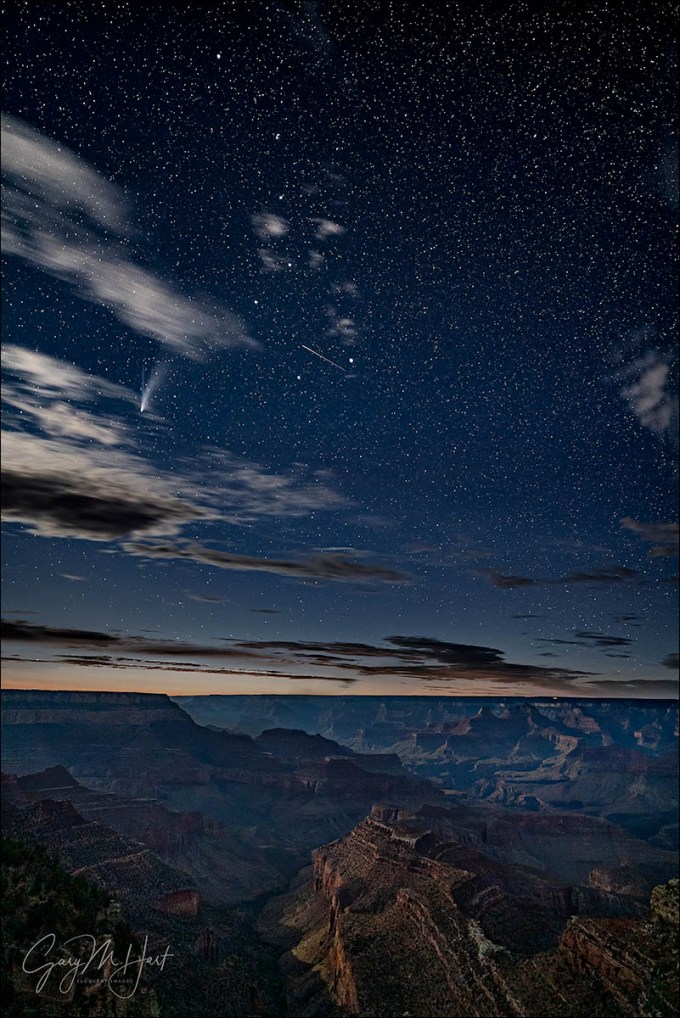
Comet NEOWISE and the Big Dipper, Grandview Point, Grand Canyon
Sony a7SII
Sony 20mm f/1.8 G
20 seconds
F/1.8
ISO 3200
I kind of have a thing for comets
As soon as I announced that I’d purchased the just-announced Sony a7SIII, people started asking why I wanted a 12 megapixel camera when I already have a 61 megapixel Sony a7RIV (two, actually). When I hear these questions, I realize the myth that megapixels are a measure of image quality is still alive. The truth is, megapixels are a reflection of image size, not image quality. In fact, for any given technology, the fewer the megapixels, the better the image quality.
Without getting too deep into the weeds of noise and clarity in a digital image, it’s safe to say the the more efficient a sensor is at capturing light, and the less heat the sensor generates, the better it will perform in these areas. How do you make a sensor more efficient? Well, you start with bigger photosites to catch more light. And how to keep the sensor cool? Give your photosites more room to breathe. But how do you make your photosites both bigger and farther apart without increasing the size of the sensor? It doesn’t take a rocket scientist to conclude that reducing the number of photosites is the only way to achieve both of these objectives.
So why do the manufacturers keep giving us more photosites? (My last rhetorical question, I promise.) Well first, advances in technology make it possible to cram more photosites onto a fixed-size sensor without compromising image quality (and in fact, often while still improving image quality). But more important that is the sad, simple truth that megapixels sell cameras.

Bridalveil Dogwood, Valley View, Yosemite
Don’t get me wrong, I think megapixel count is great and am all for as many megapixels as I can have—as long as they don’t come at the expense of image quality. The more megapixels you have, the more you can crop, and the larger you can print. While cropping is a nice safety net, goal should be to get the composition right at capture. And before chasing more megapixels, you should ask yourself how large you need to print, and how many megapixels you need to do it. Whenever this question comes up, I think about an image that I have printed 24×36 and hanging in my home. It’s an extreme close-up of a raindrop festooned dogwood flower, with Bridalveil Fall in the background. I can stand six inches from this 24×36 print and not feel like it’s missing any detail, from its delicate spider web filaments to the small dust particles suspended in the raindrops. All this was captured as a jpeg on my first DSLR, a 6 megapixel Canon 10D.
So given all this, you may be wondering why my primary camera is a 61 megapixel Sony a7RIV, with a second a7RIV as my backup. Well, like I said, all things equal, more megapixels are better than fewer megapixels, and for the vast majority of the natural light landscapes, on a tripod, that I photograph, my a7RIV bodies give me cleaner, higher resolution images than I ever dreamed possible. The dynamic range is the best I’ve ever seen, and my high ISO images are as good as any primary body I’ve ever owned. They’re so good, in fact, that last year I set aside my dedicated night camera, my 12 megapixel Sony a7SII, in favor of the a7RIV. I was getting such good results after dark with the a7RIV, I figured I could sacrifice a little low light performance to lighten my bag.
And for the most part I was satisfied—I’ve now used it enough at night to know the a7RIV is hands down the best night camera I’ve used that’s that not an a7S (original, or a7SII). But photographing Comet NEOWISE last month in Yosemite, I started to wonder if I might have been too quick to jettison the a7SII. My images were clean enough, but if I could get even less noise…
If you follow me regularly you know that I’m a one-click shooter—if I can’t get an image with one click, I don’t shoot it. That doesn’t mean I think it’s wrong to composite night images, but that approach doesn’t give me satisfaction, and I don’t like the artificial look of images that have clearly been blended. The analogy I like to use is the difference between applying a little make-up (dodging/burning and noise reduction in Photoshop), and submitting to cosmetic surgery (blending multiple exposures captured at different times, or with completely different focus and exposure settings). (There’s also a third option that’s more of a Frankenstein solution that involves assembling images from two different scenes, that I don’t even consider real photography.) My one-click approach means I have to live with more noise in my night images, but anyone viewing them knows that that truly is what my camera saw.
So anyway… For my Grand Canyon trip a couple of weeks ago, I decided to dust off the a7SII and give it a shot at Comet NEOWISE. My plan was to concentrate on the park’s east vistas to get away from the lights of Grand Canyon Village. Desert View was closed, but all the other vistas—west to east: Grandview, Moran, Lipan, and Navajo Points—were open for business. So during the day, while chased lightning out on the east end, at each stop I made a point of firing up my astronomy apps to figure out where the comet would be after dark.
Knowing that at about an hour after sunset, NEOWISE would be the northwest sky just a few degrees west of the Big Dipper (which would be dropping and rotating closer to due north as the night wore on), I decided that Grandview Point would be the best place to get it above the canyon. After it rotated farther north, I liked the way NEOWISE aligned with the canyon from the more eastern vistas. On that first night I got about 45 minutes of clear enough skies before the clouds returned.
For this trip I’d brought two tripods so I could simultaneously shoot with both the a7SII and a7RIV. On the a7SII I mounted my Sony 20mm f/1.8 G lens; on the a7RIV was the Sony 24mm f/1.4 GM lens. For both cameras I had long exposure noise reduction turned on (because with the Sonys it does make a difference for exposures measured in seconds). LENR doubles the capture time, which gave me at least 30 seconds between each shot, making it really easy to switch back and forth between cameras.
Having both cameras set up side-by-side like this, I was reminded what a nighttime monster the a7SII is—even though the a7RIV had a slightly faster lens, I could see the dark scene much better with the a7SII. I wouldn’t know how much cleaner the a7SII files would be until looked at them on my computer, but what a joy that camera is to work with in the dark.
I went with relatively few compositions, but varied my exposures for each for more processing options later. To focus, I just picked a star in my viewfinder, magnified it to the maximum, and dialed my focus ring until the star became the smallest dot possible. And even though that’s usually enough to ensure a sharp image, each time I focused I verified sharpness by magnifying the captured image in my viewfinder and checking the detail in the canyon.
I was thrilled by how much light the 20% waxing crescent moon cast on the scene. While the moonlight wasn’t noticeable to my eye, and didn’t seem to wash out the stars at all, it did cast enough light to bring out more canyon detail in my images. The small meteor that scooted through the Big Dipper during this frame was a welcome bonus that surprised me when I reviewed the image later.
When I finally got back to the room and looked at my images from that night a little more closely, the a7SII images were noticeably cleaner, so much so that when I went back out to photograph the comet the next night, I didn’t even set up the a7RIV. Is the a7RIV bad for night photography? Absolutely not. In fact, to capture 61 megapixel, high ISO, long exposure images as clean as the a7RIV does feels like cheating. But given my one-shot paradigm, and the fact that 12 megapixels is more than enough resolution for pretty much any use I can think of (for me—you need to decide for yourself how much resolution you need), for dark sky night photography, my vote goes the a7SII’s cleaner files and ease of use.
Some of my fellow Sony Artisans got to preview the a7SIII, but since it’s primarily billed as a video camera and I don’t really do video (yet), I’ll have to wait until mine arrives at the end of September (fingers crossed). But the reports from my colleagues about the a7SIII’s high ISO performance have me salivating.
Workshop Schedule || Purchase Prints
An a7S/a7SII Gallery


Chasing Lightning at the Grand Canyon (Again)
Posted on August 2, 2020

Rain and Lightning, Lipan Point, Grand Canyon
Sony a7RIV
Sony 24-105 G
1/8 second
F/18
ISO 50
Ten days ago my brother and I drove to the Grand Canyon to photograph the monsoon—you can read the story of our trip in my previous blog post.
I don’t get tired of photographing lightning. My brother Jay and I timed last month’s trip because the forecast promised lots of lightning, and though we did indeed see a lot of lightning, most of it was actually too close to photograph. Each day Jay and I headed out right after breakfast, stayed out most of the day, and returned to our room around dinnertime with lots of nice images, but no lighting to show for our effort.
I like to stand on the rim of the Grand Canyon and photograph lightning up, down, or across the canyon, but most of the lightning we saw was either coming up behind us, or right on top of us. The frustrating reality of lightning photography is that when there’s too much, it’s usually too close. How close? Fixing dinner one evening, we saw a bolt hit about 50 yards from our room. And one afternoon on the rim, while watching a storm approach from the south and hoping it would hold together long enough to make it over the canyon, I reached to adjust my camera and got a shock—we were back in the car within five seconds.
Given all the lightning we dodged on the South Rim, had we been on the North Rim, we’d have had a field day—but on the South Rim, all we got was wet. Despite our frustration, on our last day the forecast was again promising, so we went back out filled with optimism. As we had on our previous days, we pointed our cameras at lots of promising cells with no success. Lots of dry frames—shutter clicks when the Lightning Trigger detects lightning that wasn’t visible or in my frame (I could have turned down the sensitivity, but don’t usually do that until I’ve had some success)—but just one meh lightning strike I knew I’d never process. That’s just the way lighting photography goes.
But I’m nothing if not persistent, which is how we found ourselves out near Lipan Point late that final afternoon. Despite our lack of lightning success, we’d had a lot of the otherwise spectacular photography that the monsoon often delivers—billowing clouds, dark curtains of rain, light shafts, dappled light, and gorgeous sunset color—and this afternoon was no exception. I was composed on a broad area of falling rain that looked moderately promising, resigned to the fact that it too would probably fizzle (but nevertheless appreciating the gorgeous light and clouds), when a single bolt fired across the canyon. It caught me so off guard that I almost didn’t believe it, but I heard my camera click and Jay exclaim, so I marked the frame (took a picture of my hand to make it easier to find among the hundreds of empty frames) and crossed my fingers.
We saw two more lightning bolts that afternoon, but this turned out to be the only one I deemed worthy of processing. On the drive home Jay and I agreed that our trip was a great success—while we didn’t get as much lightning as we’d have liked, we got lots (and lots) of beautiful storm images, photographed a vivid sunset, and had two great Comet NEOWISE shoots. This lighting strike on our final afternoon was simply icing on the cake.
Lightning photography isn’t hard, but it does take a little education and preparation
Below is the just updated (August 2, 2020) Lightning article from my Photo Tips section
How To Photograph Lightning

Forked Lightning, Point Imperial, Grand Canyon
Sony a7RIII
Sony 100-400 GM
Lightning Trigger LT-IV
ISO 400
f/7.1
.4 seconds
Few things in nature are more dramatic than lightning. Or more dangerous. And if “safety first” is a criterion for intelligence, photographers are stupid. Because lightning is both dangerous and unpredictable, the more you understand lightning, how to anticipate it and stay safe in its presence, the greater your odds of surviving to take more pictures.
The shocking truth about lightning
A lightning bolt is an atmospheric manifestation of the truism that opposites attract. In nature, we get a spark when two oppositely charged objects come in close proximity. For example, when you get shocked touching a doorknob, on a very small scale, you’ve been struck by lightning.
In a thunderstorm, the up/down flow of atmospheric convection creates turbulence that knocks together airborne molecules, stripping their (negatively charged) electrons. Lighter, positively charged molecules are carried upward in the convection’s updrafts, while the heavier negatively charged molecules remain near the bottom of the cloud. Soon the cloud is electrically polarized, more positively charged at the top than at the base.
Nature always takes the easiest path—if the easiest path to electrical equilibrium is between the cloud top and bottom, we get intracloud lightning; if it’s between two different clouds, we get intercloud lightning. Less frequent cloud-to-ground strikes occur when the easiest path to equilibrium is between the cloud and ground.
With lightning comes thunder, the sound of air expanding explosively when heated by a 50,000-degree jolt of electricity. Thunder travels at the speed of sound, a pedestrian 750 miles per hour, while lightning’s flash zips along at the speed of light, more than 186,000 miles per second—nearly a million times faster than sound.
Knowing that the thunder occurred at the same time as the lightning flash, and the speed both travel, we can calculate the approximate distance of the lightning strike. While we see the lightning instantaneously, thunder takes about five seconds to cover a mile: Dividing by 5 the number of seconds between the lightning’s flash and the thunder’s crash gives you the lightning’s distance in miles (divide by three for kilometers).
Lightning safety
The 30 (or so) people killed by lightning in the United States each year had one thing in common with you and me: they didn’t believe they’d be struck by lightning when they started whatever it was they were doing when they were struck. The only sure way to be safe in an electrical storm is to be in a fully enclosed structure or metal-framed vehicle, away from open windows, plumbing, wiring, and electronics.
Unfortunately, photographing lightning usually requires being outside. And though there’s no completely safe way to photograph lightning, it doesn’t hurt to improve your odds of surviving enough to enjoy the fruits of your labor.
Most lightning strikes within a ten-mile radius of the previous strike. So, if less than thirty seconds elapses between the flash and bang, you’re too close. And since “most” doesn’t mean “all,” it’s even better to allow a little margin for error. Thunder isn’t usually audible beyond ten miles—if you can hear the thunder, it’s safe to assume that you’re in lightning range.
But if you absolutely, positively must be outside with the lightning firing about you, or you simply find yourself caught outside with no available shelter, there are few things you can do to reduce the chance you’ll be struck:
The thousands of humans killed by lightning each year had one thing in common with you and me: none believed they’d be struck by lightning. The safest place in an electrical storm is a fully enclosed structure or metal-framed vehicle (it has nothing to do with the tires), windows closed, away from windows, plumbing, wiring, and electronics.
The surest way to be struck by lightning is to be outside in an electrical storm, but photographing lightning usually requires being outside. And while there’s no completely safe way to photograph lightning, it doesn’t hurt to improve your odds of surviving.
Most lightning strikes within a six-mile radius of the previous strike, but strikes have been known to happen much farther from the storm. Since thunder isn’t usually audible beyond ten miles, if you hear thunder, you should go inside and stay there until at least 30 minutes after the thunder stops.
If you absolutely must be outside with lightning nearby, or you simply find yourself caught outside with no available shelter, there are things you should know and do to be safer:
- A lightning strike is often preceded by static electricity that makes your hair stand on end
- Avoid high ground
- Avoid exposed areas
- Avoid metal and electronics
- Avoid concrete, which is often reinforced with metal
- Avoid tall isolated objects such as trees and open structures (and tripods)
- Avoid water
- Stay at least fifteen feet from other people
- Do not lie down
- If you’re surrounded by trees, position yourself near shorter trees, as far from trunks as possible
- Rubber soled shoes provide no protection
- As a last resort, crouch on the balls of your feet, with your feet together and your hands covering your ears

Three Strikes, Bright Angel Point, North Rim, Grand Canyon
Lightning How-to
If, after factoring in all the risks, you still like the idea of photographing lightning, you need to gear up. The extreme contrast between darkness and brilliant lightning means photographing lightning at night is mostly a matter of pointing your camera in the right direction with a multi-second shutter speed and hoping the lightning fires while your shutter’s open—pretty straightforward.
Photographing daylight lightning is more problematic. It’s usually over before you can react, so any success just watching and clicking is probably dumb luck. And using a neutral density filter to stretch the exposure time out to multiple seconds sounds great in theory, but in daylight, a lightning bolt with a life measured in milliseconds, captured in an exposure measured in seconds, will almost certainly lack the contrast necessary to show up in an image.
Lightning Trigger: The best tool for the job
Most lightning sensors (all?) attach to your camera’s hot shoe and connect via a special cable to the camera’s remote-release port. When engaged, the sensor fires the shutter (virtually) immediately upon detecting lightning, whether or not the lightning is visible to the eye or camera. With so many lightning sensors from which to choose, I did lots of research before buying my first one. I ended up choosing the sensor that was the consensus choice among photographers I know and trust: Lightning Trigger from Stepping Stone Products in Dolores, CO. At around $350 (including the cable), the Lightning Trigger is not the cheapest option, but after many years leading lightning-oriented photo workshops, I can say with lots of confidence that lightning sensors are not generic products, and the internal technology matters a lot. Based on my own results and observations, the Lightning Trigger is the only one I’d use and recommend (I get no kickback for this). On the other hand, if you already have a lightning sensor you’re happy with, there’s no reason to switch.
I won’t get into lots of specifics about how to set up the Lightning Trigger because it’s simple and covered fairly well in the included documentation. But you should know that of the things that sets the Lightning Trigger apart from many others is its ability to put your camera in the “shutter half pressed” mode, which greatly reduces shutter lag (see below). But that also means that connecting the Trigger will probably disable your LCD replay, so you won’t be able to review your captures without disconnecting—a simple but sometimes inconvenient task. You also probably won’t be able to adjust your exposure with the Lightning Trigger connected.
The Lightning Trigger documentation promises a range of at least a 20 mile, and after using mine at the Grand Canyon for years, I’ve seen nothing that causes me to question that—if anything, without actually testing it, I’d guess that its range is at least 30 miles. The LT documentation also says you can expect the sensor to fire at lightning that’s not necessarily in front of you, or lightning you can’t see at all, which I will definitely confirm. For every click with lightning in my camera’s field of view, I get many clicks caused by lightning I didn’t see, or that were outside my camera’s field of view. But when visible lightning does fire somewhere in my composition, I estimate that the Lightning Trigger clicked the shutter at least 95 percent of the time (that is, even though I got lots of false positives, the Lightning Trigger missed very few bolts it should have detected). Of these successful clicks, I actually captured lightning in at least 2/3 of the frames.
The misses are a function of the timing between lightning and camera—sometimes the lightning is just too fast for the camera’s shutter lag. In general, the more violent the storm, the greater the likelihood of bolts of longer duration, and multiple strokes that are easier to capture. And my success rate has increased significantly since switching from a Canon 5DIII to the much faster Sony Alpha bodies (more on this in the Shutter Lag section).
The Lightning Trigger documentation recommends shutter speeds between 1/4 and 1/20 second—shutter speeds faster than 1/20 second risk completing the exposure before all of the secondary strokes fire; slower shutter speeds tend to wash out the lightning. To achieve daylight shutter speeds between 1/4 and 1/20 second, I use a polarizer and usually set my ISO to 50 and aperture to f/16 or smaller. Of course exposure values will vary with the amount of light available, and you may not need such extreme settings when shooting into an extremely dark sky. The two stops of light lost to a polarizer helps a lot, and 4- or 6-stop neutral density filter is even better with fairly bright skies (but if you’re using a neutral density filter, try to avoid shutter speeds longer than 1/4 second).
Shutter lag
Lightning is fast, really, really fast, so the faster your camera’s shutter responds after getting the command to fire, the more success you’ll have. The delay between the click instruction (whether from your finger pressing the shutter button, a remote release, or a lightning sensor) and the shutter firing is called “shutter lag.”
In general, interchangeable lens cameras (mirrorless and DSLR) have the fastest shutter lag. But even with an ILC, it’s surprising how much shutter lag varies from manufacturer to manufacturer, and even between models from the same manufacturer.
Ideally, your camera’s shutter lag should be 60 milliseconds (.06 seconds) or faster, but 120 milliseconds (.12 seconds) is usually fast enough. Most of the top cameras from Sony, Nikon, and Canon are fast enough—currently, Sonys are fastest, Nikon is a close second, and Canon is third.
And shutter lag can vary with the manufacturer’s model: While my Sony a7RIV may be the fastest camera out there, my original a7R was unusably slow, so you need to check your model’s shutter lag.
Unfortunately, shutter lag isn’t usually in the manufacturers’ specifications. The best source I’ve found is the “Pre-focused” time in the Performance tab of the camera reviews at Imaging Resource.
Other equipment
In addition to a lightning sensor and fast camera, you’ll need:
- Solid tripod and head: Don’t even think about trying to photograph lightning hand-held. And contrary to popular belief, a carbon fiber tripod is no safer than an aluminum tripod.
- Rain gear that keeps you dry from head-to-toe
- Umbrella (a.k.a., Wile E. Coyote Lightning Rod) to shield your camera and lightning sensor (many sensors, including the Lightning Trigger, aren’t waterproof) while you compose and wait in the rain. The umbrella is for when you’re photographing storm cells at a great distance, such as on the rim of the Grand Canyon and the lighting is across the canyon. Obviously, when the lightning gets within 10 miles, put the umbrella down and run for cover.)
- Lens hood to shield some of the raindrops that could mar the front element of your lenses
- Neutral density filter and/or polarizer to slow shutter speed into the ideal range (1/4 – 1/20 second)
- Garbage bag (my choice) or rainproof camera jacket (haven’t found one I like) to keep your camera and sensor dry during a downpour
- Extra lightning sensor batteries: Better safe than sorry
- Extra memory cards: When a storm is very close or active, your lightning sensor could detect 20 or 30 strikes per minute (even when little or no lightning is visible to the eye)
- Infrared remote to test your Lightning Trigger; I sometimes borrow the remote from my hotel room, but the Apple TV remote works great and is extremely compact (fits nicely into the Lightning Trigger pouch)
- Towel
Lightning app
I’ve used a few lightning apps, but I finally think I’ve found one worthy of recommending: My Lightning Tracker. I have the “pro” version, which just means I paid a few dollars so I don’t have to see ads. This app has too many useful features to list here, but the most important thing it does is give me a good idea where the lightning is firing now (as long as I have a cellular or wifi connection), and how far away it is. It will also alert me of any strikes within a user-specified radius. It’s easy to use and seems to be reliable.
Getting the shot
Even if you can photograph lightning from your front porch, it’s usually best to pick a nice scene, then monitor the weather so you can be there to capture lightning with a great foreground. I strongly recommend that you scout these lightning scenes in advance, not just for possible compositions, but for safe places to set up, escape routes, and a place to retreat to if the lightning gets too close. I try never to shoot more than a quick sprint from my car.
Once you’re there, don’t wait until you see lightning before setting up your gear. If the sky looks even a little promising, get everything ready: tripod out, camera and lens mounted, lightning sensor attached. Then test your lightning sensor to make sure it fires your camera—I can’t tell you how easy it is to overlook one little thing and wonder why the lightning is firing but your camera isn’t. I test my Lightning Triggers, with a TV remote, or with the flash from my iPhone camera.
As I said earlier, the trickiest part of lightning photography is getting the right shutter speed. Too fast and you risk missing all of the strokes; too long and you risk washing out the lightning. My target shutter speed is usually 1/8 second, +/- 1/8 second—long enough to include multiple pulses, but not so long that I risk washing out the lightning.
When the sky is relatively bright, dropping to 1/20 second can help the lightning stand out better than 1/8 second, but risks losing secondary strikes. Conversely, when the sky is extremely dark and the lightning is firing like crazy, extending to 1/4 second might increase your chances for capturing multiple pulses.
Even with a polarizer on, getting the shutter speed to my sweet spot usually requires dropping to ISO 50 and stopping down to f/16 or smaller. In these situations, a neutral density filter is a big help, but take care not to let the shutter speed go longer than necessary.
Lightning is most likely to strike in or near the gray curtains that hang beneath dark clouds (clearly recognizable as distant rain)—not only near the center, but often on the fringe or just outside. And the darkest and tallest clouds are usually the most likely to fire lightning. If you’re in the storm that you’re photographing, you’re too close.
The best lens for lightning is usually a midrange zoom, such as a 24-70 or 24-105. If you find yourself reaching for your 16-35 (or wider), you’re too close.
I generally start fairly wide to increase my margin for error (to avoid missing a bolt just outside my frame), but once I’m sure I’ve captured some good strikes, I often tighten my composition. While this narrower field of view can reduce the number of frames with lightning, the ones I get are much larger in the frame.
Here are a few more composition points to consider:
- Identify the most likely lightning cell and find the best composition that includes it.
- The more resolution you have, the looser you can compose, then crop to the best composition later.
- Don’t include too much room above the lightning—the most frequent rookie mistake I see is too much sky/clouds in the frame. I like my lightning bolts to originate just below the top of my frame.
- The second most frequent rookie mistake I see is lightning cut off at the top. Note the height from which the lightning originates and try to include enough cloud to get the stroke’s origin point. And if you’re really wide and still can’t get all the lightning, run! (Like I did after the image below.)
- Don’t forget to try some vertical compositions.

Lightning Explosion, Oza Butte, Grand Canyon North Rim
There’s a lot of standing around while photographing lightning, but storms move, so the more you can keep your eyes on the sky (instead of your phone), the better you’ll be at keeping lightning in your frame as the storm moves, and knowing when the activity is picking up or winding down. The light can change by several stops as the storm moves, intensifies, or winds down, so check your exposure frequently. And monitor your surroundings for active cells moving up behind you.
Be aware that electrical storms can move quite quickly, and more than one cell can be active in a given area, so monitor the sky closely—not just the storm you’re photographing, but scan for potential cells that could be sneaking up on you. Sometimes this simply means adjusting your composition to account for shifting lightning; other times it means retreating to the car if the cell threatens your location. No shot is worth your life.

One final note: If you check my exposure settings, you’ll see that my shutter speed here was .4 seconds, well outside the 1/20-1/4 second range I suggest. But if you look at the other settings, you’ll see that I’d opened up to f/7.1, and had cranked my ISO to 400, an indication that twilight was settling in. Successful lightning photograph is all about contrast, and the darker the sky, the better the bolt stands out, even in a longer exposure. Had we stayed past dark (and lived), we could have jettisoned the Lighting Triggers and used multi-second exposures.
Join and me in my next Grand Canyon Monsoon Photo Workshop
Workshop Schedule || Purchase Prints
A Lightning Gallery
Click an image for a closer look and slide show. Refresh the window to reorder the display.


 Eloquent Images by Gary Hart