On the rocks
Posted on November 14, 2015
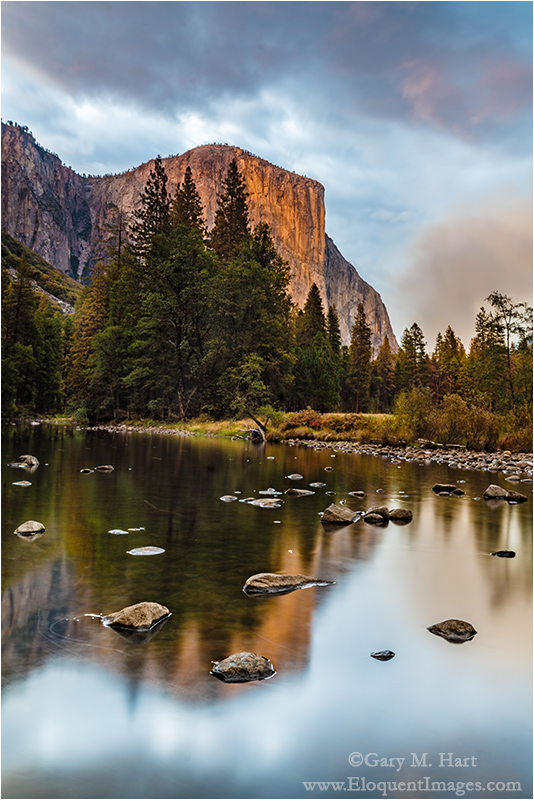
Reflection On the Rocks, El Capitan and the Merced River, Yosemite
Sony a7R II
Sony/Zeiss 24-70 f4
25 seconds
F/11
ISO 100
Yosemite is known for its waterfalls, but I gotta say, I think I’m happiest photographing Yosemite when the falls are dry. Not that I don’t love Yosemite’s waterfalls (I do!), but when the falls are dry, the Merced River has slowed to a reflective crawl that paints reflections everywhere. And as an added bonus, when the falls dry up, so do the crowds.
Last month I spent a day guiding a couple from Sweden through Yosemite when the Merced River was at its drought-starved nadir. I’d been looking forward to this day for a while, but two days earlier I’d cracked ribs and my collarbone in a cycling accident—I could walk, I could talk, but I couldn’t do both, and simply getting in and out of the car was an achievement. The seatbelt? Torture. So my camera and tripod stayed in the car all day.
But when we pulled up to Valley View for sunset, I just couldn’t resist the mix of light, clouds, sky, and reflection. By the time I extracted my camera and tripod and made my way down to the river (no more than 20 feet from the car), the sun was about done with El Capitan. There were a few hot spots in the clouds, but my Singh-Ray two-stop hard GND held back the highlights enough to enable enough exposure to bring out the shadows. The resulting 25 second exposure added a gauzy texture to the reflection.
The trickiest thing about photographing a reflection with embedded features is achieving depth of field throughout. Though it seems counter-intuitive, the focus point for a reflection is the focus point of the reflective subject, not the reflective surface. In this case I wasn’t too worried about the reflection because I knew the long exposure would soften it anyway. But I did want to be sharp from embedded rocks all the way back to El Capitan. A quick check of my hyperfocal app told me that at f11 and 28mm, focusing on the closest rock (about ten feet away), would ensure sharpness all the way to infinity.
A public service announcement
I don’t always wear a helmet when I bike. I’m fortunate to live adjacent to a bike trail that can keep me off city streets for virtually all of my bike trips, so (my rationalization went), why mess with a helmet?
My accident last month happened on the bike trail, with no cars in sight, when I clipped a portable barricade with my handlebar and my bike went right while I continued forward. In addition to cracked ribs and collarbone, some nasty road-rash, and a torn-up shirt, my helmet was totaled. I shudder to think what would have happened had I decided not to wear a helmet that day (about a 50/50 chance), and will never, ever ride a bike again without one. I encourage you to make the same promise to yourself.
I return you now to your regular programming.
A gallery of Yosemite reflections
Click an image for a closer look, and a slide show. Refresh the screen to reorder the display.


Cool stuff on a cold night
Posted on November 9, 2015
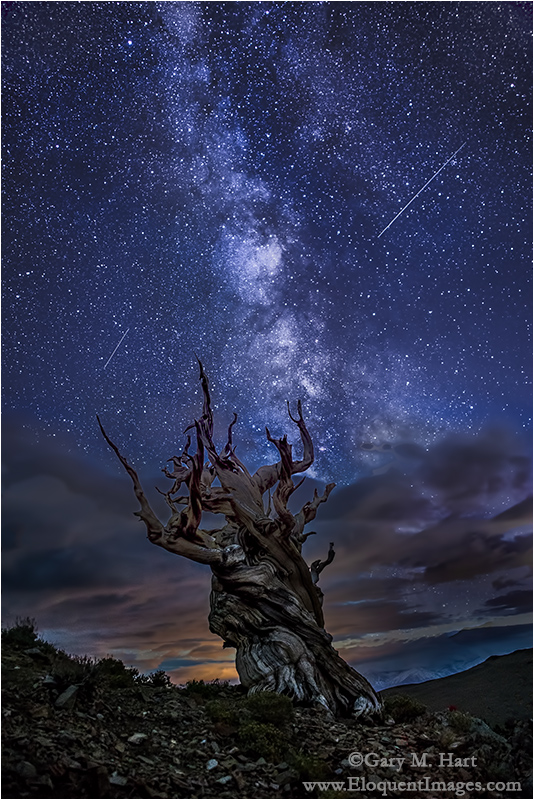
Bristlecone Night, White Mountains, California
Sony a7S
Rokinon 24mm f1.4
15 seconds
F/2
ISO 6400
About a month ago I huddled with my Eastern Sierra workshop group on a mountainside in the White Mountains (east of Bishop). We were waiting for the stars to come out, but after driving over an hour on a road that would test anyone’s motion sickness resistance, hiking a steep half mile in the thin air above 10,000 feet, and waiting out a couple of rain showers, it looked like clouds might thwart our night photography plans. Since we’d already done all the hard work, I reminded everyone that mountain weather is is fickle and suggested that we’d wait just a bit. Bolstered by sandwiches, a hardy spirit, and good humor, wait we did.
I’ve done this long enough to know that the fun a group has is proportional to the discomfort they’re experiencing. Beneath the darkening sky we clicked between sandwich bites, cursing the chill and finding no end of things to laugh about. Everyone was pretty excited by their camera’s ability to suck detail from apparent darkness, and by the smoothing effect the long exposures had on the shifting clouds. Stars or not, the night was already a success.
To maintain night vision and avoid interfering with exposures, flashlights were forbidden. Instead we used our cellphone screens to illuminate our camera controls. It was so cold that gloves were a necessity, but they had to come off for even the most simple camera adjustment. Despite the discomfort, there were no complaints. About the time it became so dark that we could only recognize each other by voice, a few twinkling pinholes burned through the black ceiling. Multiplying with each minute, the stars slowly congealed into a fuzzy stripe that finally revealed itself to be the Milky Way—we were in business.
Some in the group had never seen the Milky Way; others hadn’t seen it since childhood. Those with night photography experience went right to work, while Don Smith and I helped the others get going. For most, night photography minus moonlight is an exercise in patience: even basic composition involves a fair amount of guesswork, and finding focus is an act of faith. Working with the others in the group, I was especially thankful for my Sony a7S and focus-peaking, which made both composition and focus a snap.
To isolate the bristlecone against the sky and align it with the Milky Way, I scrambled in the dark (remember, no flashlights) across loose rock until I was about 100 feet north of the tree. Balanced on a 30 degree slope, I had to plant my tripod firmly and rely on feel to ensure that it was secure.
Spending time with this image helps me appreciate a photograph’s power to give perspective to our place in the natural world. The bristlecone pine anchoring the frame was a seedling just about the time the finishing touches were being put Stonehenge. That sounds pretty old, until you pause to consider that it’s illuminated by light from the Milky Way, which began its journey to my sensor about 20,000 years before this tree sprouted. And accenting the frame are a pair of meteors, vestigial fragments of our solar system’s formation about 4 1/2 billion years ago. Pretty cool.
Join my next Eastern Sierra photo workshop

Learn more about starlight photography
A night sky gallery
Click an image for a closer look, and a slide show. Refresh the screen to reorder the display.


Big moon
Posted on November 3, 2015
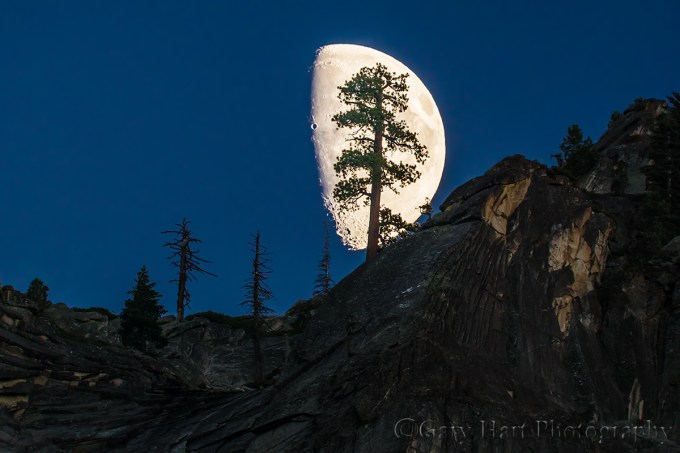
Big Moon, Yosemite
Sony a6000
Tamron 150-600 (Canon-mount with Metabones IV adapter)
1/25 second
F/8
ISO 400
A few years ago, Don Smith and I were browsing the gallery of a famous landscape photographer when we came across a striking image of a tree silhouetted against a huge moon. Because the image was clearly a composite—a tree picture transposed atop a picture of a huge moon—we were initially shocked, but soon simply amused by the photographer’s dramatic, “blood pulsing” fiction of his “capture.” To this day, merely quoting a few words from that description will incite Don and me to fits of laughter. (Several years and gallery visits later, we noticed that the hyperbolic description had been removed, and actually got a salesperson at the gallery to acknowledge that the image was indeed a composite.) Yet, amusing as it is, that image turned out to be the seed that grew into a desire to capture something similar, legitimately.
Photographing a large moon is pretty simple—the longer the focal length, the bigger the moon. You can do it from your backyard. The difficulty comes when you want to include a terrestrial object with the moon (without digital shenanigans). Doing so requires an Earth-bound subject at great distance (ideally, a mile or more for the longest focal lengths), elevated against the sky. I’m always on the lookout for potential subjects for such a moonrise, and immediately log each discovery into my mental database.
But even with a subject, there’s the matter of determining the best vantage point, and figuring out when (to the minute, if possible) the moon and subject will align. If you follow my blog at all, you know how hard I work make this happen. Today there are apps that will get you pretty close (PhotoPills and Photographer’s Ephemeris to name the two I’ve used and recommend). But my own fairly convoluted (to others—I’ve been doing it so long that it’s second nature) technique predates these apps, and I find it more precise. Convoluted? At the risk of losing my audience, I’ll just say that it involves my iPhone, my computer, a moonrise/moonset app (Focalware), topographic mapping software (National Geographic Topo!), a scientific calculator app (HP 11c from RLM Tools), and a little trigonometry.
Informed by these resources, I rarely take a trip without knowing the moon’s phase, the best place to photograph it, and exactly when to be there. Often these trips are specifically timed for the moon.
So. Given the pride I take in moonrise/set photography, and my long-time desire to isolate a distant tree against a large moon, I’d love to tell you that I spied this tree teetering on Yosemite Valley’s rim near Dewey Point, plotted the place to photograph it and when to be there, and was waiting with my camera framed and focused when the moon slid into view. Uh, not so much.
Instead, on the day before my Yosemite Autumn Moon photo workshop, I was working with a couple who had hired me to show them Yosemite Valley for a day. After a nice, productive day we were wrapping up with sunset at Valley View, photographing reflections and warm light on El Capitan. My mobility severely limited by a cracked rib sustained in a bicycle accident a week earlier, I was quite content to enjoy the view, leaving my camera in the car.
The sunlight on El Capitan had faded and the shadows were deepening fast when my mind drifted to the moon. I knew it was about 60 percent full that day, and that it had risen (above a flat horizon) a couple of hours earlier, which meant by now it might be close to cresting Yosemite Valley’s vertical south wall. With zero expectations, I casually glanced upward, in the general direction of Dewey Point, and did an actual double-take when I saw an arc of white just cresting the ridge.
I immediately alerted my clients and “rushed” (remember, cracked rib) to the car for my gear. Wanting as much magnification as possible, I reached for my big tripod, 150-600 lens, and 1.5-crop Sony a6000 camera. In the time it had taken to set up and click a couple of quick shots, the moon had risen almost all the way as viewed from my elevated parking area vantage point, so I rushed down to the river to buy a few more seconds of the moon partially behind the ridge (moving down and closer steepened the angle just enough to make difference). From my new vantage point the moon was by itself against the sky, but I spied a solitary evergreen a short distance south of where the moon was balanced and I rushed (there’s that word again, but I have no memory of feeling any pain this time) upstream until the tree and moon converged and quickly zoomed, composed, focused, and clicked.
The processing of this image was pretty straightforward—a slight cooling of the color temperature and a moderate crop for framing was all it needed. While my tale of this evening is more about broken bones than pulsing blood, I’m proud to say that no ethics were harmed in the making of this image.
A big moon gallery (telephoto moon shots)
Click an image for a closer look, and a slide show. Refresh the screen to reorder the display.


Reflection season
Posted on October 26, 2015
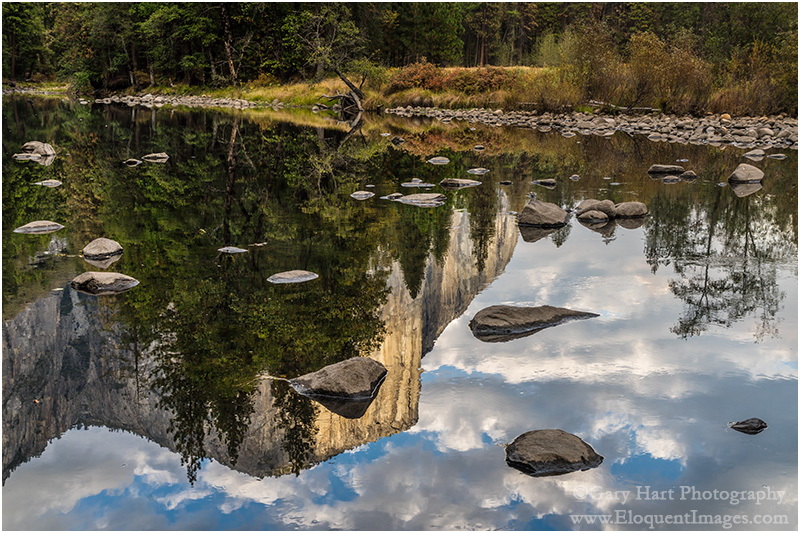
Reflection on the Rocks, El Capitan, Yosemite
Sony a7R II
Sony/Zeiss 24-70 f4
1/40 second
F/11
ISO 400
It’s reflection season in Yosemite, that time of year when the falls are dry and the Merced River slows to a glassy crawl. Plugging in the golds and reds of autumn makes this my favorite time for creative photography in Yosemite, and explains the volume of Yosemite autumn images in my portfolio.
It also explains why I’ve been to Yosemite three times this month. The month’s first visit, with my Eastern Sierra workshop group, we photographed high Sierra reflections and a Half Dome sunset from Olmsted Point—we’d had lots yellow and orange aspen in the canyons above Bishop and Lee Vining, but it was a little early for Yosemite color. The next two trips were primarily focused on Yosemite Valley, ground-zero for autumn reflections. On both Yosemite Valley trips, the Merced River, always low and slow in autumn, was down far enough that I saw places I could have rock-hopped from one side to the other without getting wet.
Today’s image, from about a week and a half ago, almost didn’t happen. I’d been looking forward to this visit (to guide a couple from Sweden) for several months, but a bike accident two days earlier had cracked a rib, torn a muscle in my shoulder, removed copious amounts of skin from my arm, and pretty much prevented me from doing anything requiring movement (or breathing, for that matter).
When I left home that morning I knew I was going to be sore, but I was actually a little surprised by just how uncomfortable I was. Somehow, bolstered by liberal quantities of ibuprofen, I managed to survive the day, quite content to limit my activity to driving, narrating, and and answering questions. Even getting in and out of the car was an ordeal, and photography seemed out of the question. But when we pulled into the parking lot at Valley View for the day’s final stop, the reflection drew me to the rocks like the Sirens of Greek mythology.
Rather than grab my camera bag and sling it over my shoulder as I normally would (the mere thought makes me flinch), I gingerly extracted my tripod, camera, and 16-35 lens, and assembled them them at my car’s tailgate. Given my level of pain and the precarious footing on the rocks by the river, I knew wouldn’t be able to move around as much as I’m accustomed to (or at all), so scanned the route and I very carefully selected my destination before departing on the 20 foot journey. In a perfect world I’d have been able to shuffle slowly, but the route to the river was over a disorganized jumble of granite rocks that made each step feel like a knife had been thrust into my ribcage.
At the river I found a flat granite platform just large enough for both my feet, and a solid rock for each tripod leg. Using the tripod for support, I found that if I moved slowly enough, I could keep the pain to a manageable minimum. Nevertheless, I was even more deliberate than I usually am, strategizing and executing each movement. Soon I developed a workflow that allowed me to do pretty much all I needed to do by only moving my arms from the elbow down.
There were a lot of moving parts to consider as I crafted this image. Since the focus point of a reflection is the focus point of the reflective subject, not the reflective surface, I needed DOF that went from the nearby rocks, just a few feet away, all the way out to El Capitan at infinity. But I couldn’t make DOF decisions until I composed and decided on a focal length. And as I tried to compose, I found that even the slight adjustment in focal length and framing introduced new problems—rocks cut off or jutting in from the side, or even worse, introducing bright sky at the top of the frame.
At one point I thought I finally had it, only to realize that the top rock of the foreground triangle intersected El Capitan. Moving my tripod a few inches to the left solved that problem, but also made it impossible to use my viewfinder without repositioning myself. Rather than destabilize my precarious perch, I decided to forego the viewfinder in favor of the LCD (thank you Sony for the articulating viewfinder).
With a little work I finally found a composition that achieved my framing objectives: balanced foreground, clean borders, and no sky. Now for my exposure variables. I estimated that foreground rocks were about 10 feet away—according to my hyperfocal app, at 40mm and f11, the hyperfocal distance was a little less than 16 feet. I picked a rock about that distance and carefully focused there, thus ensuring acceptable sharpness from about 8 feet to infinity. I decided to go with ISO 400 to mitigate the light breeze that moved the leaves just a little.
The shadows were quite dark, while the cloud reflections contained some hot spots, but I was confident that my Sony a7R II could handle the dynamic range if I was careful. Watching my histogram, I increased my shutter speed until the highlights were right up to the point of clipping.
Finally ready, I realized that my remote cable was in the car. Since there was no way I was going to put myself through an extra roundtrip, I engaged my camera’s 2-second timer and clicked. After reviewing the image on my viewfinder I made a couple of small adjustments and clicked again. I repeated this click/review/click cycle a couple more times, until I was satisfied that I’d achieved my vision.
Photograph reflections like this in my next Yosemite Autumn Moon photo workshop
A gallery of reflections
Click an image for a closer look, and a slide show. Refresh the screen to reorder the display.


The best time of day
Posted on October 20, 2015

New Day, Sunrise Sunstar, Mono Lake
Sony a7R II
Sony/Zeiss 16-35 f4
1/4 second
F/20
ISO 125
Imagine a world that’s so quiet you can hear nature’s every stirring, a place where each breath holds a pristine bouquet of subtle fragrances, and the sky is a continuously shifting kaleidoscope of indigo, blue, yellow, orange, and red. In case you haven’t figured it out, I’m describing the very world we live in, before the sun’s light and warmth draw out the dirty, noisy, oblivious masses.
As a nature photographer, I’m quite familiar with this world. And while I can’t say that I relish a 4:30 a.m. alarm, I’ve come to terms with its darkness, frigid temps, and sleep depravity. I also understand why most people despise early wake-ups, because that used to describe me. We’ve been conditioned by a lifetime of rising for school and work and completely bypassing early morning’s benefits as we rush to obligations, appointments, and responsibilities that are almost invariably less pleasant than staying in bed.
But if you haven’t learned to appreciate the joy of the pre-sunrise world, let me help you reset your bias with a few tips for making early mornings happen:
- For the full experience, plan to be at your spot at least 45 minutes before the “official” (flat horizon at that latitude and longitude) sunrise for that location. The eastern horizon will already be brightening noticeably by then, but the stars will be visible. (This is for mid-latitude locations—twilight starts earlier in the high latitudes, later in the low latitudes.)
- Get organized before you go to bed. Lay your clothes out, assemble your gear, make sure everything’s charged, and prime the coffee maker. You do all this so you can…
- Set your alarm for the absolute minimum time necessary to get ready. Your resolve will be much stronger at bedtime than when it goes off—the less time you have to delay, less the chance that you’ll lose your resolve to the cozy warmth of your bed. This also gives you the maximum amount of sleep possible. And don’t forget, one of the best things about being up when no one else is up and it’s dark is that it really doesn’t matter how you look (so you don’t really need to spend a lot of time on personal hygiene).
- Under no circumstances use the snooze button on your alarm. Rising early is like ripping off a Band-Aid—the sooner you get it over with, the happier you’ll be; the longer you drag it out, the harder it is. Trust me.
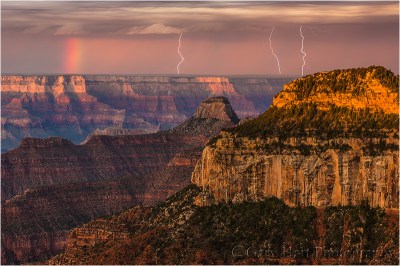
The weather report called for clear skies and no chance of rain this morning. But the lightning was already firing when we walked out to Grand Canyon’s Bright Angel Point in the dark, and it was still going when we finally ran out of compositions over two hours later.
- Don’t be discouraged by the conditions at bedtime or wake-up. Some of my most memorable sunrises have happened on mornings I’d have skipped if I’d relied solely on weather reports, or on the way things look when I peek out the window after the alarm. Photography is just one of the benefits of being out before the sun. Even when the photography conditions don’t materialize as hoped, I rarely regret those mornings when I dragged myself out of bed to sit in the cold and dark. And for some reason, the most special stuff seems happen when I go out with the lowest expectations, driven solely by the attitude that I’m just going to enjoy this special time of day.

For example (the above image)
Getting to this remote location on Mono Lake’s north shore is always an adventure; getting there early enough before the sun can feel downright crazy. We depart an hour-and-a-half before sunrise, navigate a bone-jarring maze of unpaved roads that worsen with each mile, and drive until we can drive no further. From there the lake is still a half mile walk. Most of the hike is in volcanic sand, but the last couple hundred yards are through shoe-sucking mud; with no trail or light, it’s no wonder I never end up at the same spot from one year to the next.
Earlier this month my Eastern Sierra workshop group made the annual pilgrimage out here for our final sunrise. We’d been incredibly blessed with great conditions throughout the workshop—great sunrise and sunset color, nice clouds, and glassy reflections at Mono Lake’s South Tufa the day before (always a highlight when it happens). Our luck held as we got all three—color, clouds, and reflection—for this final sunrise.

I started shooting in near darkness, with wide, east-facing compositions that included a thin slice of moon flanked by Venus, Jupiter, and Mars. My focus turned more south and west as the sun started to rise and paint the clouds with color. Soon the mountains in the west were bathed with warm light and I turned my attention there. The wind stayed calm, so every direction I shot, I was able to double the beauty with a reflection.
Watching the shadow slide down the mountains, I was able to anticipate the sun’s arrival at my position and turn back to the east just in time to make my sunstar composition. I used a trio of nearby rocks to anchor my foreground, removed my polarizer (I wanted a maximum reflection and didn’t want to worry about differential polarization at my wide focal length), extracted my 3-stop reverse graduated neutral density filter (Singh-Ray), and stopped down to f-20 to enhance the sunstar effect.
When the sun appeared I clicked a half-dozen or so images, each with a little bit brighter sunstar. I chose this one because it was a good balance between brilliant sunstar without washing out too much of the sky around it. Thanks to my GND and the ridiculous dynamic range of my a7R II, I got this scene with a single click. In Photoshop I dodged the top 2/3 of the sky and burned the water to disguise the GND effect, but did very little else.
Workshop Schedule || Purchase Prints|| Instagram
The joys of sunrise


Grad School
Posted on October 12, 2015

Sunset, Hopi Point, Grand Canyon
Sony a7R II
Sony/Zeiss 24-70 f4
2.5 seconds
F/18
Breakthrough 3-stop hard GND
Since the first photon struck a photographic plate, photographers have struggled to stuff the broad range of light their eyes see, into the relatively narrow range their camera can capture. When we shot film, the time waiting for the film to return from the lab was filled with self-doubt and second guessing, punctuated by ecstasy or despair. Then came digital capture, with its immediate image review, histograms, and a host of processing tricks that made one-click exposure-angst a thing of the past—we still had to be careful, but there was a safety net.
Despite digital’s advantages and advances, photographers are still faced with a world illuminated by a much greater range of light than our cameras can handle. Of course this creates opportunities to use our cameras’ limited dynamic range creatively, for example to create a silhouette or a high-key background that helps our subject stand out, but more often than not we’re looking for ways to squeeze all of a scene’s dynamic range into a single frame.
HDR software and layer masks are great post-capture solutions, but I prefer minimizing processing time by getting as much right as possible at capture and am never far from my graduated neutral density (GND) filters. Portable, simple, and effective, I can’t imagine photography without GNDs. And rather than being rendered irrelevant by digital’s ever-improving dynamic range and advanced blending techniques, digital processing enhances GND use.
GNDs explained
A standard (not graduated) neutral density (ND) filter is a uniform, neutral (doesn’t affect color) piece of glass (usually) that darkens a scene (the “density” part) without affecting the scene’s color (the “neutral” part). Its prime purpose is to slow shutter speed, usually to blur motion. While an ND (photographers usually shorten the name by just pronouncing its initials) filter can be rectangular, most are circular, with threads that screw onto the front of a lens. The amount of darkness an ND filter adds is measured in stops of light.
A graduated neutral density filter is half dark, with its density (dark) part on top and the bottom half completely transparent (alters nothing). Like its ND filter cousin, a GND filter’s density is measured in stops. The “graduated” part of the name refers to the transition between the dark and clear halves of the filter.
Despite their similar names, a graduated ND serves an entirely different purpose than a neutral density filter. Rather than a tool for increasing shutter speed, a GND is used to reduce contrast in opposite halves of a scene, usually by darkening a bright sky enough to pull detail from a shaded foreground.
Most GNDs are glass or (more commonly) acrylic rectangles that you move up and down in front of the lens until it’s situated on the best place to disguise the transition. While you can purchase a circular GND that screws onto your lens, a circular GND is nearly worthless because it forces you to place the horizon transition zone in the center of your frame. In other words, don’t buy any GND that’s not rectangular.
It might be natural to assume that glass GNDs are better than plastic, but that hasn’t been my experience: Quality acrylic (sometimes called optical acrylic or optical resin) can be more visually pure than glass. And while glass doesn’t scratch as easily as acrylic, it’s heavier and breaks more easily if stressed or dropped.
GNDs come in three primary flavors that describe their all-important transition from light to dark—hard, soft, and reverse—each with its own purpose, advantages, and disadvantages:

Hard GND: Most of the filter’s dark half is its maximum darkness, with a very abrupt transition across the middle separating maximum darkness and completely clear. With this abrupt transition, a hard GND will darken a greater percentage of the upper half of your scene (usually the sky). The disadvantage of this abrupt (“hard”) transition is that the transition is more difficult to hide. A hard GND is most effective when there’s a distinct break between the bright sky and dark foreground, such as at the beach or flat landscape. In this image, a 3-stop hard GND allowed me to reveal shadow detail beneath a bright Grand Canyon sky. The hard transition blended easily into the flat horizon.
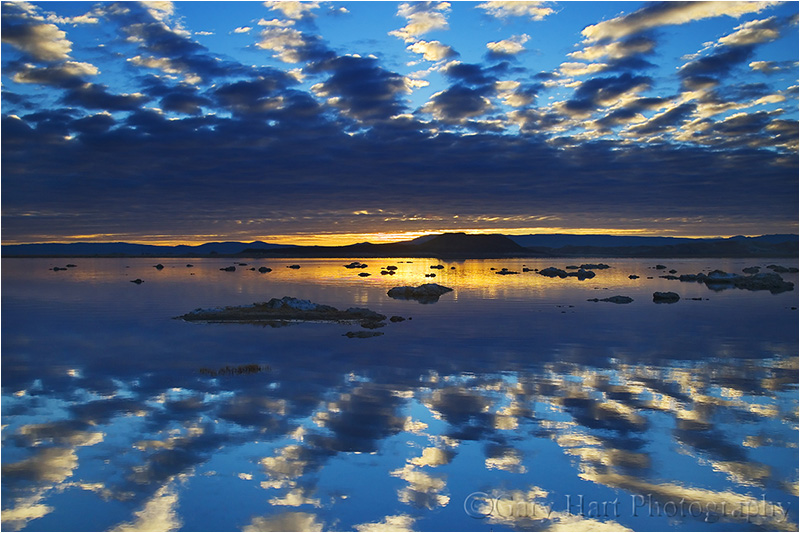
Reverse GND: A reverse GND’s darkest region is just above the center, with a hard transition to clear below, and a gradual transition lighter above. While the dark portion gradually lightens toward the top of the filter, it never becomes completely clear. A reverse GND is best for sunrises and sunsets, when the brightest part of the sky is directly on the horizon. In this Mono Lake sunrise image, a 3-stop reverse GND put the darkest part of the filter on the horizon, right where I needed it, without darkening the sky too much.

Soft GND: A soft transition GND only delivers its maximum density (darkness) near the top of the scene, and transitions very gradually to a completely clear bottom half. While this gradual transition makes a soft GND less effective for most of the scene, its subtle effect is much easier to disguise. A soft GND is best suited when there’s no an obvious place to hide the transition, such as a scene with an uneven horizon line. Above, a 3-stop soft GND held back just enough of the Yosemite sky to prevent the beautiful sunset pastels from washing out. The gradual transition blended smoothly into the uneven horizon beneath Half Dome.
Buying a GND
As I said earlier, while you can purchase a circular GND that screws onto your lens, these are pretty much useless, so my comments assume you’re using a rectangular GND. And I’m going to give you my own GND preferences—if you’re happy doing things differently, more power to you.
Hand-hold vs. filter holder
Given the large combination of options (size, density, transition), buying your first GND can be somewhat daunting. And size really does matter. But before you commit to a size, you need to decide whether you want to insert your GNDs into a filter holder that attaches to your lens, or simply hand-hold your GNDs.
The advantage to using a holder is that it frees a hand, which can occasionally be handy but is rarely something I can’t work around. And if you think you might be using a GND without a tripod (shame on you), you must use a holder and can skip the next paragraph.
At the risk of offending those photographers who use a holder, let me say that I find using a holder for my GNDs far more trouble than it’s worth: a holder can cause vignetting; a holder doesn’t play well with other things mounted to the lens, such as a lens hood (which I don’t use either) or polarizer; a holder makes it difficult to impossible to move the GND during exposure (more on this later); extracting (not to mention locating in my bag!) and attaching a holder is just one more step before I can start shooting; a holder only handles one width filter, so if you decide you never want to hand-hold, your holder choice locks in the filter size you’ll be purchasing. (If you hand-hold your filters, you can purchase a variety of filter sizes to suit various lens-opening widths.)
GND size
Holder or not, the filter you purchase must be wide enough to cover the front of your lens. I used to automatically purchase a larger size (100mm x 150mm, or about 4″ x 6″) believing that it would be easier to hand-hold without getting fingers in the frame, but I’ve slowly transitioned to a smaller size (66mm x 100mm, or about 2.6″ x 4″), keeping a couple of 4×6 filters for my largest lenses.
I prefer the smaller size not just because they’re cheaper, but because I found the bigger filter’s transition from dark to clear spans an area that’s too large to be completely effective on most of my lenses—to get maximum density with a large filter, I need to pull the transition zone down much farther into the darker part of my scene than I want to. This is especially a problem for the large soft transition and reverse GNDs.
Which GNDs to purchase
Because I don’t think one GND will give you enough flexibility for every situation, I recommend at least two. If you’re only getting two, a 2-stop hard and a 3-stop soft should handle most of your GND needs, albeit with somewhat limited flexibility. But because I prefer flexibility, and GNDs are small and light, in addition to the 2-hard and 3-soft filters, I also have a 3-stop hard and a 3-stop reverse.
I know photographers who carry far more GNDs than I do, and certainly the more filters to choose between, the more flexibility you’ll have. I try to balance flexibility with convenience, and too many GNDs can be difficult to carry and organize—four to six GNDs is my sweet spot on the flexibility/convenience continuum.
A big part of flexibility for me is the ability to carry my filters in small slotted, padded filter pouch that attaches to my tripod. With my GND filters always within reach, I’m much more likely to use them. If I care any more than six, not only do they start getting disorganized, I have less room in the pouch for spare batteries, a lens cloth, and the lens cap for my current lens.
Which brand to purchase
You don’t need to purchase the most expensive filters, but if you’ve invested in quality lenses, you’ll defeat their value by putting a cheap filter in front of them—in other words, price shouldn’t be an important factor in your brand choice (it’s better to buy one or two good filters than four or five cheap filters). Poor quality filters scratch and break easily, are often imperfectly calibrated (may be darker or lighter than advertised), and worst of all, are often not truly neutral (add a color cast).
There are two quality GND brands that I can recommend (there may be more, but I have no direct experience with them): Singh-Ray and Lee. Because of their quality, service, and variety, I’ve always used Singh-Ray (without having specific numbers, I’d guess that Singh-Ray is the most popular GND brand among pros). The only other brand with which I’ve had direct experience is Cokin, which I can’ t recommend because they add an unnatural color cast (they’re not truly neutral).
Using a GND
A typical GND scene is a landscape with a broad tonal range, from bright sky to dark foreground, that exceeds your camera’s ability to capture. While this is often addressable in processing, the more manageable you can make the scene’s dynamic range at capture, the more flexibility you’ll have when processing.
Choosing the right filter for the scene
Effective GND use starts with using the correct filter (or filters). Hard? Soft? Reverse? And how many stops? Your goal is always to defeat the scene’s dynamic range with minimal evidence a filter was used. Too much density, not enough density, improperly placed transition will be ineffective and/or betray the filter’s use.

Stacking a 3-stop reverse and 2-stop hard GND darkened the bright sky enough for me to bring out foreground detail. In post-processing I dodged (brightened) the darker parts of the sky a bit.
When shooting toward the sun, I prefer a hard or reverse GND with as much density as I can get away with. A hard-transition filter’s effect is much more pronounced than a soft-transition’s because a greater percentage of the filter is maximum density (a smaller transition zone), but its abrupt transition is also much harder to disguise in the scene.
A hard GND is especially effective for a scene with a flat horizon that spans the frame, such as the ocean or the rim of Grand Canyon. A darker, low-detail region spanning the frame between a bright sky and shaded foreground, such as a line of trees at the base of a mountain, is also a good place to hide a hard GND’s transition.
In the most extreme light conditions, for example when the sun is on the horizon and I want to pull lots of detail from the foreground shadows, I’ll stack two GNDs (pancake, one filter in front of the other). For example, combining a 2-hard and 3-reverse GND gives me up to 5 stops of density spread fairly evenly across the top half of the frame. Every scene is different, so experiment.

A 3-stop soft GND allowed me to capture detail in the trees without washing out the blue in the sky. Its gradual transition was subtle enough to be completely imperceptible.
A soft GND is easier to disguise when there’s no obvious place to hide the transition. I usually use a soft GND when I want to hold back the sky opposite the sun (e.g., the eastern horizon at sunset) enough to prevent sunset/sunrise color from washing out. For example, in Yosemite Valley, where both El Capitan and Half Dome jut into the brightest part of the sky, a hard-transition filter darkens them right along with the sky, while a soft-transition filter’s subtle transition blends much better.
Disguising your GND use
The better you are at disguising your GND use, the more effective your GND will be. Here are some common problems that betray a GND’s use:
Visible dark/light transition: Disguising the transition between the dark top and clear bottom of the filter is an art that improves with practice. Getting it right starts by choosing the right filter for the scene.
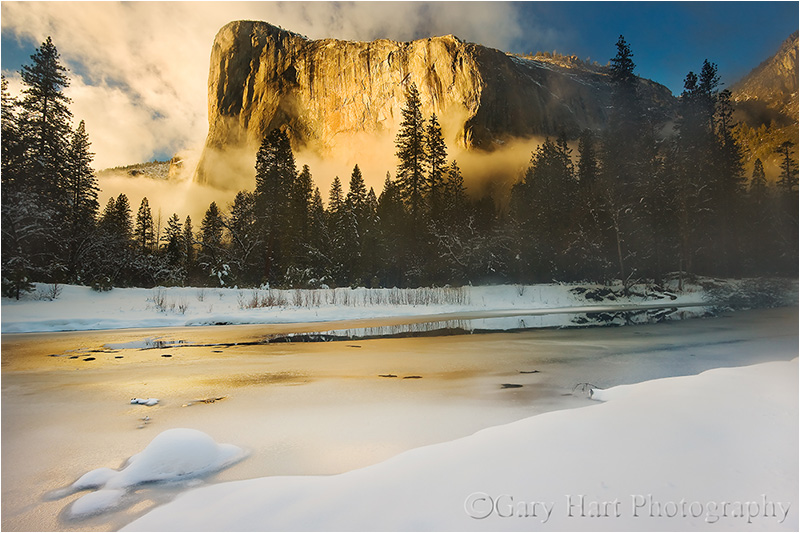
The band of trees enabled me to hide the transition of the 2-stop hard GND that held back the brilliant sunlight on El Capitan’s granite.
Most visible transitions are caused by a hard filter with too much density for the scene, and or misplacement of the GND transition. A soft GND, while usually not strong enough in extreme dynamic range conditions, is much easier to disguise.
If extreme dynamic range demands a hard or reverse GND, you need to train your eye to identify the best place for the transition. Placing the transition directly upon a flat, uniform horizon is usually best. When I don’t have a flat horizon, I look for an area of uniform darkness that spans the frame, such as a line of trees at the base of a mountain.
Often I can fix a visible transition by dodging/burning in post-processing. And some scenes just aren’t suited for a GND, in which case you’ll need to blend multiple exposures, look for a creative alternative like a silhouette, or simply move on to a different scene.
Too much density (a sky that’s too dark): Too much density causes the sky to appear too dark for the foreground. Often the problem is as simple as a sky that’s unnaturally dark, but sometimes its more subtle. I see this most frequently in reflections, when the reflection is brighter than the reflective subject—since that’s impossible, it’s a dead giveaway that a GND (and/or poor processing) was used.
Here’s one big advantage of GND use in the digital age—correcting a too much density problem can be as simple as dodging the too-dark sky and burning the too-bright foreground. The less extreme the difference, the easier it will be to correct, so an easy processing solution isn’t an excuse to be sloppy with your GND selection.
Vignetting from the filter holder: When the lens’s angle of view is too wide for the holder, vignetting (darkening on the edges) will be visible. While increasing your focal length will eventually eliminate the vignetting, that renders the lens unusable with a GND at its wider focal lengths. The better solution is to get a wider holder (and the filters to go with it). Better still, start by purchasing a holder/filter ensemble that will handle your widest lens and its widest focal length without vignetting. Or best—toss the holder and hand-hold your filters.
Visible fingertips: As someone who hand-holds every time, I have a vast assortment of images of my fingertips enjoying beautiful landscapes. Fortunately, this only happens when I’m sloppy, do-overs are no problems, and keeping your fingers out of the frame is easy if you’re careful. With the larger filters it’s usually pretty easy to simply pinch a corner that’s outside the frame.
The smaller filters I prefer often don’t have enough real estate outside the lens’s field of view, requiring a different technique. Instead of pinching a corner, I hold the smaller filters on the outside, by their edges with my thumb and middle or index finger (one on each vertical side), so my fingertips never touch the front or back of the filter. (When someone asks how much three inches is, you hold your fingers three inches apart—now, just slip a filter between those fingers and you’re ready to go.) Holding the filter like this, the rest of my hand is out of the way, either above or below the filter. It’s actually pretty simple, but I suggest practicing at home first.
Metering
In my film days (when exposure failure was not an option), when a GND was called for, I carefully spot-metered first on the highlights and and again on the shadows—the difference between the two gave me the scene’s dynamic range in stops. With this information, I knew how much light to give my shadows, and how many stops to subtract with a GND (but I still bracketed to hedge my bet).
Then came digital with its post-capture histogram that enabled me to streamline my metering—I soon found myself (after setting my ISO and f-stop) spot-metering once on the shadows, dialing the shutter speed to a value that ensured sufficient foreground light, and selecting the least extreme GND necessary to subdue the highlights. After my first shutter click, I’d check the histogram and adjust the shadows and/or GND as needed. What could be simpler?
I thought you’d never ask….
Since switching to mirrorless, I pull out the GND I think the scene calls for and with my eye on my pre-capture histogram, dial up the shutter speed until the highlights start to clip, then click. Reviewing the post-capture histogram, I determine what, if any, adjustments are needed—for example, if my shadows are still too dark, I might pull out a stronger GND and add more light. (This approach also works with a DSLR that displays the histogram in live-view mode.)
GNDs with a polarizer
I get asked so much if it’s okay to use a GND with a polarizer so much that I’ve created a whole section for my answer:
Yes.
Technique
Proper placement of the GND transition happens through the viewfinder (or live-view LCD). Compose the scene, place your

In this Mono Lake sunrise image, the brightest part of the scene was on the right, and the fine detail I wanted to pull out was on the bottom-left. By angling my 3-stop soft GND about 45 degrees across the right half of the frame (maximum density on the top-right), I was able to give the foreground tufa enough light without overexposing the sky and reflection.
GND in front of the lens, and position it where the transition will be least visible. If you can’t see the GND transition, it often helps to move the filter up and down and watch the scene slide between light and dark—just a few up/down strokes should be enough to locate and position the transition.
To prevent reflections, gently rest the filter flush against the lens when you click. But to minimize scratches, and to avoid moving the camera during exposure, it’s also important that you don’t apply too much pressure against the lens. (And there’s nothing wrong with holding the filter a couple of millimeters away while you position it.)
Sometimes we get scenes with the region of greatest brightness not distributed horizontally across the frame. Fortunately, there’s no law that mandates a GND to be oriented horizontally. I guess that in at least a quarter of my GND images the filter isn’t oriented perfectly horizontally.
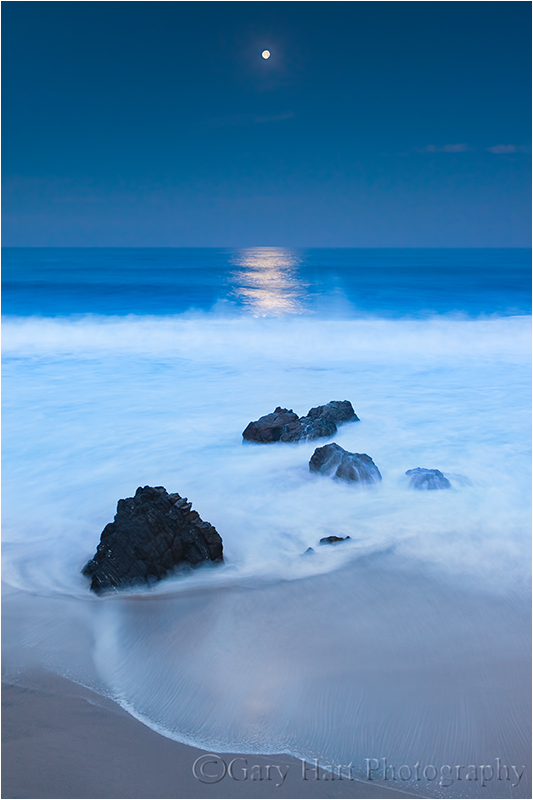
A 3-stop hard GND allowed me to avoid a glowing white lunar disk in this extremely dark twilight scene.
When I have shutter speeds approaching a second or longer, I often further disguise my GND transition by moving the filter up and down slightly during the exposure. This is especially effective for hard-transition filters. You don’t need to move it much, and the amount of movement will vary with the size of the brightness you’re trying to hold back (sometimes it’s the entire sky, other times it’s just a bright stripe on the horizon) and the size of the transition zone. If you’re not sure how much motion to use, practice a bit first by watching the motion in your viewfinder.
A GND can stretch by ten to fifteen minutes the twilight window when I can get detail in the darkening foreground and the daylight-bright moon. Since I do a lot of moonrise/moonset photography, and consider a full moon image a failure if I don’t get detail in both the foreground and the moon, the extra time a GND buys me is a huge advantage.
GNDs in the digital age
The advent of digital capture has brought a photography renaissance. Image quality improves steadily, as does our post-capture control of our images. It’s easy to forget (if you’ve been around long enough to have ever known), or believe obsolete, the basic tools that were once a landscape photography staple.
But not so fast….
Missing link
Digital processing provides the missing link for GND use. The late Galen Rowell, GND-filter pioneer and its strongest advocate, was a film shooter who was stuck with imperfect in-camera GND results—no matter how much he tried to disguise his GND’s use, there were situations where the transition or over-darkening was impossible to eliminate at capture. Google Rowell’s images, or better yet, stop by his beautiful Mountain Light Gallery in Bishop, to see a number of images with visible signs of GND use.
Even the best photographer, film or digital, will have visible GND transitions at capture. Rowell’s GND technique was impeccable, he just lacked the ability touch things up after capture. But today, with careful dodging and burning in Photoshop, digital shooters can virtually eliminate all signs that a GND was used.
As digital sensor dynamic range improves, some photographers argue that GNDs are becoming obsolete. For example, my Sony a7R II give me 2 to 3 stops more dynamic range than my Canon 5D III did. That means without filters I now get the same dynamic range I could only get by using my 5D III with a 2 or 3 stop GND. This significant improvement allows me to keep my GNDs in my bag for many shots that, in my Canon days, I would never have attempted without a GND.
But this doesn’t mean that I use GND filters any less, or that other digital shooters can use improved dynamic range as a reason to leave their GNDs home. Because for every shot improved dynamic range allows me to capture without a GND, I can find a new shot with so much dynamic range that I wouldn’t have considered attempting it even with a GND.
For example, the Grand Canyon sunset image at the top of the page wouldn’t have been possible in one click without the ridiculous dynamic range of my a7R II, a 3-stop reverse GND and the dodge/burn capabilities of Photoshop. Thanks to digital tools and my good old fashioned GNDs, I’m now closer than I ever dreamed possible to capturing natural images with the dynamic range my eyes see.
I use Breakthrough Filters
Workshop Schedule || Purchase Prints
A GND gallery
Click an image for a closer look, and a slide show. Refresh the screen to reorder the display.


Over the hill
Posted on October 3, 2015
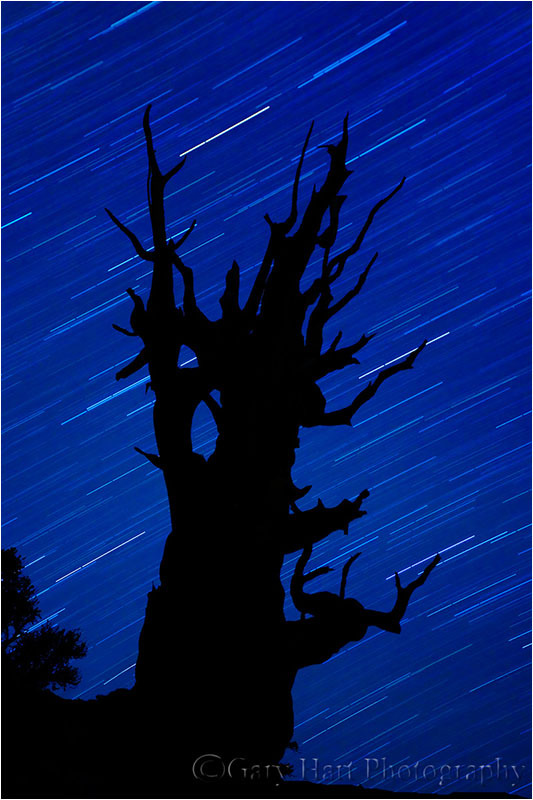
Bristlecone Star Trails, Schulman Grove, White Mountain Bristlecone Pine Forest, California
Canon EOS-1Ds Mark II
22 minutes
F/4.0
ISO 200
36 mm
Tomorrow morning I head up and over the Sierra crest and down US 395 in the shadow of the precipitous Eastern Sierra. Under-appreciated by tourists, the Eastern Sierra is no secret to photographers. It’s no surprise that Eastern Sierra fall color photo workshop, which starts Monday, has been among my most popular workshops since I started offering it nearly ten years ago.
The fall color on the other side of the “hills” is a particular highlight, but it’s by no means all we’ll photograph—of all the locations I visit, the Eastern Sierra by far offers the greatest variety of subjects. Check this out:
- Mt. Whitney and the Alabama Hills, including Mobius Arch
- Bishop Canyon, including North Lake, South Lake, Lake Sabrina, and lots of fall color
- The ancient bristlecones of the White Mountains (technically not part of the Sierra, but it’s the best place for panoramic views of the Eastern Sierra)
- Mono Lake, including South Tufa and another much more remote (solitary) location
- Lundy Canyon for more fall color
- Tuolumne Meadows and Olmsted Point in Yosemite
An Eastern Sierra workshop favorite each year is our trip to the bristlecone pine forest in the White Mountains, east of Bishop. Because it’s an hour drive back to civilization, and we leave dark-and-early for sunrise the next morning, I’ve never kept the group up there after sunset to do a night shoot. But last year I decided to give everyone the option of waiting for the stars—my plan was to make it optional, letting all who didn’t want to stay return to the hotel for a reasonable dinner and lights-out time. But no one opted out, and we had so much fun, and got such great images, that I’ve decided to make it a regular part of the workshop.
About this image
Eight years ago I was in California’s White Mountains with Don Smith and a couple of other photographer friends. On a chilly autumn evening we photographed sunset among the bristlecones, then stayed out past dark to photograph these photograph these amazing trees, (at over 4,000 years, among the oldest living things on earth) beneath the stars.
The others did some light painting, but I waited until the flashlights were dowsed to capture the silhouette of this magnificent tree against the celestial canvas. This was my first serious attempt at star trail photography, and after the success I had that night I was instantly hooked.
<< Read more in my Starlight photo tips article >>
As happy as I was with my results that night, nothing will compare to the experience of reclining with friends beneath a sky filled with more stars than I imagined possible, sometimes laughing and trading stories, and other times simply basking in impossible silence.
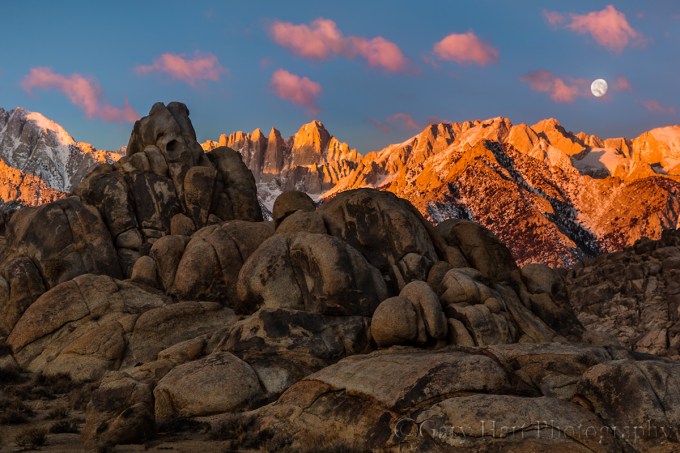
Moonset, Mt. Whitney and the Alabama Hills, California
See for yourself in my next Eastern Sierra Fall Color workshop
An Eastern Sierra Gallery
A sample of the Eastern Sierra’s varied beauty
Click an image for a closer look, and a slide show. Refresh the screen to reorder the display.


Out of my depth
Posted on September 27, 2015

Hidden Waterfall, Akaka Falls State Park, Hawaii
Sony a7R II
Sony 70-200 f4
1/10 second
F/16
ISO 1600
A couple of weeks ago I wrote about appreciating the small stuff. Writing that article opened my eyes to how much I’d gotten away from aspects of photography that give me great pleasure, and that were a big part of my photographic style. Not completely away, but far enough to notice a difference when reviewing my images from the last year or so, a year that coincides with my switch from Canon DSLR to Sony mirrorless. While I can’t attribute this shift to a shortcoming in my Sony gear (far from it), I do believe the timing is more than coincidence.
First, with its radically different interface and shooting workflow, mirrorless is a new trick and I’m an old dog, and I think I underestimated the ramifications of the mirrorless switch. Nevertheless, within a few weeks I felt reasonably comfortable seeing through an electronic viewfinder, had embraced a new focus and metering paradigm, and became sufficiently familiar with my Sony a7R’s features, buttons, dials, and menus. So far, so good.
But simply knowing a camera doesn’t mean I don’t have to think about using it. And it’s the unconscious control of photography’s technical side—the focusing, metering, setting exposure variables, and so on—that frees my brain to create. (I suspect it’s this way for most other photographers too.) So until I can make my camera an unconscious extension that functions more like an extra limb, the interface is a distraction. After ten years, I’d taken for granted my ability to control every aspect of my Canon DSLRs by feel, in the dark if necessary, without conscious thought—simply put, it’s taken nearly a year to achieve that familiarity with my Sonys.
In that gap between familiar and intimate with my Sony bodies, bad (lazy) habits formed. Because while I was getting used to a new way of shooting, I became so enamored of my a7R’s extreme dynamic range that my photography began to skew in that direction. Suddenly sunrises and sunsets that had been especially difficult (or impossible) with my Canons, were easy, a luxury I was all too happy to indulge. Then came the a7S, with its mystical ability to see in the dark, and suddenly night photography was occupying much more of my photography time.
Compounding the problem, these high dynamic range scenes tend to be more dramatic, and drama impresses the masses more than subtle. I’d post a new image to rave reviews (“Stunning!”), and soon found myself lured by the instant validation. I loved what I was shooting, others loved what I was shooting, so what could possibly be wrong?
Or maybe a better way to put it, what’s missing? I’d scroll through my recent images and couldn’t avoid the vague sense that there were fewer images that excited me personally. There were some, but not as many as I’d been accustomed to. And then it hit me—my images lacked depth.
Depth is the final frontier for aspiring photographers. Photography attempts to render a three-dimensional world in a two-dimensional medium, and intuitive disconnect. But while true depth in a photograph is impossible, what is possible is the illusion of depth. I’ve always felt that most people can compose a nice two-dimensional landscape, but what separates the great photographers from the good is their ability to convey depth.
Conveying the illusion of depth starts with not settling for a dramatic background or striking foreground subject, but using that as the starting point for a scene that contains visual points throughout the (missing) front-to-back plane. If the primary scene is in the distance, find nearer objects that balance and complement it. Likewise, if your subject is in the foreground, make every effort to include complementary background elements.
But finding a complementary foreground and background is just the beginning. Once you’ve identified your foreground and background (and mid-ground if possible) elements, you have to manage their relationships while mentally subtracting the camera’s missing third dimension (depth). Things like creating imaginary lines that connect objects at different distances; avoiding merging of discrete objects; perspective management with focal length and subject distance choices; focus (depth of field) control to emphasize/deemphasize foreground/background elements (to name a few). All of these things take a scene from more literal, two-dimentional snaps to interpretive, artistic creations that exist only in your brain until the shutter is clicked.
And that’s what I think has suffered in the year since my Sony switch—I’m still getting captures that excite me (and others), but in settling for the scenes the Sony sensor makes so easy, I lost my way a bit. Now that I recognize what’s been lacking, it’s time to up my game and apply that amazing Sony sensor to our three dimensional world.
About this image
I traveled to Hawaii earlier this month vowing to reinvigorate my quest for depth in my images. With lush rainforests, rugged volcanic beaches, vivid sunsets, and an active volcano, it’s a great spot for filling the frame from front to back.
One place in particular I looked forward to visiting was Akaka Falls State Park. The little scene in this image is extremely familiar to me—it’s near the end of Akaka Falls loop, after the view of the fall, making it easy to think the show is over as you beeline back to the parking lot to escape the humidity. Each time I pass this spot I stop and try to make it work, which starts with finding a way to pull detail from the dense shade without blowing out the fully exposed foreground foliage. And even if I can make the dynamic range work, I still have to figure out how to balance the conflicting need for a small aperture that ensures adequate depth of field, against the need for a shutter speed long enough to pull the waterfall from the extremely dense shade, but fast enough to avoid blurring the leaves in the almost unavoidable breeze.
But several things worked in my favor on this visit. A heavy cloud cover reduced the foreground brightness to a more manageable level, and my new Sony a7R II has at least two stops more dynamic range than the Canon 5D III I’d used on prior visits—suddenly, dynamic range wasn’t a deal-breaker. Also, someone had flipped the switch on Hawaii’s usually reliable trade winds—the still, humid air was extremely uncomfortable, but far better for this kind of close photography. Last but not least, the high ISO capability of my a7R II made me quite comfortable shooting at ISO 1600, high enough to permit f16 while maintaining a fast enough shutter speed.
My focal length was 154mm, so even at f16 I needed to be careful about focus. In scenes where I’m not sure whether I’ll have enough depth of field to ensure front-to-back sharpness, I almost always find a point that keeps my closer elements sharp. To maximize depth of field, I’ll focus as far behind the closest visual anchor (in this case the closest flowers) as I can without sacrificing any foreground sharpness. In this case I was pretty sure I could focus on the back flower and still keep the closer flowers sharp. In a perfect world I’d have liked just a little more motion blur in the water, but even with the air relatively still, I wasn’t comfortable going beyond 1/10 second.
Read more about controlling depth of field
The illusion of depth
Click an image for a closer look, and a slide show. Refresh the screen to reorder the display.


Kilauea Milky Way fun (with the a7S)
Posted on September 14, 2015

Starfire, Halemaumau Crater, Kilauea, Hawaii
Sony a7S
Rokinon 24mm f1.4
10 seconds
F/1.4
ISO 1600
Rain in Hawaii is great for almost everything—it fills the waterfalls, cleans the air (for the best sunrise/sunset color), sparks rainbows, and makes photographing Hawaii’s lush foliage a joy. But it’s not so great when your objective includes stars. And based on the forecast for this year’s Hawaii Big Island workshops, our odds for finding the Milky Way above Kilauea weren’t too good. But a nature photographer who relies entirely on the odds will soon be an ex nature photographer.
The first night my group visited Kilauea we were completely shutout by a wet fog that obscured the world beyond 100 feet and deposited tangible flecks of moisture on every exposed surface. Undaunted, the next night we returned to the caldera despite rain in Hilo falling faster than our wipers could erase it. The downpour pounded us all the way through town, then eased a bit as we started to climb.
Despite the improving conditions, frequent skyward peeks through the windshield offered no cause for optimism. By the time we entered Hawaii Volcanoes National Park, the rain had stopped completely, but the clouds persisted. Parking at our destination we still saw no stars, but the caldera’s orange glow throbbed below and the clouds above reflected its orange glow—a definite improvement over the previous night. While not the grand prize, this reflected fire makes beautiful photographs too, offering a small consolation for a group of photographers with their hearts set on the Milky Way.
In the complete darkness a starlight shoot requires, the less setup required at the shooting location, the less we need to use our lights and the sooner everyone’s eyes adjust. So at the cars everyone’s polarizers came off, our apertures were opened wide, and the ISOs were pushed as far as the camera’s image quality will allow. Pared down to just a tripod, one camera, and one lens, we marched off to the caldera.
Ever the optimist, midway through the short walk to the rim I ventured one more glance upward—what had just seconds earlier been a solid blanket of orange-tinted grayness had suddenly acquired a jet-black rip sprinkled with twinkling points of light. I turned off my headlamp to confirm and there it was, the Milky Way, spread like a bag of sugar spilled on a pool of ink.
Most of the group had no experience with night photography, so despite the previous day’s training, I knew most of my time would be taken helping everyone find a composition, tweak exposures, and (somehow) focus through a virtually black viewfinder (or LCD). Because the caldera’s brightness varies daily, and the amount of moisture in the air affects the overall light that reaches the camera, I started with a test shot of my own to determine that night’s exposure. Then Don Smith and I bounced around from person to person, helping them achieve starlight autonomy.
Some mastered it quite quickly, while others were slowed by a slew of problems ranging from simple lens cap removal to more difficult camera errors. On my travels I’d occasionally stop at my camera long enough to click a frame of my own (and maybe check the frame I’d clicked on my previous pass). Eventually the pleas for assistance abated and I was able to stay at my camera long enough to recompose and experiment with different exposures.
After about an hour the clouds started to fill back in. I was pretty confident that everyone had had a success by then, but I made my way up and down the line to ensure that everyone was satisfied, and thanking my lucky stars for our good fortune.
This was the sixth year I’ve attempted photographing Kilauea at night. As my experience has grown, my equipment has evolved as well. The first time my fastest lens was f4, and I was reluctant to push my Canon 1Ds Mark III beyond ISO 1600. Looking back on those early images, I’m appalled by the noise I considered acceptable. I also shake my head now at the effort required to simply get a focused frame.
Fast forward to last year, when I shot the caldera with a Canon 5D Mark III and Zeiss 28mm f2 lens. I was pretty happy with my results and the ease with which success was achieved. But this year was my first attempt with the Sony a7S and my new Rokinon 24mm f1.4, and it’s a whole new ballgame.
My excitement was underscored as I helped those in the group still using DSLRs. My a7S viewfinder and live-view LCD displayed the caldera and stars with brilliant clarity, while even the best the SLR viewfinders and LCDs were virtually black. While I composed and focused in about 3 seconds (and didn’t even bother checking my results), the SLRs took minutes to compose, focus, and confirm (the only way to ensure sharpness on one of these cameras is to replay and magnify a picture).
Night photography is limited by a camera’s ability to display the scene for composition and focus, and the viewfinder of an SLR has advanced about as far as it can. On the other hand, electronic viewfinders have barely tapped their potential—the better the sensors become, the more detail they’ll be able to pull out of the dark. Once upon a time, low-light performance was a reason to stick with an SLR, but I suspect it won’t be long before the quality of an electronic viewfinder image renders SLR viewfinders unnecessary. The a7S is there already; for higher resolution mirrorless bodies, it’s only a matter of time.
Hawaii Photo Workshops
A starlight gallery
Click an image for a closer look, and a slide show. Refresh the screen to reorder the display.


Appreciating the small stuff
Posted on September 9, 2015
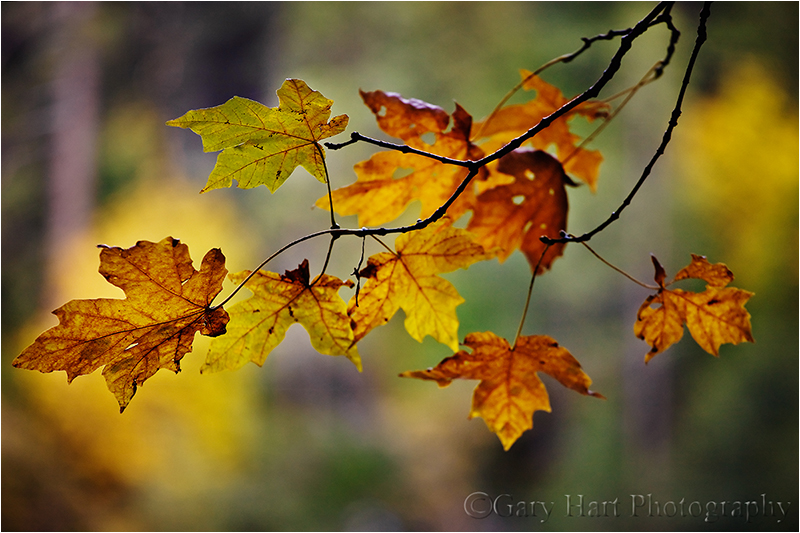
Forest Autumn, Yosemite
Canon EOS-1Ds Mark III
1/25 second
F/4.0
ISO 200
200 mm
Posting as much as I do here in my blog and on Facebook, it’s sometimes easy to be sucked into sharing images that I know will generate the most enthusiastic response. But that’s not a complete reflection of my relationship with nature, or the reason I take pictures for a living. So every once in a while I find myself needing a reset, a re-focus on images for me.
Here’s an example of the kind of stuff that makes me happy. Fall color is always beautiful, but merely putting your eye to your camera and photographing a beautiful scene is no guarantee of a successful image. The closer you can come to identifying a scene’s essence, what about the scene that moves you (and not what you think will move others), the more your photography will resonate.
The obvious draw of fall color is (duh) the color. But beyond that, I particularly love the way leaves light up when they’re backlit. So when I wander forests in the fall I look for backlit leaves that stand out, leaves I can isolate from the distraction of their surroundings. When I find something that works, my job has just begun. Next I look for a complementary background that (if I’m lucky) also adds context (location, conditions, and so on). And finally I need to make my depth of field decision—do I want lots of DOF, or will too much background detail distract from my subject?
I found this group of leaves as I wandered the Merced River near Fern Spring in Yosemite Valley a few years ago. I move around until the leaves aligned with vertical evergreen trunks and a splash of deciduous color. The forest had lots going on, so I opted for a wide open aperture to reduce it to a barely recognizable blur of color, shape, and line.
Scenes like this underscore my desire to be in charge of as much of my camera’s decision making process as possible: spot metering in manual mode, manual focus, raw capture—all these things remove the decision process from my camera and give it to me. In this case, before composing I metered on a bright leaf and set the exposure to what I thought would give me the best color (in manual mode I can point my camera’s meter anywhere and not have to worry about my settings changing when I recompose).
The wind was nearly calm, but to be safe I bumped my ISO to 200 (the quality difference between ISO 100 and 200 is nearly imperceptible) to further ensure against microscopic motion blur. And since I shoot in raw mode, I never have to make my white balance decisions until I’m in the comfort of my home office.
When all my settings were complete, I returned my camera to the tripod, focused carefully on the center vein of the most prominent (left-most) leaf (at f4 there’s no margin for focus error), and clicked. It’s unfortunate that nature’s subtle beauty doesn’t attract the attention that the dramatic sunrises, sunsets, and spectacular weather do. I enjoy photographing those scenes as well, but I never want to forget to appreciate the small stuff.
A gallery of unspectacular beauty
(Subtle beauty you need to slow down to appreciate)
Click an image for a closer look, and a slide show. Refresh the screen to reorder the display.


 Eloquent Images by Gary Hart