Eloquent Images by Gary Hart
Insight, information, and inspiration for the inquisitive nature photographer
Yosemite game-changer
Posted on June 26, 2017

Evening Reflection, Mirror Lake, Yosemite
Sony a7R II
Sony 12-24 f4 G
12mm
1/15 second
F/9
ISO 100
“Game changer” is most certainly a cliché, but every once in a while I get to use the term without shame. I used it when I switched from film to digital; again when I discovered that the Sony a7R (and now the a7RII) gave me 2- to 3-stops more dynamic range than my Canon 5DIII; one more time when I first turned the Sony a7S (since replaced with the a7SII) toward the night sky. And I think I’ll trot it out once more for Sony’s new 12-24 f4 G lens.
Of course I can only speak for the 12-24’s change in my game—your results may vary. But as a landscape-only shooter who spends a lot of time in Yosemite, this lens allows me to capture images that were heretofore not possible with anything in my bag: Game changed.
Early last month, with only a few days to play with the new (and at the time, top secret) lens, I beelined to Yosemite. My first stop was Mirror Lake, a wide spot in Tenaya Creek that isn’t technically a lake (it’ll be dry by summer’s end), but each spring is most definitely a mirror. The coveted feature here is Half Dome, which towers more than 4,000 feet above the glassy water, close enough to require some serious neck craning. Many times at Mirror Lake I’ve visualized a composition that includes Half Dome and its reflection, only to be thwarted because even at its widest, a 16-35 lens isn’t wide enough.
Since my days with the lens were limited, I wasn’t able to time my visit for interesting weather or some celestial event. No worries, I rationalized, even on Yosemite’s standard blue-sky days, I can always count on warm, late afternoon light bathing Half Dome—not spectacular, but reliably nice.
I arrived at the lake about an hour before sunset and immediately started seeking out compositions to put the new lens to the test. I can’t tell you how thrilled I was to mount the 12-24 on my a7RII, put my eye to the viewfinder, and see all of Half Dome and its reflection with room to spare. It wasn’t long before I zeroed in on the scene you see here (that required me to balance atop a rock about three feet from the shore, tripod 10 inches deep in frigid snowmelt).
As luck would have it, just as the light started to warm, a few clouds drifted down from the north, so I quickly adjusted my composition and waited for them to slip into my composition. They were moving quite fast, leaving a window of just a few seconds when they filled the sky without being seriously truncated by the border. With composition, exposure, and focus set, I clicked a half dozen rapid-fire frames before the clouds started drifting out of the frame.
This was just my first stop with this lens. On the walk back to my car I stopped for a shot that I shared a few weeks ago; that night, and again the next morning, I tried it at a favorite El Capitan View with great success (to be shared in a future blog). And before returning home, I discovered a completely unexpected use at Yosemite Falls. Needless to say, I’ve already ordered this lens—I expect to see it next month.
Workshop Schedule || Purchase Prints
A Half Dome Gallery
Click an image for a closer look and slide show. Refresh the window to reorder the display.


Happy Father’s Day, Dad
Posted on June 18, 2017

Sunset Palette, Half Dome from Sentinel Dome, Yosemite
Canon EOS-1Ds Mark II
Canon 24-105L
2 seconds
F/20
ISO 100
June 2017
This summer it will be 13 years since I lost my dad to Alzheimer’s disease. He would have turned 87 next month, and I have no doubt that his body would still be going strong if the Alzheimer’s hadn’t taken over. Sadly, it’s difficult to fully appreciate a parent’s influence until they’re gone. We’re certainly aware of the love, wisdom, advice, discipline, tears, and laughs while we’re in the midst of growing up, but it takes being a parent to fully appreciate our parents’ influence on the adults we become.
Dad was a United Methodist minister who literally practiced what he preached. In 1965, when Martin Luther King issued a plea to clergy to join him, Dad borrowed money and flew across the country to march with Dr. King in Selma, Alabama (he was on national TV getting arrested). His was an inclusive theology that respected all religions: I can remember Dad preaching at the local synagogue on a Saturday, and reciprocating in our Sunday service by opening his pulpit to the rabbi. And I’ve lost track of the number of homeless people, including families with young children, we housed while they tried to get back on their feet.
More than the values he instilled, so many of the things that define me today are directly attributable to my dad’s influence. My love of sports and sense of humor for sure. And when asked how I became a photographer, I have to cite Dad. My standard answer has always been that Dad was a serious amateur photographer whose 80-hour work week offered too little time to pursue his passion, so he made up for lost time on our summer family vacations—I grew up believing that a camera was just a standard outdoor accessory. But I think his influence goes deeper than that. More than simply modeling camera use, Dad instilled his appreciation of nature’s beauty, and his longing for its soothing qualities.
Our vacations were, without exception, camping trips—always tent-camping, though in the later years we splurged on a used, very basic tent trailer (no kitchen, bathroom, or any of the other luxuries available in today’s tent trailers). A few times we (Dad, Mom, my two brothers, and I) hit the road for a longer camping trip, one summer taking a month to camp all the way across the country, another summer venturing into the Canadian Rockies. But usually we took advantage of the mountain scenery (always the mountains) closer to our California home.
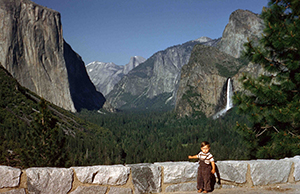
Me, on an early (but probably not my first) Yosemite trip
Of these locations, Yosemite was the clear favorite. Marveling at the Firefall from Camp Curry and Glacier Point, waiting in lawn chairs at the Yosemite dump for the bears to arrive for their evening meal (really), rising in the dark for a fishing expedition to Tuolumne Meadows, family hikes up the Mist Trail to Vernal and Nevada Falls, are just a few of the memories that I only realize in hindsight formed my Yosemite connection.

My father’s rainbow
My favorite Dad photography story happened when I was about ten. It involves an electrical storm atop Sentinel Dome, and his desire to get the shot that was so great that it trumped common sense. As his ignorant assistant, I stretched to hold an umbrella high above Dad’s head to keep his camera dry. (In his defense, as Californians, lightning was a true novelty that trumped full appreciation of its dangers.) We didn’t get the lightning, and more importantly, it didn’t get us. But what I remember more than anything about that day was Dad’s excitement when later that afternoon he was able to photograph a rainbow arcing across the face of Half Dome.
This story has achieved family legend status, and we’ve felt a special connection to Sentinel Dome as a result. When it came time to scatter Dad’s ashes, Sentinel Dome was the obvious choice.
One more thing
I have the reputation for being very lucky where photography conditions are concerned: The clouds that part just as the moon rises, the snowstorm that blankets Yosemite Valley just as the workshop begins, the rainbow arcing across the Grand Canyon. In our family we like to believe that Dad is somehow up there pulling some strings. It’s just the kind of thing he’d do.
I love you, Dad.
Workshop Schedule || Purchase Prints || Instagram
Sharing the Love: A Yosemite Gallery
Click any image to scroll through the gallery LARGE


Merry Nature Photography Day!
Posted on June 15, 2017
For everyone who lay awake all night wondering what they were getting for Nature Photography Day, wait no longer (okay, seriously, as far as I’m concerned every day is Nature Photography Day, but I’ll play along). Here is a collection of my favorite images of nature.
Click an image for a closer look and slide show. Refresh the window to reorder the display.


Workshop Schedule || Purchase Prints
Starry, starry night
Posted on June 9, 2017
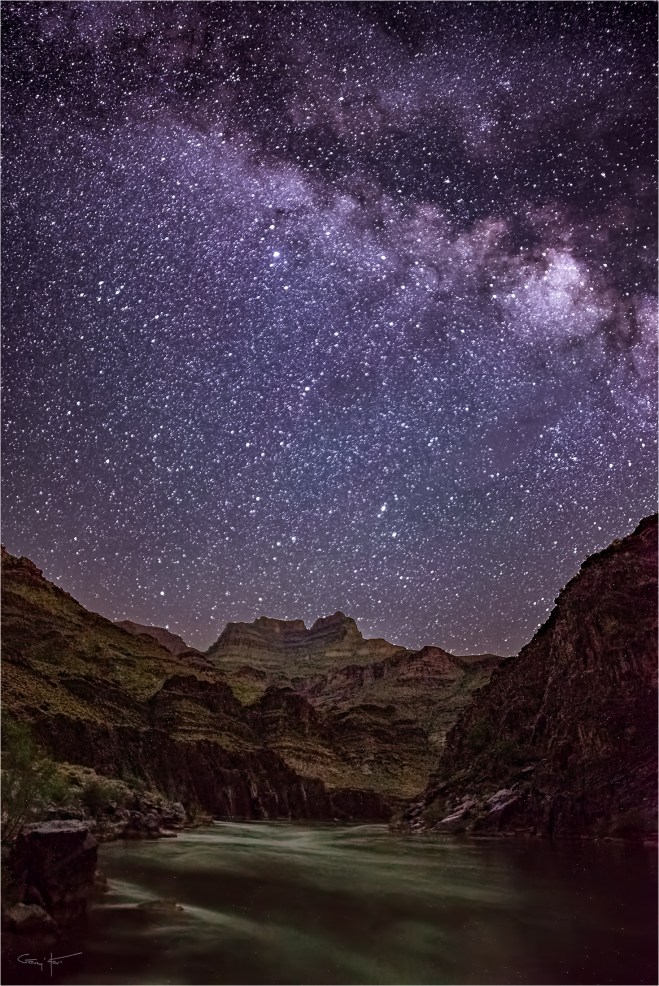
Starry Night, Colorado River and Evans Butte, Grand Canyon
Sony a7S II
Rokinon 24mm f1.4
20 seconds
F/2
ISO 12800
Few experiences in nature surpass a dark sky brimming with an impossible number of stars. The darker the sky the better, and the sky doesn’t get much darker, or more impossible, than a moonless night at the bottom of the Grand Canyon. I schedule my annual Grand Canyon raft trip for the week of the new moon to ensure the darkest skies and the most stars; I prefer May because canyon temperatures are comfortably warm but not yet hot, and the Colorado River runs clear, unmuddied by sediment stirred by the summer monsoon.
As darkness seeps into the mile-deep gorge, the first pinpoints overhead are the planets, some combination of Venus, Jupiter, Mars, Mercury, and Saturn. Soon the darkness is as complete as we ever see it at home, and the planets are joined by the brightest stars in recognizable constellations. But unlike home, the darkening continues, and with every passing minute comes more stars, until it seems the sky can’t possibly hold any more.
Pausing to take it all in, the first thing to catch your eye in the unprecedented dark might be the Big Dipper—in May it’s high overhead as darkness falls, a comforting sight to disoriented observers still not convinced that this sky is real. Perhaps you’ll be temporarily distracted by the blinking lights of a distant jetliner, a silent reminder of the world left behind. A keen eye may discern a faint “star” moving among its neighbors—a satellite, possibly monitoring the weather, or sending GPS coordinates, or maybe even a foreign country secretly observing (smile!). And if you’re patient you might see a streaking meteor (or two, or three…), as if a hidden star has sprinted across the darkness and into a new hiding place.
But this visual feast is only the appetizer, because the main course, the Milky Way’s glowing band, isn’t served until close to midnight (or later, depending on the part of the sky that’s visible from the chosen vantage point). The Milky Way rises in the east, a band of light running north and south, ascending until it eventually spans the sky. Fainter in the north, the Milky Way brightens as your eyes follow it south, toward the glowing galactic core. The photogenic galactic core rises highest in the southern sky, so we hope for campsites with an open view in that direction. Since the Grand Canyon sky is crowded by tight, towering walls, the best views of the sky are usually up- or down-canyon.
Our best south-sky opportunities come on the trip’s first two nights, when we’re in Marble Canyon, the north/south trending section of the Grand Canyon that ends at the Little Colorado River confluence. At the confluence the canyon walls open to offer the trip’s best view of the sky, but just downriver the Colorado turns westward and the walls rise and squeeze closer. Fortunately, rather than beeline to Lake Mead, the Colorado River meanders a bit, bending north here and south there, providing an occasional view of the southern sky throughout the Grand Canyon.
Pulling into camp after a long day on the river, the first thing I do is find a spot for my cot that will ensure the best possible view of the night sky as I fall asleep. With my claim staked, I survey the surroundings for potential night photography scenes. Campsites on the Colorado River are first-come, first-served, and we have to hope we find one that’s oriented properly and has photogenic vantage points. Usually that means down by the river, but sometimes it’s an elevated location with the river in the distance. But if the campsite doesn’t have a photogenic vantage point, I’m not disappointed because nothing can take away my bedtime canopy.
If I find a scene I like, I compose, dial in my night exposure settings, and focus my camera well before dark. Sometimes I’ll compose and leave the camera poised on the tripod, ready for my return in the wee hours of the morning. If I’m afraid someone might stumble on my tripod in the dark, I leave it beside my cot, camera loaded and ready for action when I wake later.
On the trip’s third evening we pulled into camp exhausted but exhilarated after the trip’s most intense day of rapids. I found a view I liked near camp—getting there required a little rock scrambling that was no big deal with the sun out, but would require a bit more care. The Milky Way in May reaches its zenith in the south at around 3 a.m., but since we didn’t have a good view of the southern sky from this site, I decided the best views of the Milky Way would come earlier, when I could photograph it downstream, in the eastern sky. I woke at 1 a.m., grabbed my camera, and stumbled by the screen of my iPhone (the less artificial light my eyes are exposed to, the better they function when I try to photograph in the dark) to the spot I’d chosen. I could tell by a handful of glowing LCDs scattered downstream that I wasn’t the only one shooting. (On the first night I’d given the group instruction and guidance on photographing the Milky Way, but after that everyone was free to pick their spot and time, or stay in bed.)
I shot exclusively with my Sony a7SII and Rokinon 24mm f/1.4 lens. Once I’d perfected the composition and verified the sharpness, sticking with a 20 second shutter speed, I varied my ISO and aperture for more processing options later: ISO 3200, 6400, and 12,800; f1.4 and f2. At these settings I capture more light than my eyes take in—not only does this reveal more of the canyon than I can see, it also reveals even more stars.
I only photographed for about 20 minutes, but was so wired when I returned to my cot that I lay awake for another hour, mesmerized by my glittering ceiling.
Workshop Schedule || Purchase Prints
A Starry, Starry Gallery
Click an image for a closer look and slide show. Refresh the window to reorder the display.


Downhill All the Way
Posted on June 5, 2017

El Capitan Reflection, Yosemite
Canon EOS 10D
1/4 second
F22
ISO 100
27 mm
On Saturday, with little fanfare, Alex Honnold stunned the climbing world when he free-soloed El Capitan in Yosemite, the world’s largest granite monolith. (What’s the big deal? From this image, you can clearly see that it’s downhill all the way….)
But seriously…
Speaking for all non-climbers, Alex Honnold didn’t just stun the entire climbing world, he stunned the entire rational world. Soaring three-thousand feet above Yosemite Valley, El Capitan is the Holy Grail of climbing. Among climbers, if you’ve summited El Cap, you’ve made the Major Leagues.
First conquered by Warren Harding in 1958, today dozens of climbers dot El Capitan’s vertical surface on any non-winter day with reasonable weather in the forecast. But until Saturday, all who scale El Capitan do it with ropes and a virtual hardware store worth of climbing aids. Most require multiple days to summit.
Alex Honnold chose to ascend El Capitan unencumbered by ropes or safety hardware of any sort (free climbing uses ropes for safety only; free-soloing is completely sans rope), scampering up the shear granite the old fashioned way, using only his hands and feet like a kid climbing a tree in his backyard. Even more astonishing, he accomplished his feat in less than four hours.
I’m not a climber, and in fact have a difficult time getting within three feet of any un-railed vertical drop greater than thirty feet. But I’ve always lived vicariously through climbers, devouring climbing books, videos, and documentaries just to marvel at their accomplishments. And for years Alex Honnold has been the climber I’ve followed most closely, not just because he’s the best (he is), but also because of our common affinity for Yosemite, and the fact that my daughters went to high school with him (and I was a Honnold fan even before I knew this connection).
I also admire Alex Honnold not only for his skill and accomplishments, but for his humble demeanor (I suspect that he’d prefer climbing in complete anonymity) and quiet wisdom. And though we’ve never met, I can’t help worrying a little about him when I think of the number of mistakes I make with my camera—”Oops, I’m still at ISO 3200 from last night’s Milky Way shoot”; “Crap, I forgot to orient my polarizer”; “Did I remember to focus?” (I could go on)—and realize that for Alex Honnold, even one small mistake likely means death. I mean, even if I knew with absolute certainty that missing my exposure by just 1/3 stop would cause my camera to explode, I’m pretty sure I’d still be dead long ago.
So hats off to you, Alex Honnold, here’s wishing you many happy years as the world’s greatest living climber.
Links
- Check out this “60 Minutes” segment
- Here he is climbing El Sendero Luminoso in Mexico
- And if the video makes you squeamish, here’s a simple interview
An El Capitan Gallery


Seeing the future
Posted on June 1, 2017

Rapids, Half Dome and Tenaya Creek, Yosemite
Sony a7R II
Sony 12-24 f4 G
12mm
.8 seconds
F/9
ISO 200
Ansel Adams and visualization
Most photographers know that Ansel Adams visualized his prints, and the darkroom work necessary to create them, before clicking the shutter. This ability to look into the future of each capture is part of what set Ansel Adams apart from his peers.
But Adams’ extensive darkroom work is often cited by digital photographers defending their over-processesed images. We’ve all heard (and perhaps even uttered ourselves) statements like, “Ansel Adams spent more time in the darkroom than he did in the field,” or “Ansel Adams would love Photoshop.” Perhaps true, but using Ansel Adams’ darkroom mastery to justify extreme Photoshop processing misses a significant point: Adams’ mental picture of the ultimate print was founded on a synergistic relationship between his vision and his camera’s vision, coupled with a master’s control of capture variables like composition, light, motion, and depth. In other words, Adams’ gift wasn’t merely his darkroom skills, it was an overarching vision that enabled him to make decisions now based on invisible realities he knew he’d encounter later.
I bring this up because I’m concerned about many photographers’ Photoshop-centric “fix it later” approach that seriously undervalues capture technique. This mindset ranges from simple over-reliance on the LCD for exposure with no real understanding of the histogram or how metering works (shoot-review-adjust, shoot-review-adjust, shoot-review-adjust, until the picture looks okay), to photographers who channel their disappointment with an image into an overzealous Photoshop session, pumping color, adding “effects,” or inserting/removing objects until they achieve the ooooh-factor they crave.
The better approach is to understand the potential in a scene, anticipate the processing that will be required to make the most of it, and shoot accordingly. In other words, Photoshop should inform capture decisions, not fix them.
Putting Photoshop in its place
Every image ever shot, film or digital, was processed. Just as the processing piece was easy to ignore when the exposed film you sent to a lab magically returned as prints or slides, many digital shooters, forgetting that a jpeg capture is processed by their camera, brag that their jpeg images are “Exactly the way I shot them.” Trust me, they’re not.
Whether you shoot monochrome film, Fuji Velvia slides, or low-compression jpeg, there’s nothing inherently “pure” about your image. On the other hand, digital landscape photographers who understand that processing is unavoidable, rather than relinquish control of their finished product to black-box processing algorithms in the camera, usually opt for the control provided by raw capture and hands-on processing.
Unfortunately, Photoshop’s power makes it difficult for many to know where to draw the processing line. And every photographer draws that line in a different place—one man’s “manipulation” is another’s “masterpiece.” Photoshop isn’t a panacea; its main function should be to complement the creativity already achieved in the camera, and not to fix problems created (or missed) at capture.
While I’m not a big Photoshop user, I readily acknowledge that it’s an amazing tool that’s an essential part of my workflow. I particularly appreciate that Photoshop gives the me ability to achieve things that are possible with black and white film and a decent darkroom, but difficult-to-impossible with the color transparencies I shot for over 25 years.
Creating an image, from start to finish
I was in Yosemite on a “secret mission” (my inner 10-year-old just loves saying that) for Sony, trying out the yet-to-be-announced (at the time) Sony 12-24 f4 G lens. Among the many places in Yosemite that are especially conducive to ultra-wide photography is Mirror Lake and its view of Half Dome from directly below, and that’s where I started.
Walking up the trail to Mirror Lake, I skirted Tenaya Creek in less than ideal light, scouting potential scenes for later. On the walk back after sunset, I returned to this scene that I’d found and mentally composed earlier. Despite already having an idea of how I wanted to shoot it, there’s quite a bit going on here, so it took some time and a bit of rock scrambling to get all the elements to work together: Half Dome, Tenaya Creek, the nearby evergreen, and the creekside boulders.
While most of the scene was in deep shade, the sky was still relatively bright. Capturing this much dynamic range in an unprocessed jpeg (or color transparency) would have been impossible—my highlights would have been too bright, the color in the sky would have been washed out, and the shadow detail would have been lost to blackness. And that’s exactly what I saw in the jpeg that popped onto my LCD. But despite the crappy looking jpeg on the back of my camera, my histogram told me all my color and detail was there in my raw file.
With a good histogram, I adjusted my ISO up and down, compensating with a corresponding shutter speed adjustment, to get different blur effects in the creek. Opening the raw file in Lightroom, I simply pulled the Highlights slider to the left and the Shadows slider to the right to confirm my successful exposure. While the exposure adjustment was essential, once that was done, there was very little processing left to do. And as much as he enjoyed the dark room, I suspect Ansel would have embraced any technology that gave him more time outdoors with his camera.
Workshop Schedule || Purchase Prints
Different Takes on Half Dome


Spring has sprung
Posted on May 15, 2017
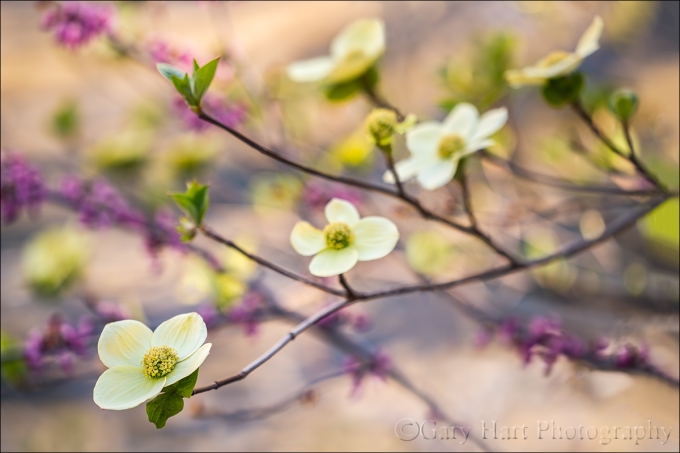
Dogwood and Redbud, Merced River, Yosemite
Sony a7R II
Sony 70-200 f/4
1/40 second
F/4
ISO 200
I spent most of the last week in Yosemite and can confirm that spring has definitely sprung there. The Merced River, swollen by snowmelt, is overspilling its banks, flooding meadows and submerging riverside trails. Reflections are everywhere, and viewing the waterfalls without getting wet? Forget about it.
Another spring highlight is the moonbow that colors the mist beneath Yosemite Falls. A fortunate convergence of Yosemite Falls’ southeast exposure and the angle of the rising full moon when the snowmelt is at its peak make Yosemite one of the best locations in the world to witness a lunar rainbow. I was able to photograph it three times last week, twice with my workshop group and once with a private tour customer. Easily visible to the naked eye as a silvery arc in the billowing mist, a long exposure reveals the moonbow’s true colors.
But of all the spring treats Yosemite offers, for creative photography I think the dogwood might be my favorite. For just a few short weeks in April and May, these graceful blooms shower Yosemite Valley with splashes of white that remind me of the Fourth of July sparklers of my childhood. But unlike the ephemeral sparks of a sparkler, the dogwood progress in slow motion so I can appreciate them at a much more relaxing pace.
I found this branch at the Bridalveil Fall vista on Northside Drive, about a mile east of Valley View. The river was gold with late light, and the air was still as I went to work on the scene. Careful positioning allowed me to juxtapose three layers in my frame: in the foreground is the dogwood branch with varying degrees of detail; the middle-ground is a blend of heavily blurred redbud and more dogwood; all this spring beauty stands out against a backdrop of the sunlit Merced River. I experimented with different depths of field by varying my f-stop, focal length, and focus distance until I was satisfied.
Yosemite Spring
Click an image for a closer look and slide show. Refresh the window to reorder the display.


Dogwood days
Posted on April 21, 2017

Forest Dogwood, Yosemite Valley
Canon EOS 5D Mark III
1/80 second
159 mm
ISO 800
F4
People ask all the time for my favorite season in Yosemite, and I really can’t give them an answer that doesn’t sound like a press conference by a waffling politician—there are things I love about each season in Yosemite, so asking me to choose is like asking me to pick a favorite child. But I can tell you what I like about each season, and I’ve always felt that spring in Yosemite is the most consistently photographable—it doesn’t really matter what the conditions are, I can always find something to photograph.
Spring is when Yosemite’s waterfalls peak, and Yosemite Valley starts to green up. Many of the meadows are home to ephemeral pools that reflect Yosemite’s iconic monoliths, soaring cliffs, and plunging waterfalls. And with all the water in the falls, spring sunshine means rainbow opportunities from many spots if you know when to be there.
Maybe my favorite Yosemite spring treat is dogwood, which usually peaks around May 1, give or take a week or two. I enjoy photographing dogwood in any kind of light, from sunshine, to overcast, to full shade. In sunshine, I put backlit blooms against a dark background, expose for the flower, and go to town. The translucence of these backlit flowers gives them a luminosity that appears to originate from within. In overcast and shade, I opt for soft focus that emphasizes my primary subject and reduces the background to colors, lines, and shapes.
Regardless of the light, I start with a bloom, group of blooms, or entire branch, that I can isolate from surrounding distractions. Once I identify a likely candidate, I maneuver myself until I can get the subject against a complementary background, such as shade, shape, and color.
I worked this scene for about a half hour before I was satisfied. I started with the flower-laden branch and moved around a bit until the background was right. Then I tried a variety of focal lengths to simplify, balance, and soften the composition. Once I was satisfied with my composition, I used live-view to focus toward the front of the center cluster. Finally, I ran the entire range of f-stops from f4 to f16, in one-stop increments, to ensure a variety of bokeh effects to choose from.
A Dogwood Gallery


A few of my favorite things
Posted on March 30, 2017
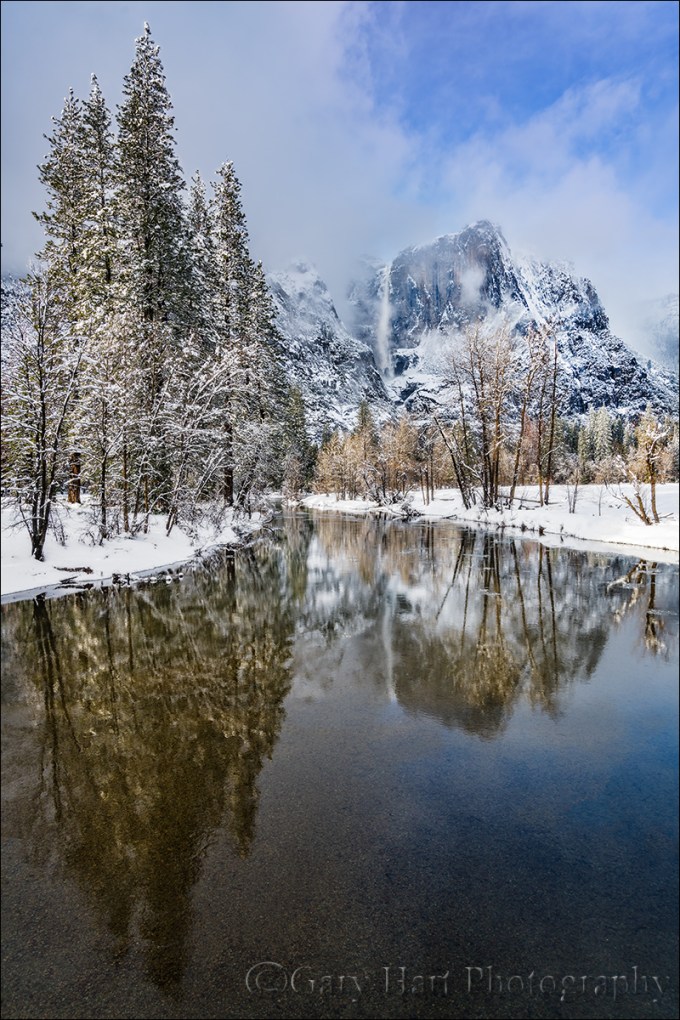
Yosemite Falls Reflection, Swinging Bridge, Yosemite
Sony a7R II
Sony/Zeiss 16-35 f/4
1/20 seconds
F/9
ISO 100
I love being a photographer, but it’s an unfortunate reality that turning your passion into your profession risks sapping the pleasure when earning money takes priority over taking pictures. When I decided to make photography my livelihood, it was only after observing other very good amateur photographers who, lulled by the ease of digital photography, failed to anticipate that running a photography business requires far more than taking good pictures. Rather than an opportunity for further immersion in their passion, their new profession forced them to photograph not for love, but to put food on the table. And with the constant need for marketing, networking, bookkeeping, collections, taxes, and just plain keeping customers happy, these newly minted photographers soon found that little time remained for the very thing that led them to become photographers in the first place.
I changed from photographer to Photographer about twelve years ago. After seeing what the change had done to others, my transition started with a vow to photograph only what I want to photograph, and to never photograph something simply because I thought I could sell it. In my case that meant sticking with landscapes: no people or wildlife (in other words, pretty much nothing that moves).
But how to make money? For that answer I had to look no farther than my career in technical communications: For five years I’d been a technical writer for a (very) large high tech company; before that I’d spent fifteen years tech training, supporting, documenting, and testing a programming language for a small software company. This experience, combined with a lifetime of camping, hiking, backpacking, and (of course) photographing throughout the western US, made photo workshops a logical choice. Today my workshops, supplemented by writing and print sales, allow me to pay the bills, visit favorite destinations, and explore new locations.
And most importantly, my new life has allowed me to concentrate on photographing the subjects and locations I love most. In no particular order (and far from all-inclusive), my favorite subjects include: poppies, the Milky Way, the moon (both crescent and full), rainbows, moonlight, fresh snow, dogwood, bristlecone pines, lightning, fall color, reflections. Among my favorite locations are Yosemite Valley, Grand Canyon’s North Rim, the Colorado River through the Grand Canyon, California’s foothills, Maui’s bamboo forest, and Kilauea Caldera.
Of course nothing beats photographing a favorite subject at a favorite location. To maximize my opportunity to combine favorite subjects and locations, I monitor weather forecasts, check local condition reports (to learn where the trees have turned or the wildflowers are blooming), study natural phenomena to learn how to anticipate an event (such as rainbows and lightning), and plot celestial alignments and add them to my calendar.
Despite (and more likely because of) a lifetime of visits, Yosemite Valley remains at the top of my favorite locations. I can’t give you a favorite season, but I can tell you that my favorite time to be in Yosemite is just after a snowstorm, when every exposed surface is glazed white and overhead swirls an ever-changing mix of clouds and blue sky.
Today’s image of snowy Yosemite with Upper Yosemite Fall reflected in the Merced River is the product of a week’s worth of monitoring weather reports and schedule shifting. That day started with a lock-down blizzard that obscured all views beyond 100 yards, but by late morning the clouds started to lighten and lift and soon the clearing was underway in earnest. Sometimes when a storm clears in Yosemite I’ll pick a spot and work it through the entire clearing process; on this day I took the other approach, moving around capture the clearing in a variety of locations.
I ended up at Swinging Bridge in mid-afternoon. The Merced River widens and slows here, making reflections possible even in high water months. Though Swinging Bridge no longer swings (but I remember when it did), it does bounce enough to jiggle a tripod at the slightest step. To minimize the vibration, I try to set up my tripod atop one of the bridge’s support pillars, but that didn’t give me the exact angle I wanted on this afternoon so I just needed to take extra care to stay still and time my clicks when the bridge was empty.
In the fifteen or so minutes I photographed here that afternoon I tried a variety of compositions, horizontal and vertical. I also played with my polarizer, sometimes maximizing the reflection, other times dialing it down to reveal the rocky riverbed below. Most of my compositions were a little tighter than this, but here I went with a vertical orientation wide enough to include lots of blue sky, and the trees and their reflection from top to bottom. My polarizer was turned to the partial range, enough to capture Upper Yosemite Fall’s reflection, while still revealing some of the submerged smooth stones nearer the bridge. The trees were partially lit by cloud-filtered sunlight just starting to break through.
A Gallery of my Favorite Things
Click an image for a closer look and slide show. Refresh the window to reorder the display.


Silent Night
Posted on March 21, 2017

Silent Night, Yosemite Valley from Tunnel View
Sony a7R II
Sony/Zeiss 16-35 f/4
20 seconds
F/5.6
ISO 1250
One perk of being a photographer is the opportunity to experience normally crowded locations in relative peace. That’s because the best nature photography usually happens at most people’s least favorite time to be outside: crazy weather and after dark. A couple of weeks ago in Yosemite I got the opportunity to enjoy both.
After spending a snowy Sunday guiding a couple around Yosemite Valley in a snowstorm, I dropped them back at (the hotel formerly known as) The Ahwahnee with nothing but the drive home on my mind. But winding through the valley in the fading twilight I saw signs of clearing skies and made a snap decision to check out the scene at Tunnel View.
I found the vista at Tunnel View gloriously empty. By the time I’d set up my camera and tripod the darkness was nearly complete, but as my eyes adjusted I could make out large, black holes in the once solid clouds overhead. Soon stars dotted the blackness above El Capitan and the white stripe of Bridalveil Fall. Each time light from the waxing gibbous moon slipped through the shifting clouds, the entire landscape lit up as if someone had flipped a switch.
Because the best parts of the view were in a narrow strip starting with the snow-glazed trees beneath me and continuing through the scene and up into the star-studded sky, I opted for a vertical composition. To include as much foreground and sky as possible, I went nearly as wide as my 16-35 lens would allow, more or less centering El Capitan and Bridalveil Fall to give the snow and stars equal billing.
Being completely comfortable with my a7RII’s high ISO performance, I didn’t stress the 1250 ISO that allowed me to stop down to a slightly sharper f/5.6 (virtually every lens is a little sharper stopped down from its largest aperture). Night focus with the Sony a7RII is extremely easy, easier than any camera I’ve ever used that isn’t an a7S/a7SII. Often I manually focus on the stars and use focus peaking* to tell me I’m sharp; in this case I back-button auto-focused on the contrast between the moonlit snow and dark granite near Bridalveil Fall. I chose a long enough shutter speed to capture motion blur in the rapidly moving clouds, knowing the potential for visible star streaking was minimized by my extremely wide focal length.
My favorite thing about that evening? The 20 seconds my shutter was open, when I didn’t have anything to do but stand there and enjoy the view in glorious silence.
* Focus peaking is a mirrorless feature that highlights in the viewfinder the in-focus areas of your scene.
Workshop Schedule || Purchase Prints
Yosemite After Dark
Click an image for a closer look and slide show.


 Eloquent Images by Gary Hart