A Star in the East
Posted on May 22, 2017

Yosemite Falls Sunstar, Yosemite (Sony 12-24 f/4)
Sony a7R II
Sony 12-24 f4 G
12mm
1/30 second
F/20
ISO 100
When Sony asked Don Smith and me to try out their new lenses, I immediately thought of a couple of El Capitan and Half Dome views in Yosemite that would be ideal for the new Sony 12-24 f4 G lens. After great success photographing Yosemite’s granite icons as I’ve never been able to before (okay, well there was that one time last year when I borrowed a friend’s ultra-wide lens), I was ready to go home. But before leaving, I decided to walk up to the bridge beneath Lower Yosemite Fall, which was bursting with spring flow.
With my Yosemite Moonbow and Dogwood workshop starting in just five days, my goal this morning was more to see exactly how wet it is on the bridge than it was to take any more pictures, but I decided to take my camera anyway. On the way back I played with ultra-wide (12mm) vertical compositions of this scene. Still getting used to how much I can actually fit in my frame at 12mm, I flipped the camera to horizontal and was startled to find the sun in the right corner of my viewfinder. Startled because from my location, the top of Yosemite Falls is due north (0 degrees), and the sun at that time was at 125 degrees azimuth (35 degrees south of due east).
I quickly came to terms with this revelation and repositioned myself until the sun was behind a tree, dialed the aperture to f/20, composed, metered, and focused, then clicked as the sun peaked out. For the next ten minutes or so I moved as the sun moved, keeping my lens right on the edge of the tree’s shadow.
I knew the sunstar’s highlights would clip, but I wanted to give the shadows as much light as possible without losing the highlights in the waterfall. And as important as the histogram is in these scenes with brilliant highlights and dark shadows, I knew in this case it wouldn’t tell me the entire story. As I increased the light by lengthening my shutter speed, in my viewfinder (I love mirrorless!) I monitored both the shadow side of the histogram and the highlight alert in the fall. I know that shooting raw on my Sony Alpha bodies, I can increase the exposure a stop beyond where the highlight alert appears, but in this case I found that I only needed to add 2/3 stop before the histogram showed me that I had all the recoverable data in the shadows I needed.
A few words about sunstars
Sunstars can be overdone, but they’re often the best way to make something interesting in difficult light. When I find myself wanting to photograph a clear sky scene facing the sun, I often use the sunstar to add visual interest to a sky that is otherwise pretty boring. Often the sunstar makes an excellent counterbalance to another strong visual object. And while a sunstar isn’t exactly what our eyes see when we look toward the sun, I think it makes a pretty good substitute for the blinding experience of looking into the sun. Take a look at the gallery of images below and ask yourself how many of these images would have been as visually appealing without a sunstar spicing up the sky.
To capture a sunstar, use a small aperture (I usually use f/16 or smaller), remove any filters (to minimize flare), and place the sun on a hard edge with most of the sun obscured: the horizon, a cloud, a tree, a flower, and so on. The more sun visible, the bigger (and more blown out) the sunstar will be. As a general rule, I try to avoid too much sun. And since each lens creates a slightly different sunstar, it helps to experiment with different lenses to determine which ones work best.
I’ll be on my annual Grand Canyon raft trip, off the grid and unable to respond, until May 30
Workshop Schedule || Purchase Prints
A Sunstar Gallery


The cat’s out of the bag…
Posted on May 19, 2017
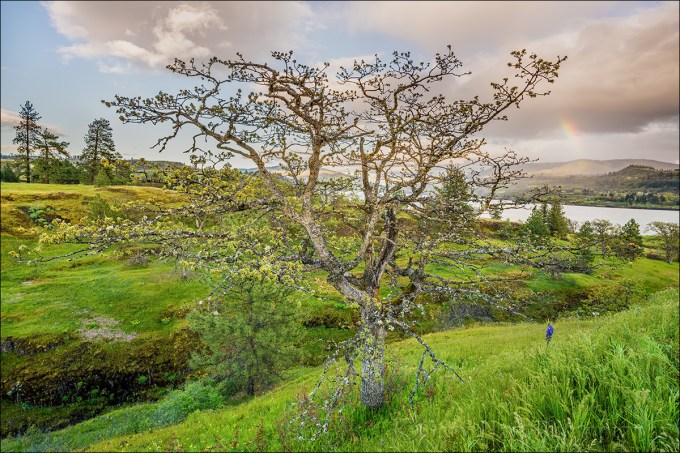
Spring Rainbow, Catherine Creek Trail, Columbia River Gorge
Sony a7R II
Sony 16-35 f2.8 GM
18mm
1/125 second
F/11
ISO 400
For about three weeks I’ve had to bite my tongue about two new Sony lenses I got to try out a few weeks ago. But yesterday Sony announced their brand new 16-35 f2.8 GM and 12-24 f4 G lenses and I’m free to share.
I spent most of this week just outside of Santa Barbara, California with a hundred or so Sony Artisan and Creative Collective photographers at Sony’s Kando Summit. This event was revelatory in many ways: Not only did I get to commune with fellow Sony Artisan’s who had previously been just names on e-mails and pictures on Facebook, I also learned that the future of photography is in the very capable hands of the Collective members—such an impressive group of creative, intelligent young adults.
For most of the Summit the hardware show-stealer was the brand new Sony a9—each of us got our own a9 to play with (but not to keep) for the duration of the event, along with many great photo opportunities (models, sets, and demonstrations) provided to us by Sony. Without going into a lot of detail, I predict that time will prove that the Sony a9 is an actual photography game changer and not just another “next great camera” cliché.
But the availability of the a9 wasn’t a surprise; the surprise (to almost everyone else) was the announcement of the new 16-35 and 12-24 lenses, and their instant availability (again only to borrow). Since I’d already had nearly a week of quality time with them, I passed on this opportunity, but had to jump aside to avoid being trampled by a stampede of photographers intent on getting their hands on these two new lenses.
Don Smith and I were just wrapping up our back-to-back Columbia River Gorge workshops when Sony asked us if we could stay a couple of extra days to try out their two new (super-secret) lenses. They overnighted them to us, and since we had them for a week, Don and I decided we had time to try them for a couple of extra days at our favorite locations closer to home. For me that was Yosemite (Don went to Big Sur). Since I knew I wanted the 12-24 in Yosemite, I took the 16-35 for our two extra days in the CRG.
First Impressions: 16-35 f2.8 GM
The first thing that struck me about this lens was its compactness. As a landscape shooter always on a tripod, I value compactness over speed in a lens, but this one gives me both. Of course it’s not as compact as my Sony/Zeiss 16-35 f4, but it’s noticeably more compact than my Canon 16-35 f2.8 was. I was also pleased with its smoothness of operation and speed of focus—this lens is definitely a joy to use.
Of course compactness and ease of use mean nothing if a lens isn’t sharp, and I can tell you with certainty that this lens is as sharp as we’ve come to expect Sony’s GM lenses to be—that is, ridiculously sharp from corner to corner and throughout the aperture range. I haven’t really taken the time to do a/b tests against any other lenses (I leave the pixel-peeping to others), but I did magnify many images to 100% (on my 27-inch iMac Retina 5K monitor) and can’t imagine that I have any lenses sharper than this one (including primes).
First Impressions: 12-24 f4 G
Even more than with the 16-35, the 12-24 blew me away with its compactness. I’ve handled the Nikon 14-24 f2.8 many times, and actually used Canon’s 11-24 f4, and as sharp as those lenses are, the first thing I remember about those lenses is their heft—they’re beasts, and just too heavy to carry in my bag for regular use. Not so with the Sony 12-24: This lens is 1/3 the weight of Canon’s 11-24—in fact it’s noticeably lighter than the Canon 24-105, and not much heavier than the Canon 17-40. Wow.
Like the 16-35, this lens just felt good on my camera and in my hand. The operation was smooth, and focus was fast and easy. Having rarely shot with a lens this wide, I found myself frequently surprised by how much more I could get in my frame at 12mm than I can at 16mm—suddenly things not possible with a single click before were very doable. With so many views of very large and close subjects (such as El Capitan and Half Dome), this lens was made for Yosemite. And I did an actual double-take at the top of the trail to lower Yosemite Fall when I realized I could get the entire fall and a sunstar (with the sun behind my right shoulder) in one frame (see the gallery below).
Sharpness? Again, I didn’t do any pixel peeping beyond magnifying my images to 100%, but they looked every bit as sharp as the Canon 11-24 images that blew me away when I used it a year ago. I will own this lens the first day it’s available.
About this image
On the first evening with our new toys, Don and I went to Catherine Creek on the Washington side of the Columbia River Gorge. At the trailhead Don headed off in one direction and I went in the other, eventually ending up at this tree that I remembered from previous visits.
With the wind blowing like crazy, probably 25-35 MPH, this lens was perfect for the wide scenes that deemphasize motion. To further ensure against any motion blur I bumped my ISO to 400 and went to work. I started by balancing the tree with a small waterfall that was down the hillside to my left, but when a surprise rainbow fragment popped out above the Columbia River I quickly shifted position. My exposure variables were already set, so all I had to do was compose, focus, and shoot. Good thing, because the rainbow faded quickly and I only had time for a handful of images before it was gone completely.
Listen to Don and I discuss the new lenses on the Alpha Universe Podcast
Sony 16-35 f2.8 GM and Sony 12-24 f4 G Sample Images
Click an image for a closer look and slide show. Refresh the window to reorder the display.


Spring has sprung
Posted on May 15, 2017
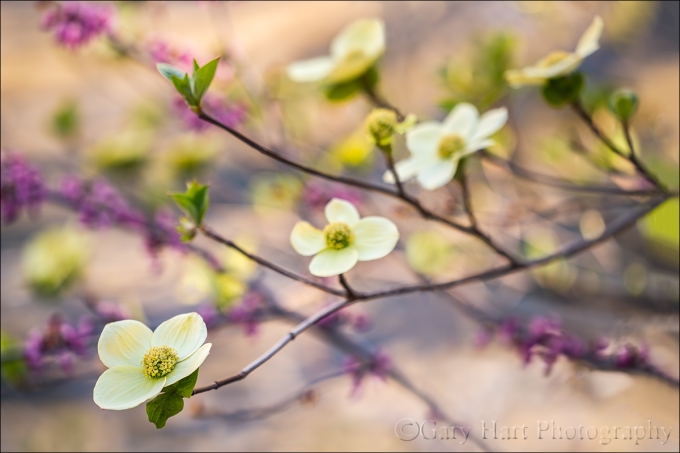
Dogwood and Redbud, Merced River, Yosemite
Sony a7R II
Sony 70-200 f/4
1/40 second
F/4
ISO 200
I spent most of the last week in Yosemite and can confirm that spring has definitely sprung there. The Merced River, swollen by snowmelt, is overspilling its banks, flooding meadows and submerging riverside trails. Reflections are everywhere, and viewing the waterfalls without getting wet? Forget about it.
Another spring highlight is the moonbow that colors the mist beneath Yosemite Falls. A fortunate convergence of Yosemite Falls’ southeast exposure and the angle of the rising full moon when the snowmelt is at its peak make Yosemite one of the best locations in the world to witness a lunar rainbow. I was able to photograph it three times last week, twice with my workshop group and once with a private tour customer. Easily visible to the naked eye as a silvery arc in the billowing mist, a long exposure reveals the moonbow’s true colors.
But of all the spring treats Yosemite offers, for creative photography I think the dogwood might be my favorite. For just a few short weeks in April and May, these graceful blooms shower Yosemite Valley with splashes of white that remind me of the Fourth of July sparklers of my childhood. But unlike the ephemeral sparks of a sparkler, the dogwood progress in slow motion so I can appreciate them at a much more relaxing pace.
I found this branch at the Bridalveil Fall vista on Northside Drive, about a mile east of Valley View. The river was gold with late light, and the air was still as I went to work on the scene. Careful positioning allowed me to juxtapose three layers in my frame: in the foreground is the dogwood branch with varying degrees of detail; the middle-ground is a blend of heavily blurred redbud and more dogwood; all this spring beauty stands out against a backdrop of the sunlit Merced River. I experimented with different depths of field by varying my f-stop, focal length, and focus distance until I was satisfied.
Yosemite Spring
Click an image for a closer look and slide show. Refresh the window to reorder the display.


Moving the eye
Posted on April 29, 2017
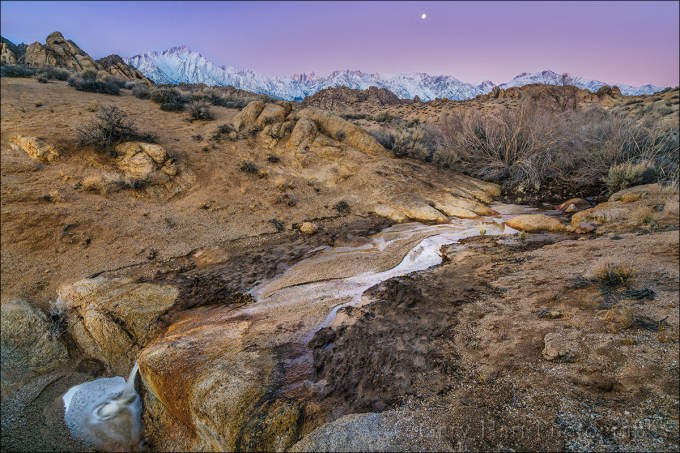
Sierra Dawn, Mt. Whitney and the Alabama Hills, California
Sony a7R II
Sony/Zeiss 16-35 f/4
.4 seconds
F/10
ISO 100
With virtually every still camera now equipped with video capability, the last few years have seen an explosion of nature videos. When done well, videos of nature can be quite effective, conveying motion and engaging both eyes and ears to reveal the world in a manner that’s closer to the human experience than a still image is. But like other sensory media whose demise has been anticipated by the arrival of something “better,” (with apologies to Mark Twain) let me say that the rumors of still photography’s death at the hands of videography have been greatly exaggerated.
Just as I much prefer reading the book to watching the movie, I prefer the unique perspective a still image presents. For example, while motion in a video is similar to being there, a still image gives me the freedom to apply my own motion, at my own pace. A video’s frame rate dictates the pace of my relationship with the scene, while entering the world of a photograph gives my eyes the freedom to linger and explore a scene’s nooks and crannies, to savor its nuances at my own pace.
In a video my eyes are essentially fixed while the scene moves before them. In a still image, on the other hand, my eyes do the moving, often following lines in the scene the way a hiker follows a trail to reach a destination. But also like a hiker, I can choose to venture cross-country through an image to more closely scrutinize whatever looks interesting.
About this image
I’d been in the Eastern Sierra, exploring the Alabama Hills specifically looking for scenes near the famous Mobius Arch that didn’t include the arch. Detouring from the well-worn path back to the car, I headed up a rocky creek bed that was carrying water for the first time in recent memory. Soon the creek’s quiet whisper was replaced by the sound of a more agitated rush, hinting at a little faster water somewhere around the next bend. Continuing upstream, I scrambled up a large boulder and was rewarded with an unobstructed view of the Sierra Crest, freshly glazed with snow. Below me the creek cut a diagonal path across weathered granite, rushing through a narrow gap and over a rocky ledge.
The light was poor for photography that evening, so my camera stayed in my bag. Instead, I simply cinched my jacket against the January wind and appreciated the view. Standing there, I thought about the next day’s sunrise, its softer light, and (especially) the nearly full moon that would descend through twilight’s pastel hues.
Having already plotted the moon’s path, I was able to visualize its nearly full disk at the top of my frame, low in the sky between Mt. Whitney and Mt. Williamson. But including the creek in the same frame would pose a problem. Normally I’d drop to creek level to shrink the middle-ground, but because the creek was in a steep-walled ravine of its own creation, any view that included the creek and the Sierra Crest needed to be on higher ground. So I scanned the nearby terrain and soon found a narrow gap between two elevated rocks, just wide enough for me and my tripod with a little creative contortion (by both tripod and photographer), and just high enough to see the mountains.
The next morning I beelined back to “my” spot and went right to work in the predawn gloaming. Wedged into the rocks about five vertical feet above the creek, my perch felt more awkward than dangerous. To fit the entire scene, I used the full width of my Sony/Zeiss 16-35 lens. I was thrilled by how well each visual element meshed vantage point: the mountains—Lone Pine Peak, Mt. Whitney, and Mt. Williamson connected to the tumbling cascade by a slash of moonlit creek, and moon as the scene’s exclamation point. I even liked the way the nearby granite sand and rocks, and the shrubs stripped bare by winter cold and wind, filled the empty surroundings with a pleasing textures and shapes without distracting.
Once I identified and refined my composition until I was confident I’d done as well as I could with it, I clicked at regular intervals to capture the entire sunrise sequence. The moment of this image was darker to my eyes what you see in this frame, dark enough that the creek still reflected moonlight. I was particularly grateful for the dynamic range of my Sony a7RII, which allowed me to capture all this wonderful detail in my scene without turning the moon into a useless white blob.
Images that Move the Eye
Click an image for a closer look and slide show. Refresh the window to reorder the display.


Dogwood days
Posted on April 21, 2017

Forest Dogwood, Yosemite Valley
Canon EOS 5D Mark III
1/80 second
159 mm
ISO 800
F4
People ask all the time for my favorite season in Yosemite, and I really can’t give them an answer that doesn’t sound like a press conference by a waffling politician—there are things I love about each season in Yosemite, so asking me to choose is like asking me to pick a favorite child. But I can tell you what I like about each season, and I’ve always felt that spring in Yosemite is the most consistently photographable—it doesn’t really matter what the conditions are, I can always find something to photograph.
Spring is when Yosemite’s waterfalls peak, and Yosemite Valley starts to green up. Many of the meadows are home to ephemeral pools that reflect Yosemite’s iconic monoliths, soaring cliffs, and plunging waterfalls. And with all the water in the falls, spring sunshine means rainbow opportunities from many spots if you know when to be there.
Maybe my favorite Yosemite spring treat is dogwood, which usually peaks around May 1, give or take a week or two. I enjoy photographing dogwood in any kind of light, from sunshine, to overcast, to full shade. In sunshine, I put backlit blooms against a dark background, expose for the flower, and go to town. The translucence of these backlit flowers gives them a luminosity that appears to originate from within. In overcast and shade, I opt for soft focus that emphasizes my primary subject and reduces the background to colors, lines, and shapes.
Regardless of the light, I start with a bloom, group of blooms, or entire branch, that I can isolate from surrounding distractions. Once I identify a likely candidate, I maneuver myself until I can get the subject against a complementary background, such as shade, shape, and color.
I worked this scene for about a half hour before I was satisfied. I started with the flower-laden branch and moved around a bit until the background was right. Then I tried a variety of focal lengths to simplify, balance, and soften the composition. Once I was satisfied with my composition, I used live-view to focus toward the front of the center cluster. Finally, I ran the entire range of f-stops from f4 to f16, in one-stop increments, to ensure a variety of bokeh effects to choose from.
A Dogwood Gallery


Seeing the whole frame
Posted on April 14, 2017
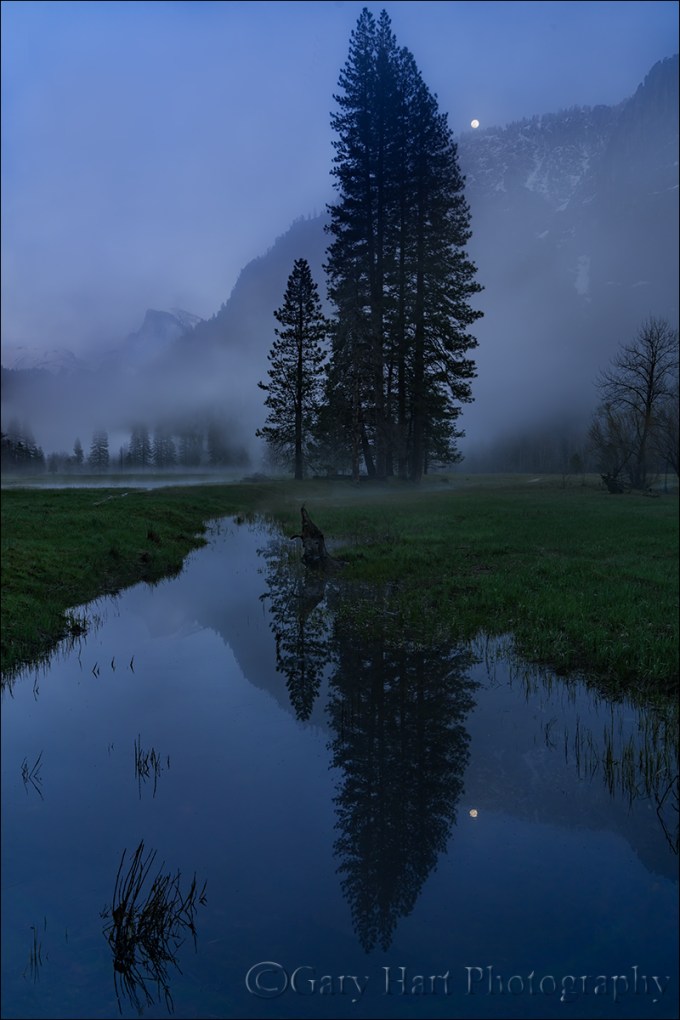
Moonrise Reflection, Leidig Meadow, Yosemite
Sony a7R II
Sony/Zeiss 24-70 f4
1 second
F/10
ISO 100
Photographers are responsible for every square inch of their frame—not just the primary subject, but every other point of visual interest, and the relationships of those points to each other. Nevertheless, there’s a natural tendency give too much attention to the primary subject at the expense of the rest of the scene. The result is moments in nature that felt special in person fall flat in an image.
I’m a tripod evangelist because there’s just too much going on in most scenes to nail an image on the first click: Reviewing a hand-held image requires us to pull the camera down from the scene we just shot, while composing on a tripod, we can evaluate and refine without changing the prior shot, ensuring that each subsequent click is an improvement of the prior click.
For example
We wrapped up last week’s Yosemite Moonbow and Wildflowers workshop in Leidig Meadow, photographing Half Dome reflecting in small vernal pools. I’d spent most of the evening photographing about 30 feet west of this spot, mostly tighter (but still fairly wide) compositions that used the stump in the center of this frame as a foreground balance-point for Half Dome, and the tall trees splitting the middle to frame the right side. The sunset color had left Half Dome, and I saw that most of the group was starting to pack up.
The April full moon doesn’t align well with Half Dome, so it wasn’t a consideration in that night’s sunset plans. But because the moon (two days from full) rose about two hours before sunset, as the light faded I guessed that it might just about be high enough to top the valley wall. With low expectations I glanced toward the high ridge just east of Sentinel Rock (partially visible on the right in this image), where, what to my wondering eye should appear (oh, wait a minute, wrong story)…, and saw the glow of the moon’s leading edge pushing up through the trees.
I called out to the group and soon everyone was back in action. The window to could capture foreground and lunar detail in a single frame was closing fast, but I knew I’d need to relocate to include the moon effectively.
One important concept I try to convey to my workshop students is “visual weight,” the idea that elements in the frame draw the eye the way gravity tugs an object earthward. Visual weight isn’t quantifiable like gravity; it can vary with many factors that change with the conditions, perspective, and even the viewer (that is, visual weight isn’t entirely a function of the object the object itself). Qualities of an object than can pull the eye in an image include: size, brightness, color, contrast, position in the frame, and emotional connection (for example, the moon).
In this scene I felt that the moon and Half Dome carried equal visual weight: Half Dome for its bulk and iconic status, the moon for its brilliance and emotional pull. Given this, if nothing else I needed to balance the two of them in my frame, so I moved eastward along the pool’s bank until Half Dome and the moon were equidistant from their respective sides, connected by the diagonal of the ridge. The diagonal was a bonus, because another important concept is the power of diagonal lines, both literal lines or lines implied by a virtual connection between two objects, and their ability to generate visual tension by moving they eye along two planes at once.
My next concern was how to handle the rest of the scene. I try to avoid cutting strong elements in my frame, so I opted for a vertical that included all of the tall nearby evergreens and their reflection. This required nearly all the width my 24-70 lens offered (if I’d have had more time, I’d have switched to my 16-35), and shrunk the moon quite a bit. Since I’ve always believed that even a small moon (in a wide composition) carries lots of weight, I don’t usually worry too much about that if the rest of the composition calls for it, and I’m happy with my choice here.
With the primary subjects handled, I still needed to address the rest of the frame. My prime concern was the grass in the reflection—though it doesn’t carry nearly the visual weight of Half Dome and the moon, it does have some visual pull, especially the way it stands out against the pristine reflection. I try to avoid anything that my draws the eye to the edge of my frame, so after evaluating my first click on my LCD, I tweaked the composition slightly to keep the borders as free of grass clumps and blades as possible.
In a perfect world the large clump on the bottom left would have had a little more room around it, but the world rarely cooperates perfectly and I soon realized that going wider to give that clump more space would have introduced even greater distractions elsewhere. I was also aware that the stump that had been a focus point of my earlier compositions (lots of visual weight), in my new position was mostly swallowed by the reflection, but there was nothing I could do about that.
The hyperfocal distance at my current focal length and f-stop was 9 feet (focusing nine feet in would have given me “acceptable” sharpness from 4 1/2 feet to infinity), but since the closest grass was at least 10 feet away, I focused farther into the scene to ensure an even sharper background.
Exposing a scene like this on my Sony a7RII is so easy it feels like cheating: I just kept dialing my shutter speed longer until the “zebra” highlight alert appeared in the moon, then pushed the exposure another 2/3 stop knowing I could easily recover the moon’s highlights in Lightroom.
Though this was billed as a “Moonbow and Wildflowers” workshop, we got neither: clouds prevented us from photographing the moonbow in Yosemite Fall, and the wildflowers in Merced River Canyon weren’t quite ready for primetime. But I don’t think anyone in the group would trade what we got for what we’d planned. This workshop included (daylight) waterfall rainbows, multiple clearing storms, more reflections than we could count, and even a little snowfall. Our shoot this evening was a fitting finale.
Using the whole frame


A few of my favorite things
Posted on March 30, 2017
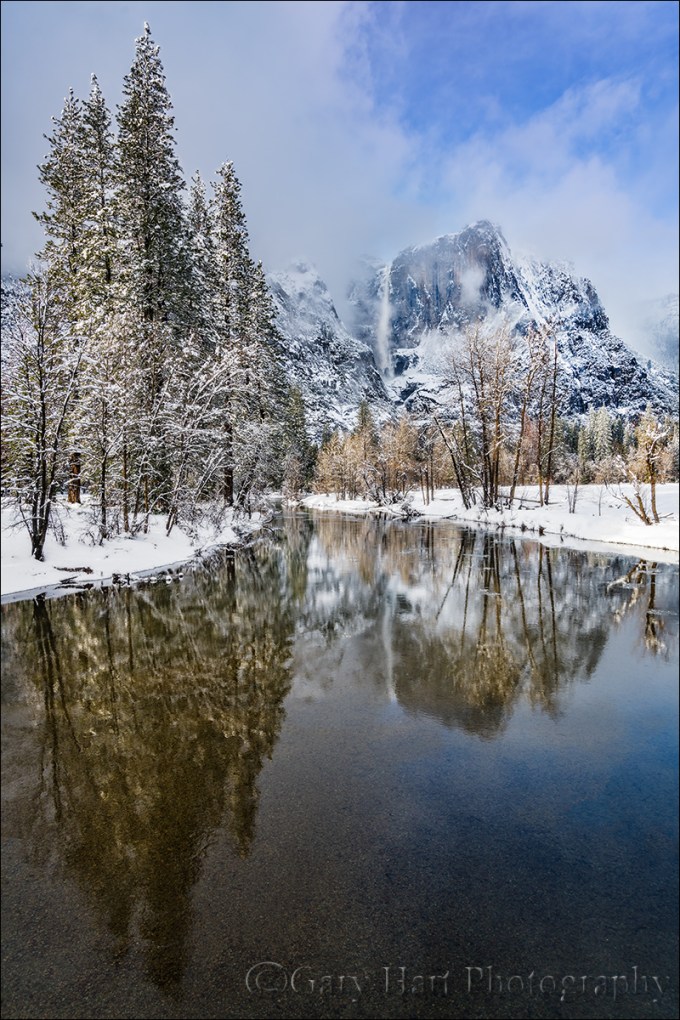
Yosemite Falls Reflection, Swinging Bridge, Yosemite
Sony a7R II
Sony/Zeiss 16-35 f/4
1/20 seconds
F/9
ISO 100
I love being a photographer, but it’s an unfortunate reality that turning your passion into your profession risks sapping the pleasure when earning money takes priority over taking pictures. When I decided to make photography my livelihood, it was only after observing other very good amateur photographers who, lulled by the ease of digital photography, failed to anticipate that running a photography business requires far more than taking good pictures. Rather than an opportunity for further immersion in their passion, their new profession forced them to photograph not for love, but to put food on the table. And with the constant need for marketing, networking, bookkeeping, collections, taxes, and just plain keeping customers happy, these newly minted photographers soon found that little time remained for the very thing that led them to become photographers in the first place.
I changed from photographer to Photographer about twelve years ago. After seeing what the change had done to others, my transition started with a vow to photograph only what I want to photograph, and to never photograph something simply because I thought I could sell it. In my case that meant sticking with landscapes: no people or wildlife (in other words, pretty much nothing that moves).
But how to make money? For that answer I had to look no farther than my career in technical communications: For five years I’d been a technical writer for a (very) large high tech company; before that I’d spent fifteen years tech training, supporting, documenting, and testing a programming language for a small software company. This experience, combined with a lifetime of camping, hiking, backpacking, and (of course) photographing throughout the western US, made photo workshops a logical choice. Today my workshops, supplemented by writing and print sales, allow me to pay the bills, visit favorite destinations, and explore new locations.
And most importantly, my new life has allowed me to concentrate on photographing the subjects and locations I love most. In no particular order (and far from all-inclusive), my favorite subjects include: poppies, the Milky Way, the moon (both crescent and full), rainbows, moonlight, fresh snow, dogwood, bristlecone pines, lightning, fall color, reflections. Among my favorite locations are Yosemite Valley, Grand Canyon’s North Rim, the Colorado River through the Grand Canyon, California’s foothills, Maui’s bamboo forest, and Kilauea Caldera.
Of course nothing beats photographing a favorite subject at a favorite location. To maximize my opportunity to combine favorite subjects and locations, I monitor weather forecasts, check local condition reports (to learn where the trees have turned or the wildflowers are blooming), study natural phenomena to learn how to anticipate an event (such as rainbows and lightning), and plot celestial alignments and add them to my calendar.
Despite (and more likely because of) a lifetime of visits, Yosemite Valley remains at the top of my favorite locations. I can’t give you a favorite season, but I can tell you that my favorite time to be in Yosemite is just after a snowstorm, when every exposed surface is glazed white and overhead swirls an ever-changing mix of clouds and blue sky.
Today’s image of snowy Yosemite with Upper Yosemite Fall reflected in the Merced River is the product of a week’s worth of monitoring weather reports and schedule shifting. That day started with a lock-down blizzard that obscured all views beyond 100 yards, but by late morning the clouds started to lighten and lift and soon the clearing was underway in earnest. Sometimes when a storm clears in Yosemite I’ll pick a spot and work it through the entire clearing process; on this day I took the other approach, moving around capture the clearing in a variety of locations.
I ended up at Swinging Bridge in mid-afternoon. The Merced River widens and slows here, making reflections possible even in high water months. Though Swinging Bridge no longer swings (but I remember when it did), it does bounce enough to jiggle a tripod at the slightest step. To minimize the vibration, I try to set up my tripod atop one of the bridge’s support pillars, but that didn’t give me the exact angle I wanted on this afternoon so I just needed to take extra care to stay still and time my clicks when the bridge was empty.
In the fifteen or so minutes I photographed here that afternoon I tried a variety of compositions, horizontal and vertical. I also played with my polarizer, sometimes maximizing the reflection, other times dialing it down to reveal the rocky riverbed below. Most of my compositions were a little tighter than this, but here I went with a vertical orientation wide enough to include lots of blue sky, and the trees and their reflection from top to bottom. My polarizer was turned to the partial range, enough to capture Upper Yosemite Fall’s reflection, while still revealing some of the submerged smooth stones nearer the bridge. The trees were partially lit by cloud-filtered sunlight just starting to break through.
A Gallery of my Favorite Things
Click an image for a closer look and slide show. Refresh the window to reorder the display.


Silent Night
Posted on March 21, 2017

Silent Night, Yosemite Valley from Tunnel View
Sony a7R II
Sony/Zeiss 16-35 f/4
20 seconds
F/5.6
ISO 1250
One perk of being a photographer is the opportunity to experience normally crowded locations in relative peace. That’s because the best nature photography usually happens at most people’s least favorite time to be outside: crazy weather and after dark. A couple of weeks ago in Yosemite I got the opportunity to enjoy both.
After spending a snowy Sunday guiding a couple around Yosemite Valley in a snowstorm, I dropped them back at (the hotel formerly known as) The Ahwahnee with nothing but the drive home on my mind. But winding through the valley in the fading twilight I saw signs of clearing skies and made a snap decision to check out the scene at Tunnel View.
I found the vista at Tunnel View gloriously empty. By the time I’d set up my camera and tripod the darkness was nearly complete, but as my eyes adjusted I could make out large, black holes in the once solid clouds overhead. Soon stars dotted the blackness above El Capitan and the white stripe of Bridalveil Fall. Each time light from the waxing gibbous moon slipped through the shifting clouds, the entire landscape lit up as if someone had flipped a switch.
Because the best parts of the view were in a narrow strip starting with the snow-glazed trees beneath me and continuing through the scene and up into the star-studded sky, I opted for a vertical composition. To include as much foreground and sky as possible, I went nearly as wide as my 16-35 lens would allow, more or less centering El Capitan and Bridalveil Fall to give the snow and stars equal billing.
Being completely comfortable with my a7RII’s high ISO performance, I didn’t stress the 1250 ISO that allowed me to stop down to a slightly sharper f/5.6 (virtually every lens is a little sharper stopped down from its largest aperture). Night focus with the Sony a7RII is extremely easy, easier than any camera I’ve ever used that isn’t an a7S/a7SII. Often I manually focus on the stars and use focus peaking* to tell me I’m sharp; in this case I back-button auto-focused on the contrast between the moonlit snow and dark granite near Bridalveil Fall. I chose a long enough shutter speed to capture motion blur in the rapidly moving clouds, knowing the potential for visible star streaking was minimized by my extremely wide focal length.
My favorite thing about that evening? The 20 seconds my shutter was open, when I didn’t have anything to do but stand there and enjoy the view in glorious silence.
* Focus peaking is a mirrorless feature that highlights in the viewfinder the in-focus areas of your scene.
Workshop Schedule || Purchase Prints
Yosemite After Dark
Click an image for a closer look and slide show.


Variations on a scene
Posted on March 14, 2017
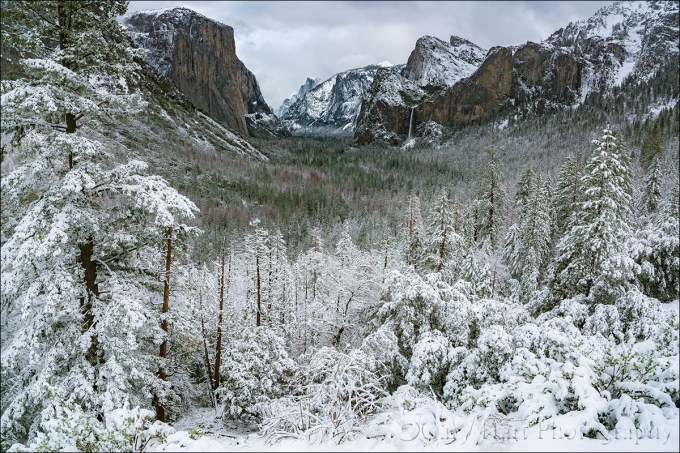
Snowfall, Tunnel View, Yosemite
Sony a7R II
Sony/Zeiss 16-35 f/4
1/250 second
F/9
ISO 100
A week or so ago I had the good fortune to be in Yosemite for the most recent snowfall there. All week the National Weather Service had been waffling a bit on the snow—based on the forecast, I probably wouldn’t have made the trip. But I was there anyway, guiding a fun couple from England for the weekend. Following a nice but unspectacular Saturday, we woke Sunday morning to find the world dipped in white.
The snow fell all day, at times so hard that that it was difficult to see more than a couple hundred yards, other times dwindling to a few flakes per minute. During one of the lulls we made our way to Tunnel View for the obligatory shot there. Despite hundreds (thousands?) of pictures of this view, after surveying the scene for a few minutes I couldn’t resist pulling out my camera and tripod.
My general feeling is that people tend to go too wide with their Tunnel View images, shrinking the main features (El Capitan, Half Dome, Bridalveil Fall) to include less exciting granite left of El Capitan and right right of Cathedral Rocks/Bridalveil Fall. That’s why I opt to tighten my horizontal Tunnel View compositions on the left and right, or isolate one or two of the three primary subjects with a telephoto. And when something exciting is happening in the sky (moon, clouds, or color) or foreground (fog, snow, rainbow), I’ll often compose vertically and bias my composition to favor the most compelling part of the scene.
With so many Tunnel View images in my portfolio, that afternoon I consciously set aside my long-held composition biases in favor of something I don’t already have. Of course the feature that most set the scene apart was the snow, so I set out to find the best way to emphasize it. Because the snow level that day was right around 4000 feet, also the elevation of Yosemite Valley, even the three hundred or so feet of elevation gain at Tunnel View resulted in much more snow virtually at my feet than on the distant valley floor. My Sony/Zeiss 16-35 f/4 lens, a great lens that I usually find too wide for Tunnel View, was perfect for highlighting the foreground snow.
Dialing my focal length to about 20mm allowed me to maximize the foreground snow while including minimal less-than-interesting gray sky. Of course going this wide meant shrinking the scene’s “big three” and adding lots of extraneous middle-ground on the left and right. To mitigate that problem I used the snowy pine on the left, often an obtrusive distraction to be dealt with, as a frame for that side of the scene. Not only did the tree block less interesting features, it actually enhanced the snowy effect I sought. On the right the diagonal ridge added a touch of visual motion (diagonal lines are so much stronger visually than horizontal and vertical lines), and it didn’t hurt that much of the bland granite there was covered with snow.
Workshop Schedule || Purchase Prints
A Tunnel View Gallery
Click an image for a closer look and slide show. Refresh the window to reorder the display.


Photograph the Milky Way: Part Two
Posted on March 9, 2017
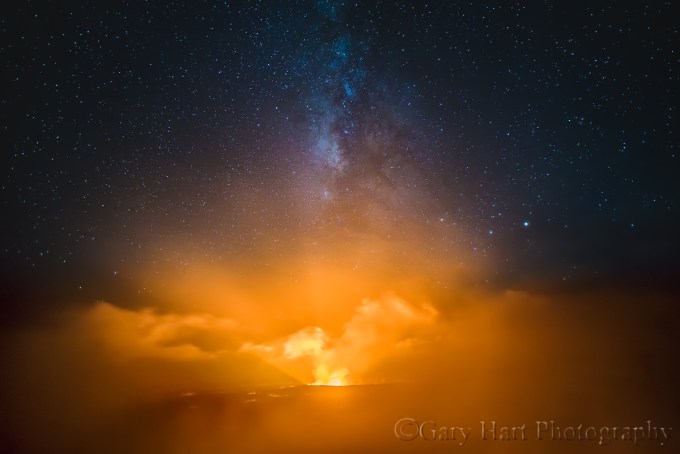
Fire and Mist, Halemaumau Crater, Kilauea, Hawaii
Sony a7S
Sony/Zeiss 16-35 f4
10 seconds
F/4
ISO 3200
Previously on the Eloquent Nature blog: Photograph the Milky Way: Part One
Viewing the Milky Way requires nothing more than a clear, dark sky. The Milky Way’s luminosity is fixed, so our ability to see it is largely a function of the darkness of the surrounding sky—the darker the sky, the better the Milky Way stands out. But because our eyes can only take in a fixed amount of light, there’s a ceiling on our ability to view the Milky Way with the unaided eye.
A camera, on the other hand, can accumulate light for a virtually unlimited duration. This, combined with technological advances that continue increasing the light sensitivity of digital sensors, means that when it comes to photographing the Milky Way, well…, the sky’s the limit. As glorious as it is to view the Milky Way with the unaided eye, a camera will show you things your eyes can’t see. In fact, not only does the right camera in the right hands resolve far more Milky Way detail than we can see, it also reveals color too faint for the human eye.
Knowing when and where to view the Milky Way is a great start, but photographing the Milky Way requires a combination of equipment, skill, and experience that doesn’t just happen overnight (so to speak). But Milky Way photography doesn’t need to break the bank, and it’s not rocket science.
Equipment
Bottom line, photographing the Milky Way is all about maximizing your ability to collect light: long exposures, fast lenses, high ISO.
Camera
In general, the larger your camera’s sensor and photosites (the “pixels” that capture the light), the more efficiently it collects light. Because other technology is involved, there’s not an absolute correlation between sensor and pixel size and light gathering capability, but a small, densely packed sensor almost certainly rules out your smartphone and point-and-shoot cameras anything more than a fuzzy snap of the Milky Way. At the very least you’ll want a mirrorless or DSLR camera with an APS-C (1.5/1.6 crop) size sensor. Better still is a full frame mirrorless or DSLR camera. (A 4/3 Olympus or Panasonic sensor might work, but I’ve not been overly impressed with the high ISO images I’ve seen from these smaller sensors.)
Another general rule is that the newer the technology, the better it will perform in low light. Even with their smaller, more densely packed sensors, many of today’s top APS-C bodies outperform in low light full frame bodies that have been out for a few years, so full frame or APS-C, if your camera is relatively new, it will probably do the job.
If you’re shopping for a new camera and think night photography might be in your future, compare your potential cameras’ high ISO capabilities—not their maximum ISO, but read some reviews to see how your camera candidates fare in objective tests by credible sources like DP Review or Imaging Resource (there are many others).
An often overlooked consideration is the camera’s ability to focus in extreme low light. Autofocusing on the stars or landscape will be difficult to impossible, and you’ll not be able to see well enough through a DSLR’s viewfinder to manually focus. Some bodies with a fast lens will autofocus on a bright star or planet, but it’s not something I’d count on (though I expect within a few years before this capability becomes more common).
Having photographed for years with Sony and Canon, and working extensively with most other mirrorless and DSLR bodies in my workshops, I have lots of experience with cameras from many manufacturers. In my book, focus peaking makes mirrorless the clear winner for night focusing. Sony’s current mirrorless bodies (a7R II, a7S, and a7S II) are by far the easiest I’ve ever used for focusing in the dark—what took a minute or more with my Canon, I can do in seconds using focus peaking with my Sony bodies. That said, of the major DSLR brands, I’ve found Canon’s superior LCD screen makes it much easier to focus in extreme low light than Nikon. (More on focus later.)
Lens
Put simply, to photograph the Milky Way you want fast, wide glass—the faster the better. Fast to capture as much light as possible; wide to take in lots of sky. A faster lens also makes focus and composition easier because its larger aperture gathers more light. How fast? F/2.8 or faster—preferably faster. How wide? At least 28mm, and 24mm or wider is better still. I do enough night photography that I have a dedicated, night-only lens—my original night lens was a Canon-mount Zeiss 28mm f/2; my current night lens is a Rokinon 24mm f/1.4.
Tripod
It goes without saying that at exposure times up to 30 seconds, you’ll need a sturdy tripod and head for Milky Way photography. You don’t need to spend a fortune, but the more you spend, the happier you’ll be in the long run (trust me). Carbon fiber provides the best combination of strength, vibration reduction, and light weight, but a sturdy (heavy) aluminum tripod will do the job.
An extended centerpost is not terribly stable, and a non-extended centerpost limits your ability to spread the tripod’s legs and get low, so I avoid tripods with a centerpost. But if you have a sturdy tripod with a centerpost, don’t run out and purchase a new one—just don’t extend the centerpost when photographing at night.
Read my tips for purchasing a tripod here.
Other stuff
To eliminate the possibility of camera vibration I recommend a remote release; without a remote you’ll risk annoying all within earshot with your camera’s 2-second timer beep. Don’t forget a flashlight or headlamp for the walk to and from the car. And it’s never a bad idea to toss an extra battery in your pocket.
Getting the shot
Keep it simple
There are just so many things that can go wrong on a moonless night when there’s not enough light to see camera controls, the contents of your bag, and the tripod leg you’re about to trip over. After doing this for many years, both on my own and helping others in workshops, I’ve decided that simplicity is essential.
Simplicity starts with paring down to the absolute minimum gear: a sturdy tripod, one body, one lens, and a remote release (plus an extra battery in my pocket). Everything else stays at home, in the car, or if I’m staying out after a sunset shoot, in my bag.
Upon arrival at my night photography destination, I extract my tripod, camera, lens (don’t forget to remove the polarizer), and remote release. I connect the remote and mount my lens—if it’s a zoom I set the focal length at the lens’s widest—then set my exposure and focus (more on exposure and focus below). If I’m walking to my photo site, I carry the pre-exposed and focused camera on the tripod (I know this makes some people uncomfortable, but if you don’t trust your head enough to hold onto your camera while you’re walking, it’s time for a new head), trying to keep the tripod as upright and stable as possible as I walk.
Flashlights/headlamps are essential for the walk/hike out to to and from my shooting location, but while I’m there and in shoot mode, it’s no flashlights, no exceptions. This is particularly important when I’m with a group. Not only does a flashlight inhibit your night vision, its light leaks into the frame of everyone who’s there. And while red lights may be better for your night vision, they’re particularly insidious about leaking into everyone’s frame (so before you ask, no red light!). If you follow my no flashlight rule, you’ll be amazed at how well your eyes adjust. I can operate my camera’s controls in the dark—it’s not hard with a little practice, and well worth the effort to learn. If I ever do need to see my camera to adjust something, or if I need to see to move around, my cell phone screen (not the phone’s flashlight, just its screen) gives me all the light I need.
Composition
A good Milky Way image is distinguished from an ordinary Milky Way image by its foreground. Simply finding a location that’s dark enough to see the Milky Way is difficult enough; finding a dark location that also has a foreground worthy of pairing with the Milky Way usually takes a little planning.
Since the Milky Way’s center is in the southern sky (for Northern Hemisphere observers), I look for remote (away from light pollution) subjects that I can photograph while facing south. Keep in mind that unless you have a ridiculous light gathering camera (like the Sony a7S or a7S II) and an extremely fast lens (f/2 or faster), your foreground will probably be more dark shape than detail. Water’s inherent reflectivity makes it a good foreground subject as well, especially if the water includes rocks or other features to add a little visual weight.
When I encounter a scene I deem photo worthy, not only do I try to determine its best light and moon rise/set possibilities, I also consider its potential as a Milky Way subject. Can I align it with the southern sky? Are there strong subjects that stand out against the sky? Is there any water I can include in my frame?
I’ve found views of the Grand Canyon from the North Rim, the Kilauea Caldera, and the bristlecone pines in California’s White Mountains that work spectacularly. On the other hand, while Yosemite Valley has lots to love, you don’t see a lot of Milky Way images from Yosemite Valley because there just aren’t that many south views there, and Yosemite’s towering, east/west trending granite walls give its south views an extremely high horizon that blocks much of the galactic core from the valley floor.
To maximize the amount of Milky Way in my frame, I generally (but not always) start with a vertical orientation that’s at least 2/3 sky. On the other hand, I do make sure to give myself more options with a few horizontal compositions as well. Given the near total darkness required of a Milky Way shoot, it’s often too dark to see well enough to compose that scene. If I can’t see well enough to compose I guess at a composition, take a short test exposure at an extreme (unusable) ISO to enable a relatively fast shutter speed (a few seconds), adjust the composition based on the image in the LCD, and repeat until I’m satisfied.
Focus
Needless to say, when it’s dark enough to view the Milky Way, there’s not enough light to autofocus (unless you have a rare camera/lens combo that can autofocus on a bright star and planet), or even to manually focus with confidence. And of all the things that can ruin a Milky Way image (not to mention an entire night), poor focus is number one. Not only is achieving focus difficult, it’s very easy to think you’re focused only to discover later that you just missed.
Because the Milky Way’s focus point is infinity, and you almost certainly won’t have enough light to stop down for more depth of field, your closest foreground subjects should be far enough away to be sharp when you’re wide open and focused at infinity. Before going out to shoot, find a hyperfocal app and plug in the values for your camera and lens at its widest aperture. Even though it’s technically possible to be sharp from half the hyperfocal distance to infinity, the kind of precise focus this requires is difficult to impossible in the dark, so my rule of thumb is to make sure my closest subject is no closer than the hyperfocal distance.
For example, I know with my Rokinon 24mm f/1.4 wide open on my full frame Sony a7S II, the hyperfocal distance is about 50 feet. If I have a subject that’s closer (such as a bristlecone pine), I’ll pre-focus (before dark) on the hyperfocal distance, or shine a bright light on an object at the hyperfocal distance and focus there, but generally I make sure everything is at least 50 feet away. Read more about hyperfocal focus in my Depth of Field article.
By far the number one cause of night focus misses is the idea that you can just dial any lens to infinity; followed closely by the idea that focused at one focal length means focused at all focal lengths. Because when it comes to sharpness, almost isn’t good enough, if you have a zoom lens, don’t even think of trying to dial the focus ring to the end for infinity. And even for most prime lenses, the infinity point is a little short of all the way to the end, and can vary slightly with the temperature and f-stop. If you know your lens well enough to be certain of its infinity point by feel (and are a risk taker), go for it. And that zoom lens that claims to be parfocal? While it’s possible that your zoom will hold focus throughout its entire focal range, regardless of what the manufacturer claims, I wouldn’t bet an entire shoot on it without testing first.
All this means that the only way to ensure night photography sharpness is to focus carefully on something before shooting, refocus every time your focal length changes, and check focus frequently by displaying and magnifying an image on your LCD. To simplify (there’s that word again), when using a zoom lens, I usually set the lens at its widest focal length, focus, verify, then never change the focal length again once I know I’m focused. And remember, the best way to ensure focus is to set your focal length and focus before it gets dark.
But sometimes pre-focusing isn’t possible, or for some reason you need to refocus after darkness falls. If I arrive at my destination in the dark, I autofocus on my headlights, a bright flashlight, or a laser 50 feet or more away. And again, never assume you’re sharp—always magnify your image and check it after you focus.
For more on focusing in the dark, including how to use stars to focus, read my Starlight Photo Tips article.
Exposure
Exposing a Milky Way image is wonderfully simple once you realize that you don’t have to meter because you can’t (not enough light)—your goal is simply to capture as many photons as you can without damaging the image with noise, star motion, and lens flaws.
Basically, you can’t give a Milky Way image too much light. What I mean by that is, capturing the amount of light required to overexpose a Milky Way image is only possible if you’ve chosen an ISO and/or shutter speed that significantly compromises the quality of the image with excessive noise and/or star motion.
In a perfect world, I’d take every image at ISO 100 and f/8—the best ISO and f-stop for my camera and lens. But that’s not possible when photographing in near total darkness—a usable Milky Way image requires exposure compromises. What kind of compromises? Each exposure variable causes a different problem when pushed too far:
- ISO: Raising ISO to increase light sensitivity comes with a corresponding increase in noise that muddies detail. The noise at any particular ISO varies greatly with the camera, so it’s essential to know your camera’s low-light capability(!). Some of the noise can be cleaned up with noise reduction software (I use Topaz DeNoise 6)—the amount that cleans up will depend on the noise reduction software you use, your skill using that software, and where the noise is (is it marring empty voids or spoiling essential detail?).
- Shutter speed: The longer the shutter stays open, the more motion blur spreads the stars’ distinct pinpoints into streaks. I’m not a big fan of formulas that dictate star photography shutter speeds because I find them arbitrary and inflexible, and they fail to account for the fact that the amount of apparent stellar motion varies with the direction you’re composing (you’ll get less motion the closer to the north or south poles you’re aimed). My general shutter-speed rule of thumb is 30-seconds or less, preferably less—I won’t exceed 30 seconds, and do everything I can to get enough light with a faster shutter speed.
- F-stop: At their widest apertures, lenses tend to lose sharpness (especially on the edges) and display optical flaws like comatic aberration (also called coma) that distorts points of light (like stars) into comet shaped blurs. For many lenses, stopping down even one stop from wide open significantly improves image quality.
Again: My approach to metering for the Milky Way is to give my scene as much light as I can without pushing the exposure compromises to a point I can’t live with. Where exactly is that point? Not only is that a subjective question that varies with each camera body, lens, and scene, as technology improves, I’m less forgiving of exposure compromises than I once was. For example, when I started photographing the Milky Way with my Canon 1DS Mark III, the Milky Way scenes I could shoot were limited because my fastest wide lens was f/4 and I got too much noise when I pushed my ISO beyond 1600. This forced me compromise by shooting wide open with a 30-second shutter speed to achieve even marginal results. In fact, given these limitations, despite trying to photograph the Milky Way from many locations, the only foreground that worked well enough was Kilauea Caldera, because it was its own light source.
Today (early 2017) I photograph the Milky Way with a Sony a7S II and a Rokinon 24mm f/1.4 lens. I get cleaner images from my Sony at ISO 6400 than got a ISO 1600 on my Canon 1DSIII, and the light gathering capability of an f/1.4 lens revelatory. Now I can stop down slightly to reduce lens aberrations, drop my shutter speed to 20 or 15 seconds to cut star motion 33-50 percent, and still get usable foreground detail by starlight.
I can’t emphasize enough how important it is to know your camera’s and lens’s capabilities in low light, and how for you’re comfortable pushing them. For each of the night photography equipment combos I’ve used, I’ve established a general exposure upper threshold, rule-of-thumb compromise points for each exposure setting that I won’t exceed until I’ve reached the compromise threshold of the other exposure settings. For example, with my a7SII/Rokinon combo, I usually start at ISO 3200, f/2, 20 seconds. Those settings will usually get me enough light for Milky Way color and a little foreground detail. But if I want more light (for example, if I’m shooting into the black pit of the Grand Canyon from the North Rim), my first exposure compromise is to increase to ISO 6400; if I decide I need even more light, my next compromise is to open up to f/1.4; if that still isn’t enough light, my next compromise is to bump my shutter speed to 30 seconds. Finally, if I want more light that ISO 6400, f/1.4, 30 seconds delivers, I’ll try ISO 12,800 (and cross my fingers)*. If that’s not enough, I go home (or just sit and enjoy the view).
These thresholds are guidelines rather than hard-and-fast rules, and they apply to my setup only—your results may vary. And even though I’m pretty secure with this workflow, for every Milky Way composition I try a variety of exposure combinations before moving to another composition. Not only does this give me a range of options to choose between when I’m at home and reviewing my images on a big monitor, it also gives me more insight into my camera/lens capabilities, allowing me to refine my exposure compromise threshold points.
* In normal situations the Sony a7SII can handle ISO 12,800 without even breathing hard, but the long exposure time required of night photography generates a lot of heat on the sensor with a corresponding increase in noise.
It’s time to click that shutter
You’re in position with the right gear, composed, focused, and exposure values set. Before you actually click the shutter, let me remind you of a couple of things you can do to ensure the best results: First, lower that center post. A tripod center post’s inherent instability is magnified during long exposures, not just by wind, but even by nearby footsteps, the press of the shutter button, and slap of the mirror (and sometimes it seems, by ghosts). And speaking of shutter clicks, you should be using a remote cable or two-second timer to eliminate the vibration imparted when your finger presses the shutter button.
When that first Milky Way image pops up on the LCD, it’s pretty exciting. So exciting in fact that sometimes you risk being lulled into a “Wow, this isn’t as hard as I expected” complacency. Even though you think everything’s perfect, don’t forget to review your image sharpness every few frames by displaying and magnifying and image on your LCD. In theory nothing should change unless you changed it, but in practice I’ve noticed a distinct inclination for focus to shift mysteriously between shots. Whether it’s slight temperature changes or an inadvertent nudge of the focus ring as you fumble with controls in the dark, you can file periodically checking your sharpness falls under “an ounce of prevention….” Believe me, this will save a lot of angst later.
And finally, don’t forget to play with different exposure settings for each composition. Not only does this give you more options, it also gives you more insight into your camera/lens combo’s low light capabilities.
The bottom line
Though having top-of-the-line low-light equipment helps a lot, it’s not essential. If you have a full frame DSLR that’s less than five years old, and a lens that’s f/2.8 or faster, you probably have all the equipment you need to get great the Milky Way images. Even with a cropped sensor, or an f/4 lens, you have a good chance of getting usable Milky Way images. If you’ve never done it before, don’t expect perfection the first time out. What you can expect is improvement each time you go out as you learn the limitations of your equipment and identify your own exposure compromise thresholds. And success or failure, at the very least you’ll have spent a magnificent night under the stars.
Workshop Schedule || Purchase Prints
A Milky Way Gallery
Click an image for a closer look and slide show. Refresh the window to reorder the display.


 Eloquent Images by Gary Hart