Eloquent Images by Gary Hart
Insight, information, and inspiration for the inquisitive nature photographer
Photograph the Milky Way: Part Two
Posted on March 9, 2017
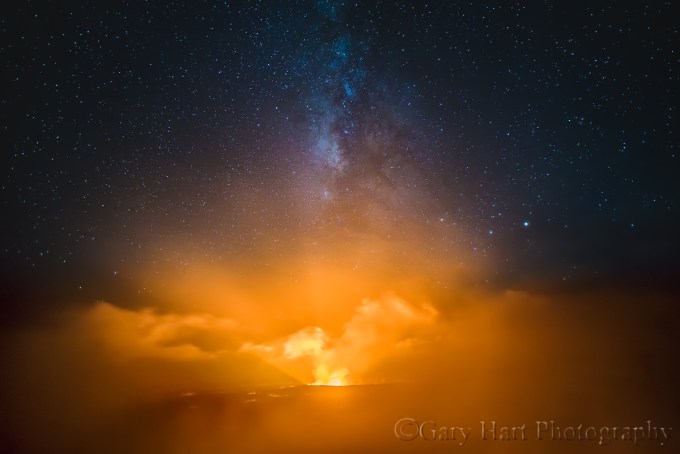
Fire and Mist, Halemaumau Crater, Kilauea, Hawaii
Sony a7S
Sony/Zeiss 16-35 f4
10 seconds
F/4
ISO 3200
Previously on the Eloquent Nature blog: Photograph the Milky Way: Part One
Viewing the Milky Way requires nothing more than a clear, dark sky. The Milky Way’s luminosity is fixed, so our ability to see it is largely a function of the darkness of the surrounding sky—the darker the sky, the better the Milky Way stands out. But because our eyes can only take in a fixed amount of light, there’s a ceiling on our ability to view the Milky Way with the unaided eye.
A camera, on the other hand, can accumulate light for a virtually unlimited duration. This, combined with technological advances that continue increasing the light sensitivity of digital sensors, means that when it comes to photographing the Milky Way, well…, the sky’s the limit. As glorious as it is to view the Milky Way with the unaided eye, a camera will show you things your eyes can’t see. In fact, not only does the right camera in the right hands resolve far more Milky Way detail than we can see, it also reveals color too faint for the human eye.
Knowing when and where to view the Milky Way is a great start, but photographing the Milky Way requires a combination of equipment, skill, and experience that doesn’t just happen overnight (so to speak). But Milky Way photography doesn’t need to break the bank, and it’s not rocket science.
Equipment
Bottom line, photographing the Milky Way is all about maximizing your ability to collect light: long exposures, fast lenses, high ISO.
Camera
In general, the larger your camera’s sensor and photosites (the “pixels” that capture the light), the more efficiently it collects light. Because other technology is involved, there’s not an absolute correlation between sensor and pixel size and light gathering capability, but a small, densely packed sensor almost certainly rules out your smartphone and point-and-shoot cameras anything more than a fuzzy snap of the Milky Way. At the very least you’ll want a mirrorless or DSLR camera with an APS-C (1.5/1.6 crop) size sensor. Better still is a full frame mirrorless or DSLR camera. (A 4/3 Olympus or Panasonic sensor might work, but I’ve not been overly impressed with the high ISO images I’ve seen from these smaller sensors.)
Another general rule is that the newer the technology, the better it will perform in low light. Even with their smaller, more densely packed sensors, many of today’s top APS-C bodies outperform in low light full frame bodies that have been out for a few years, so full frame or APS-C, if your camera is relatively new, it will probably do the job.
If you’re shopping for a new camera and think night photography might be in your future, compare your potential cameras’ high ISO capabilities—not their maximum ISO, but read some reviews to see how your camera candidates fare in objective tests by credible sources like DP Review or Imaging Resource (there are many others).
An often overlooked consideration is the camera’s ability to focus in extreme low light. Autofocusing on the stars or landscape will be difficult to impossible, and you’ll not be able to see well enough through a DSLR’s viewfinder to manually focus. Some bodies with a fast lens will autofocus on a bright star or planet, but it’s not something I’d count on (though I expect within a few years before this capability becomes more common).
Having photographed for years with Sony and Canon, and working extensively with most other mirrorless and DSLR bodies in my workshops, I have lots of experience with cameras from many manufacturers. In my book, focus peaking makes mirrorless the clear winner for night focusing. Sony’s current mirrorless bodies (a7R II, a7S, and a7S II) are by far the easiest I’ve ever used for focusing in the dark—what took a minute or more with my Canon, I can do in seconds using focus peaking with my Sony bodies. That said, of the major DSLR brands, I’ve found Canon’s superior LCD screen makes it much easier to focus in extreme low light than Nikon. (More on focus later.)
Lens
Put simply, to photograph the Milky Way you want fast, wide glass—the faster the better. Fast to capture as much light as possible; wide to take in lots of sky. A faster lens also makes focus and composition easier because its larger aperture gathers more light. How fast? F/2.8 or faster—preferably faster. How wide? At least 28mm, and 24mm or wider is better still. I do enough night photography that I have a dedicated, night-only lens—my original night lens was a Canon-mount Zeiss 28mm f/2; my current night lens is a Rokinon 24mm f/1.4.
Tripod
It goes without saying that at exposure times up to 30 seconds, you’ll need a sturdy tripod and head for Milky Way photography. You don’t need to spend a fortune, but the more you spend, the happier you’ll be in the long run (trust me). Carbon fiber provides the best combination of strength, vibration reduction, and light weight, but a sturdy (heavy) aluminum tripod will do the job.
An extended centerpost is not terribly stable, and a non-extended centerpost limits your ability to spread the tripod’s legs and get low, so I avoid tripods with a centerpost. But if you have a sturdy tripod with a centerpost, don’t run out and purchase a new one—just don’t extend the centerpost when photographing at night.
Read my tips for purchasing a tripod here.
Other stuff
To eliminate the possibility of camera vibration I recommend a remote release; without a remote you’ll risk annoying all within earshot with your camera’s 2-second timer beep. Don’t forget a flashlight or headlamp for the walk to and from the car. And it’s never a bad idea to toss an extra battery in your pocket.
Getting the shot
Keep it simple
There are just so many things that can go wrong on a moonless night when there’s not enough light to see camera controls, the contents of your bag, and the tripod leg you’re about to trip over. After doing this for many years, both on my own and helping others in workshops, I’ve decided that simplicity is essential.
Simplicity starts with paring down to the absolute minimum gear: a sturdy tripod, one body, one lens, and a remote release (plus an extra battery in my pocket). Everything else stays at home, in the car, or if I’m staying out after a sunset shoot, in my bag.
Upon arrival at my night photography destination, I extract my tripod, camera, lens (don’t forget to remove the polarizer), and remote release. I connect the remote and mount my lens—if it’s a zoom I set the focal length at the lens’s widest—then set my exposure and focus (more on exposure and focus below). If I’m walking to my photo site, I carry the pre-exposed and focused camera on the tripod (I know this makes some people uncomfortable, but if you don’t trust your head enough to hold onto your camera while you’re walking, it’s time for a new head), trying to keep the tripod as upright and stable as possible as I walk.
Flashlights/headlamps are essential for the walk/hike out to to and from my shooting location, but while I’m there and in shoot mode, it’s no flashlights, no exceptions. This is particularly important when I’m with a group. Not only does a flashlight inhibit your night vision, its light leaks into the frame of everyone who’s there. And while red lights may be better for your night vision, they’re particularly insidious about leaking into everyone’s frame (so before you ask, no red light!). If you follow my no flashlight rule, you’ll be amazed at how well your eyes adjust. I can operate my camera’s controls in the dark—it’s not hard with a little practice, and well worth the effort to learn. If I ever do need to see my camera to adjust something, or if I need to see to move around, my cell phone screen (not the phone’s flashlight, just its screen) gives me all the light I need.
Composition
A good Milky Way image is distinguished from an ordinary Milky Way image by its foreground. Simply finding a location that’s dark enough to see the Milky Way is difficult enough; finding a dark location that also has a foreground worthy of pairing with the Milky Way usually takes a little planning.
Since the Milky Way’s center is in the southern sky (for Northern Hemisphere observers), I look for remote (away from light pollution) subjects that I can photograph while facing south. Keep in mind that unless you have a ridiculous light gathering camera (like the Sony a7S or a7S II) and an extremely fast lens (f/2 or faster), your foreground will probably be more dark shape than detail. Water’s inherent reflectivity makes it a good foreground subject as well, especially if the water includes rocks or other features to add a little visual weight.
When I encounter a scene I deem photo worthy, not only do I try to determine its best light and moon rise/set possibilities, I also consider its potential as a Milky Way subject. Can I align it with the southern sky? Are there strong subjects that stand out against the sky? Is there any water I can include in my frame?
I’ve found views of the Grand Canyon from the North Rim, the Kilauea Caldera, and the bristlecone pines in California’s White Mountains that work spectacularly. On the other hand, while Yosemite Valley has lots to love, you don’t see a lot of Milky Way images from Yosemite Valley because there just aren’t that many south views there, and Yosemite’s towering, east/west trending granite walls give its south views an extremely high horizon that blocks much of the galactic core from the valley floor.
To maximize the amount of Milky Way in my frame, I generally (but not always) start with a vertical orientation that’s at least 2/3 sky. On the other hand, I do make sure to give myself more options with a few horizontal compositions as well. Given the near total darkness required of a Milky Way shoot, it’s often too dark to see well enough to compose that scene. If I can’t see well enough to compose I guess at a composition, take a short test exposure at an extreme (unusable) ISO to enable a relatively fast shutter speed (a few seconds), adjust the composition based on the image in the LCD, and repeat until I’m satisfied.
Focus
Needless to say, when it’s dark enough to view the Milky Way, there’s not enough light to autofocus (unless you have a rare camera/lens combo that can autofocus on a bright star and planet), or even to manually focus with confidence. And of all the things that can ruin a Milky Way image (not to mention an entire night), poor focus is number one. Not only is achieving focus difficult, it’s very easy to think you’re focused only to discover later that you just missed.
Because the Milky Way’s focus point is infinity, and you almost certainly won’t have enough light to stop down for more depth of field, your closest foreground subjects should be far enough away to be sharp when you’re wide open and focused at infinity. Before going out to shoot, find a hyperfocal app and plug in the values for your camera and lens at its widest aperture. Even though it’s technically possible to be sharp from half the hyperfocal distance to infinity, the kind of precise focus this requires is difficult to impossible in the dark, so my rule of thumb is to make sure my closest subject is no closer than the hyperfocal distance.
For example, I know with my Rokinon 24mm f/1.4 wide open on my full frame Sony a7S II, the hyperfocal distance is about 50 feet. If I have a subject that’s closer (such as a bristlecone pine), I’ll pre-focus (before dark) on the hyperfocal distance, or shine a bright light on an object at the hyperfocal distance and focus there, but generally I make sure everything is at least 50 feet away. Read more about hyperfocal focus in my Depth of Field article.
By far the number one cause of night focus misses is the idea that you can just dial any lens to infinity; followed closely by the idea that focused at one focal length means focused at all focal lengths. Because when it comes to sharpness, almost isn’t good enough, if you have a zoom lens, don’t even think of trying to dial the focus ring to the end for infinity. And even for most prime lenses, the infinity point is a little short of all the way to the end, and can vary slightly with the temperature and f-stop. If you know your lens well enough to be certain of its infinity point by feel (and are a risk taker), go for it. And that zoom lens that claims to be parfocal? While it’s possible that your zoom will hold focus throughout its entire focal range, regardless of what the manufacturer claims, I wouldn’t bet an entire shoot on it without testing first.
All this means that the only way to ensure night photography sharpness is to focus carefully on something before shooting, refocus every time your focal length changes, and check focus frequently by displaying and magnifying an image on your LCD. To simplify (there’s that word again), when using a zoom lens, I usually set the lens at its widest focal length, focus, verify, then never change the focal length again once I know I’m focused. And remember, the best way to ensure focus is to set your focal length and focus before it gets dark.
But sometimes pre-focusing isn’t possible, or for some reason you need to refocus after darkness falls. If I arrive at my destination in the dark, I autofocus on my headlights, a bright flashlight, or a laser 50 feet or more away. And again, never assume you’re sharp—always magnify your image and check it after you focus.
For more on focusing in the dark, including how to use stars to focus, read my Starlight Photo Tips article.
Exposure
Exposing a Milky Way image is wonderfully simple once you realize that you don’t have to meter because you can’t (not enough light)—your goal is simply to capture as many photons as you can without damaging the image with noise, star motion, and lens flaws.
Basically, you can’t give a Milky Way image too much light. What I mean by that is, capturing the amount of light required to overexpose a Milky Way image is only possible if you’ve chosen an ISO and/or shutter speed that significantly compromises the quality of the image with excessive noise and/or star motion.
In a perfect world, I’d take every image at ISO 100 and f/8—the best ISO and f-stop for my camera and lens. But that’s not possible when photographing in near total darkness—a usable Milky Way image requires exposure compromises. What kind of compromises? Each exposure variable causes a different problem when pushed too far:
- ISO: Raising ISO to increase light sensitivity comes with a corresponding increase in noise that muddies detail. The noise at any particular ISO varies greatly with the camera, so it’s essential to know your camera’s low-light capability(!). Some of the noise can be cleaned up with noise reduction software (I use Topaz DeNoise 6)—the amount that cleans up will depend on the noise reduction software you use, your skill using that software, and where the noise is (is it marring empty voids or spoiling essential detail?).
- Shutter speed: The longer the shutter stays open, the more motion blur spreads the stars’ distinct pinpoints into streaks. I’m not a big fan of formulas that dictate star photography shutter speeds because I find them arbitrary and inflexible, and they fail to account for the fact that the amount of apparent stellar motion varies with the direction you’re composing (you’ll get less motion the closer to the north or south poles you’re aimed). My general shutter-speed rule of thumb is 30-seconds or less, preferably less—I won’t exceed 30 seconds, and do everything I can to get enough light with a faster shutter speed.
- F-stop: At their widest apertures, lenses tend to lose sharpness (especially on the edges) and display optical flaws like comatic aberration (also called coma) that distorts points of light (like stars) into comet shaped blurs. For many lenses, stopping down even one stop from wide open significantly improves image quality.
Again: My approach to metering for the Milky Way is to give my scene as much light as I can without pushing the exposure compromises to a point I can’t live with. Where exactly is that point? Not only is that a subjective question that varies with each camera body, lens, and scene, as technology improves, I’m less forgiving of exposure compromises than I once was. For example, when I started photographing the Milky Way with my Canon 1DS Mark III, the Milky Way scenes I could shoot were limited because my fastest wide lens was f/4 and I got too much noise when I pushed my ISO beyond 1600. This forced me compromise by shooting wide open with a 30-second shutter speed to achieve even marginal results. In fact, given these limitations, despite trying to photograph the Milky Way from many locations, the only foreground that worked well enough was Kilauea Caldera, because it was its own light source.
Today (early 2017) I photograph the Milky Way with a Sony a7S II and a Rokinon 24mm f/1.4 lens. I get cleaner images from my Sony at ISO 6400 than got a ISO 1600 on my Canon 1DSIII, and the light gathering capability of an f/1.4 lens revelatory. Now I can stop down slightly to reduce lens aberrations, drop my shutter speed to 20 or 15 seconds to cut star motion 33-50 percent, and still get usable foreground detail by starlight.
I can’t emphasize enough how important it is to know your camera’s and lens’s capabilities in low light, and how for you’re comfortable pushing them. For each of the night photography equipment combos I’ve used, I’ve established a general exposure upper threshold, rule-of-thumb compromise points for each exposure setting that I won’t exceed until I’ve reached the compromise threshold of the other exposure settings. For example, with my a7SII/Rokinon combo, I usually start at ISO 3200, f/2, 20 seconds. Those settings will usually get me enough light for Milky Way color and a little foreground detail. But if I want more light (for example, if I’m shooting into the black pit of the Grand Canyon from the North Rim), my first exposure compromise is to increase to ISO 6400; if I decide I need even more light, my next compromise is to open up to f/1.4; if that still isn’t enough light, my next compromise is to bump my shutter speed to 30 seconds. Finally, if I want more light that ISO 6400, f/1.4, 30 seconds delivers, I’ll try ISO 12,800 (and cross my fingers)*. If that’s not enough, I go home (or just sit and enjoy the view).
These thresholds are guidelines rather than hard-and-fast rules, and they apply to my setup only—your results may vary. And even though I’m pretty secure with this workflow, for every Milky Way composition I try a variety of exposure combinations before moving to another composition. Not only does this give me a range of options to choose between when I’m at home and reviewing my images on a big monitor, it also gives me more insight into my camera/lens capabilities, allowing me to refine my exposure compromise threshold points.
* In normal situations the Sony a7SII can handle ISO 12,800 without even breathing hard, but the long exposure time required of night photography generates a lot of heat on the sensor with a corresponding increase in noise.
It’s time to click that shutter
You’re in position with the right gear, composed, focused, and exposure values set. Before you actually click the shutter, let me remind you of a couple of things you can do to ensure the best results: First, lower that center post. A tripod center post’s inherent instability is magnified during long exposures, not just by wind, but even by nearby footsteps, the press of the shutter button, and slap of the mirror (and sometimes it seems, by ghosts). And speaking of shutter clicks, you should be using a remote cable or two-second timer to eliminate the vibration imparted when your finger presses the shutter button.
When that first Milky Way image pops up on the LCD, it’s pretty exciting. So exciting in fact that sometimes you risk being lulled into a “Wow, this isn’t as hard as I expected” complacency. Even though you think everything’s perfect, don’t forget to review your image sharpness every few frames by displaying and magnifying and image on your LCD. In theory nothing should change unless you changed it, but in practice I’ve noticed a distinct inclination for focus to shift mysteriously between shots. Whether it’s slight temperature changes or an inadvertent nudge of the focus ring as you fumble with controls in the dark, you can file periodically checking your sharpness falls under “an ounce of prevention….” Believe me, this will save a lot of angst later.
And finally, don’t forget to play with different exposure settings for each composition. Not only does this give you more options, it also gives you more insight into your camera/lens combo’s low light capabilities.
The bottom line
Though having top-of-the-line low-light equipment helps a lot, it’s not essential. If you have a full frame DSLR that’s less than five years old, and a lens that’s f/2.8 or faster, you probably have all the equipment you need to get great the Milky Way images. Even with a cropped sensor, or an f/4 lens, you have a good chance of getting usable Milky Way images. If you’ve never done it before, don’t expect perfection the first time out. What you can expect is improvement each time you go out as you learn the limitations of your equipment and identify your own exposure compromise thresholds. And success or failure, at the very least you’ll have spent a magnificent night under the stars.
Workshop Schedule || Purchase Prints
A Milky Way Gallery
Click an image for a closer look and slide show. Refresh the window to reorder the display.


Aspen abstract
Posted on February 25, 2017
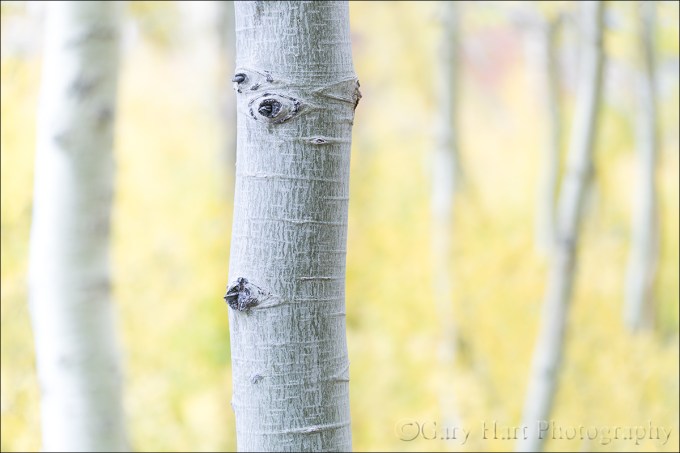
Aspen Abstract, Lundy Canyon, Eastern Sierra
Sony a7R II
Sony 70-200 f/4
1/25 second
F/4
ISO 400
I recently started rereading Ansel Adams’ “Examples: The Making of 40 Photographs,” a book I’d recommend to anyone interested in the thinking side of photography. Though much of the book covers equipment and techniques that are irrelevant to today’s digital photographer, Adams’ words reveal a vision and mastery of craft that transcends technology. Like him or not (I do!), you can’t deny that Ansel Adams possessed an artist’s vision and an ability to convey that vision in ways the world had never seen.

©Ansel Adams
Aspen, New Mexico, 1958
“The majority of the viewers (of this image) think it was a sunlit scene. When I explain that it was diffused lighting from the sky and also reflected light from distant clouds, some rejoin, ‘Then why does it look the way it does?’ Such questions remind me that many viewers expect a photograph to be a literal simulation of reality.”
Ansel Adams in “Examples: The Making of 40 Photographs”
Another takeaway from the book is Adams’ clear disdain for pictorialism, a more abstract approach to photography that (among other things) uses the camera’s unique vision to interpret the world in ways that are vastly and intentionally different from the human experience. Preferring instead the more literal front-to-back sharpness of the f/64 group that became his hallmark, Adams had little room for pictorialists’ soft focus and abstract images.
I, on the other hand, love using limited depth of field to emphasize my primary subject and disguise potential distractions. When we explore the world in person, our ability to pivot our head, move closer or farther, and change perspective allows us to enables us to lock in on a compelling subject and experience the scene in the way we find most meaningful. But an image is a constrained, two-dimensional approximation of the real world as seen by someone else. The photographer shares his or her experience of the scene by guiding our eyes with visual clues about what’s important and how to find it.
This reality wasn’t lost on Ansel Adams. Despite his distaste for soft focus techniques, Adams guided viewers of his images with in other ways, particularly his use of light. He knew that the camera and human eye handle light differently, and used every trick at his disposal, both at capture and in the darkroom, to leverage that difference.
At the risk of initiating a debate about the relative merits of the two techniques, I’ll just say that I’m a fan of both and am not afraid to apply whichever approach best suits my objective. And I suspect that if Ansel Adams were photographing today, he would be taking full advantage of the creative possibilities created by today’s technology.
Last October I was exploring the aspen grove at the end of the Lundy Canyon road near Mono Lake. With fall color peaking I put extension tubes on my Sony 70-200 f/4 looking for subjects that I could get close to, but with a distant enough background to maximize focus contrast (sharp/soft). I’ve always felt that soft focus aspen make a great background, but they need to be soft enough that individual leaves and trunk detail don’t distract.
I started looking for dangling leaves, either individual or bunches, but soon turned my attention to stark white aspen trunks that stood out in striking contrast against the distant wall of yellow leaves. I soon zeroed in on this trunk for its well-spaced knots, gentle curve, and clean, textured bark, plus the nice assortment of parallel trunks at varying distances in the background.
This frame I shot wide open at the closest possible focus distance to get the softest background focus. To emphasize the white trunks, I exposed the scene as bright as I could without clipping the highlights in the primary trunk. On my camera’s LCD at capture this image looked pretty much as you see it here, and required minimal processing.
Workshop Schedule || Purchase Prints
A Selective Focus Gallery
Click an image for a closer look and slide show. Refresh the window to reorder the display.


The Range of Light
Posted on February 19, 2017

Twilight Crescent, Mt. Whitney
Sony a7R II
Sony 70-200 f/4
1/3 second
F/11
ISO 160
“… the mighty Sierra, miles in height, and so gloriously colored and so radiant, it seemed not clothed with light but wholly composed of it, like the wall of some celestial city…. Then it seemed to me that the Sierra should be called, not the Nevada or Snowy Range, but the Range of Light.” — John Muir
Anyone who has spent time in or around the Sierra Nevada has to agree that there’s something special about its interaction with light. Towering one to two miles above the surrounding terrain for nearly all of its 400-mile length, the Sierra Nevada are California’s most prominent natural feature. But it’s not just prominence that sets the Sierra apart. The Sierra are almost entirely granite, an intrusive igneous rock comprised primarily of light-toned feldspar and liberally infused with lustrous quartz and mica. Because igneous intrusive rocks form deep beneath the Earth’s surface, constituent minerals cool and harden slowly enough for large, reflective crystals to form.
In addition to its inherently reflective qualities, granite is quite hard and resistant to erosion. Unlike the overlying sedimentary and metamorphic rock that washed downhill as the Sierra pushed (and continues to push) upward, granite remains intact when subjected to wind and rain. Eventually small cracks form; water percolating into these cracks expands as it freezes, widening the cracks further until the granite fractures and a large block separates. The result is large vertical and domed surfaces whose extreme slope and hardness are particularly inhospitable to plant life, even well below the timberline. Granite’s hardness also means that rather than crumbling beneath the weight of the numerous glaciers to scour the Sierra, much of the Sierra granite has been polished to a glassy sheen.
Granite’s light complexion, reflective inclusions, and abundance of exposed, polished surfaces make the Sierra particularly inclined to reflect the color of whatever light illuminates it. This relationship with light is quite evident in Yosemite Valley, nestled in the range’s more moderately sloped west side. When the sun strikes Yosemite’s Half Dome and El Capitan at day’s end, warm sunset light paints these monoliths in brilliant orange and red hues just before the sun is snuffed by the horizon. While this color can be seen at sunset year round, it takes center stage each February when sunset shadow and light conspire to highlight normally insignificant Horsetail Fall’s tumble down El Capitan’s east face.
As exquisite as the light on Yosemite’s granite is, I’m even more drawn to the Sierra’s east side, which gets its best sun at sunrise. Unlike the Sierra’s gradually sloped, relatively moist, and largely foliated west slopes, the Sierra’s east side is much steeper, drier, and therefore sparsely foliated and more exposed. Enhancing the drama, the Eastern Sierra’s towering granite face also catches the earliest possible sunlight, sunlight that has traveled farther and through purer air (because there fewer airborne pollutants in the morning in general, and the sunlight east of the Sierra traverses much less densely populated terrain).
My favorite place to watch the light play on the Eastern Sierra granite is in and near the Alabama Hills, two vertical miles beneath Mt. Whitney and the Sierra’s most precipitous section. Looming above the Owens Valley, 14,505 foot Mt. Whitney is the highest point in the 48 contiguous United States. Unlike many towering peaks that stand by themselves, Mt. Whitney is bounded by 13,000 foot Lone Pine Peak and 14,000 foot Mt. Williamson, all connected by a serrated ridge of 13,000+ foot sharks tooth prominences.
Before sunrise I like to arrive early enough to see the Sierra crest reflect the pale blue of the pre-dawn sky, then watch it warm gradually as the sky brightened before the approaching sun. The color reaches a crescendo when the sun’s longest wavelengths first kiss the highest peaks with pink alpenglow. As the rest of the sun’s visible wavelengths join the party, the crest warms to amber before finally cooling beneath the daylight-blue sky.
At the end of the day the best color arrives after the sun has long disappeared behind the crest and the entire scene is illuminated by a sky well on its way to night. Though the mountains’ color is more subtle than the sunrise show, the Eastern Sierra’s granite when imbued with the pale mauve of evening twilight is no less beautiful. Eventually night takes over and once again the Sierra granite throbs a soft blue.
Early last October I guided my Eastern Sierra workshop group up to Whitney Portal at the base of Mt. Whitney to photograph cascading Whitney Portal Fall in late afternoon shade. On the drive back down we squeezed into a small turnout not too far down the road for the closest view of Whitney that doesn’t require a serious hike. This year’s group got a bonus when a thin slice of brand new moon appeared shortly after sunset.
Mounting my Sony 70-200 f4 on my a7RII, I framed the scene as tightly as I could while still including both Mt. Whitney and the crescent moon. Though the sky was clear, a steady stream of small clouds materialized as if issued by a cloud making machine just out of sight behind the crest to the right of Whitney. Each new cloud scooted to the left and dissipated quickly in drier air near the summit. After composing, metering, and focusing, I waited for the next cloud to appear and clicked this frame in the purple twilight.
PURCHASE PRINTS || PHOTO WORKSHOPS
The Many Colors of Mt. Whitney


Up a creek
Posted on February 12, 2017
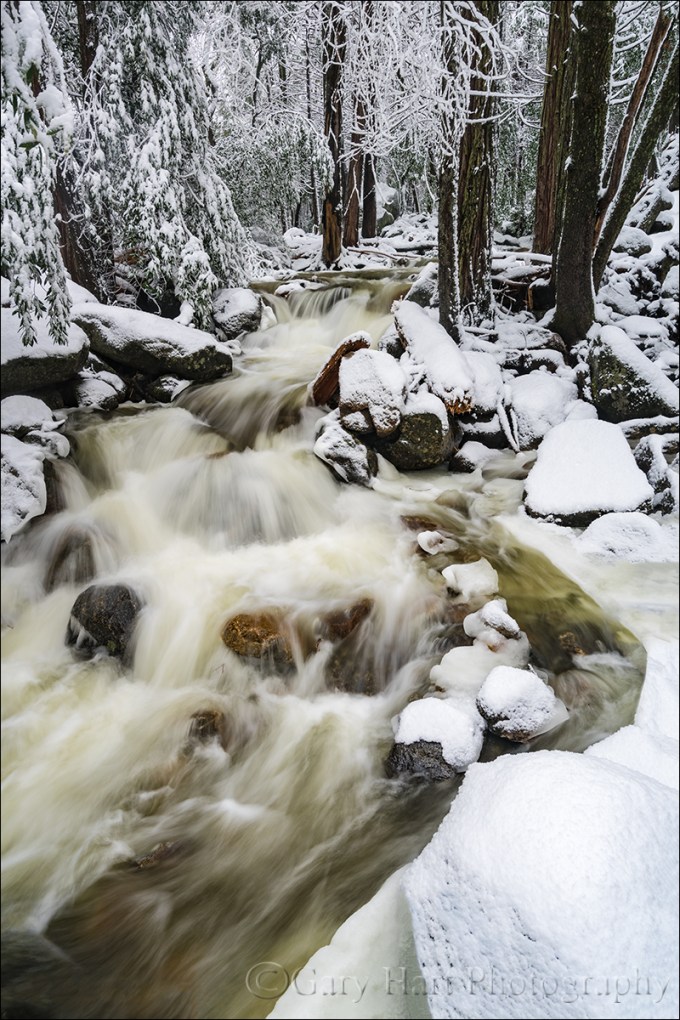
Wonderland, Bridalveil Creek, Yosemite
Sony a7R II
Sony/Zeiss 16-35 f/4
1/4 second
F/10
ISO 100
Many photographers vary their portfolios by visiting as many locations as possible. While I love visiting new locations, I’ve always preferred the kind of intimate familiarity that’s only possible with frequent, quality visits. And as enjoyable as it is photograph the icons, for my personal pleasure I’m most drawn to quiet pastorals and intimate portraits of nature that could be anywhere—wildflowers, fall color, solitary oaks, sparkling reflections, and tumbling creeks can keep me happy for hours.
One of my favorite intimate settings is Bridalveil Creek beneath Bridalveil Fall in Yosemite. Not only is there lots to photograph here, it’s different every time I visit. In spring the water in all three of the creek’s branches roars down the slope beneath Bridalveil Fall like it can’t get to the Merced River soon enough. And I’m especially fond of Bridalveil Creek in autumn, when the flow is often down to a single leisurely trickle, its whispering cascades and spinning pools adorned with vivid yellow leaves. Winter can find Bridalveil Creek in a variety of states that range from a gentle rivulet to a raging torrent. During one particularly cold winter the creek was solid ice, as if some frostbitten wizard had waved his wand and frozen the flowing water in place.
For some reason I haven’t had as much success here in winter as autumn or spring, so this winter I redoubled my efforts. On last month’s snow trip, while waiting for Yosemite’s monoliths to emerge from the clouds, I headed to Bridalveil Creek and found every square inch covered with snow—not a fine etching, but a dense glazing that covered virtually every exposed surface with several inches of white powder.
I hadn’t even crossed the first bridge when I was stopped by the scene here. I extended my tripod and evaluated the possibilities, starting on the bridge before moving down to a rock right on the creek. My first compositions were horizontal, but I eventually adjusted to vertical to emphasize the creek. Following my standard click, review, refine, click process, I finally landed on this composition—just wide enough to include both sides of the creek, and tall enough to include the parallel tree trunks and the creek’s exit from the bottom of the frame. I had to drop down quite low to get beneath an overhanging branch and keep it from occluding part of the creek.
The non-compositional variables I had to consider were motion and depth of field—there was no wind to sway the branches, but I knew the water’s blur would vary greatly with my shutter speed choice. And because I wanted everything in my frame sharp, I needed to be careful with my f-stop choice. The closest point of interest, the snowy foreground rock, was about five feet away. My hyperfocal app told me that at my 22mm focal length and f/8, my hyperfocal distance was about six feet (sharp from three feet to infinity). Because hyperfocal data draws the acceptable sharpness line a little less critically than I do, I stopped down to f/10 and focused on a small rock about eight feet away. Playing with a few ISOs to vary my shutter speed for different water motion effects, I decided I liked 1/4 second because it blurred the creek enough to clearly convey the water’s speed, but not so much that it lost its definition.
Intimate and Anonymous
Click an image for a closer look and slide show. Refresh the window to reorder the display.


The illusion of depth
Posted on February 4, 2017
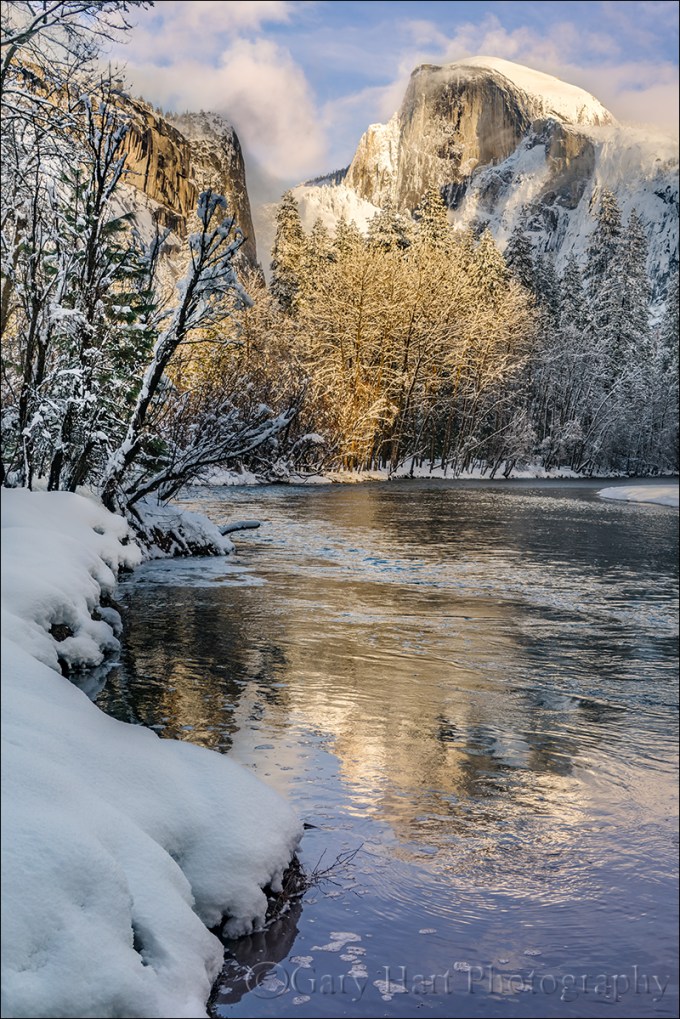
Frozen Reflection, Half Dome, Yosemite
Sony a7R II
Sony/Zeiss 24-70 f4
1/40 second
F/9
ISO 100
It seems too obvious to mention, but I’ll say it anyway: Photography is a futile attempt to render a three-dimensional world in a two-dimensional medium. Unfortunately, that reality doesn’t seem to keep people from putting their eye to their viewfinder and clicking without regard for their camera’s unique view of the world. But here’s a secret: Anyone with a camera can manage the lateral (left-to-right) aspect of a scene, but the photographers who distinguish themselves are those able to convey the illusion of depth by translating a scene’s actual depth to their camera’s virtual depth.
Creating the illusion of depth isn’t rocket science. It starts with seeking a foreground for your beautiful background, or a background for your beautiful foreground. Once you’ve figured out your foreground or background, do your best to ensure that the elements at varying depths don’t merge with each other—the more elements in your frame stand alone, the more you invite your viewers to move incrementally through the frame, hopping (subconsciously), front to back, from one visual point to the next. Getting elements to stand apart often requires some physical effort on your part (sorry): Moving left/right, up/down, foreword/backward changes the relationship between objects at varying depths, sometimes quite significantly.
With your foreground and background identified, decide whether you want the entire image in focus, or selective focus that guides your viewer to a particular point in the frame. With all your pieces in place, you’re ready to choose your f-stop and focus point. (Here’s some extra credit reading: hyperfocal focusing techniques.)
About this image
The primary subject here is Half Dome, but I had to work incorporate all the other wonderful things going on this afternoon: fresh snow, beautiful clouds, warm sunlight, and an abstract reflection.
With Half Dome as my centerpiece, my biggest concern was organizing the other visual elements into a coherent image. I started with the decision that a vertical orientation would make the most efficient use of the scene, allowing me to include the river at the bottom of my frame and Half Dome at the top without shrinking the scene and introducing less interesting elements on the left and right. I didn’t want too much sky, but I found a break in the clouds for the top of my frame.
I could have moved a little to the right and made the reflection my entire foreground, but I decided to use the snowy riverbank to convey an illusion of depth. Because there wasn’t too much visual interest in the snow, I included just enough snow to frame the left side of my scene. A focus point about 20 feet away gave me sharpness throughout my frame. Click.
Focus and depth of field simplified
Workshop Schedule || Purchase Prints
A Gallery of Depth
Click an image for a closer look and slide show. Refresh the window to reorder the display.


Managing light, depth, and motion in nature
Posted on January 29, 2017
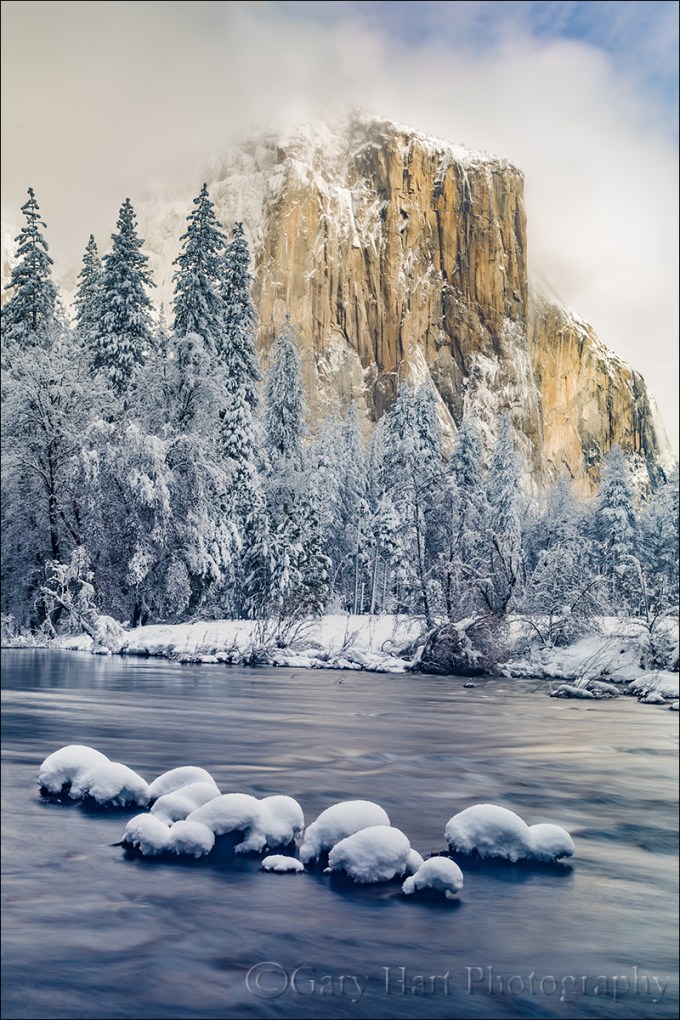
Snowcap, El Capitan, Yosemite
Sony a7R II
Sony/Zeiss 24-70 f4
3.2 seconds
F/10
ISO 50
Independent of composition, photographers have three scene variables to play with when setting up a shot: light, depth, and motion. And not so coincidentally, we have three exposure parameters with which to manage those variables: shutter speed, f-stop, and ISO. The exposure parameters have a reciprocal relationship—an increase/decrease in one can be compensated by a corresponding decrease/increase in another—but merely getting the “correct” exposure with a random combination of exposure values can yield wildly different results. This is why I never want my camera making decisions for me, and always photograph in manual mode. It’s also why I tell my workshop students that they should be able to defend (explain their reason for) every exposure value.
My approach to metering
As a landscape photographer who is always on a tripod, I’ve removed camera shake from the exposure equation, so the only motion that concerns me is motion in the scene. Unless I’m trying for a motion effect (for example, blurring moving water or freezing wind-blown leaves) I use the f-stop and ISO that yields the absolute sharpest, cleanest image—no quality compromise (such as a large f-stop or high ISO) to subdue camera shake. This allows me to approach every scene at ISO 100 (most camera’s best ISO) and f/8 – f/11 (the maximum depth of field possible with minimal diffraction, and also the range where most lenses tend to be sharpest), and only deviate when my scene variables dictate.
Once I determine my composition, I refine the f-stop to ensure to depth of field that achieves my desired effect, then dial my shutter speed to whatever value delivers the proper exposure. My ISO only moves from 100 when motion in the scene requires it. For example, photographing at night requires a shutter speed fast enough to minimize star motion and I’m force to increase my ISO to 800, 1600, or higher, depending on the amount of light and the focal length at which I’m shooting.
About this image
In this image from last Monday’s snow day in Yosemite, I wanted to smooth the rapidly flowing Merced River to smooth chop that I thought might distract from rest of this spectacular scene, but first I had to get everything else in place. I on a fairly tight vertical composition that eliminated everything on the left and right of El Capitan. I used the snow-capped boulders in the foreground to create a little depth, and included just a little sky for some extra color (if the clouds swirling about El Capitan had been more interesting, I might not have done this).
Aligning the foreground boulders was both tricky and awkward. First, I had to wade through a couple of shallow pools to reach a one-rock island (not much bigger than a basketball), then thrust my tripod into the water as far to the left as I could and still operate my camera. A focal length too narrow would have cut off important elements, and too would have introduced distractions just outside this frame. Where the camera was positioned, I couldn’t get my eye to the viewfinder without going for a swim, and there was too much light to see my LCD clearly. So I pulled my camera from the tripod and framed the composition to get the right focal length. With my composition established, I decided f/10 was the largest aperture that would ensure front-to-back sharpness, and focused on a ripple a little behind the boulders.
Finally ready to shoot, I returned the camera to the tripod and used what I could see of the LCD to guess the final composition. After each click I removed the camera and reviewed the image in my electronic viewfinder (another reason I love the EVF), adjusting two or three times until the composition was right.
With my composition framed exactly as I wanted, my exposure dialed in, and my focus point set, I was ready to play with the motion. I started by dropping my ISO to 50 (almost as good as ISO 100, but with slightly less dynamic range), but still couldn’t get the shutter speed long enough without shrinking my f-stop to a less than ideal, diffraction inducing number.
The solution was my Singh-Ray Vari-ND filter. Because my Vari-ND is 77mm, I had to stretch to hold it in front of my 67mm Sony/Zeiss 24-70 f4. Dialing the filter ever so slightly darker between exposures and adjusting my shutter speed to maintain the correct exposure, I ended up with a variety of motion effects. I found that this one, at around 3 seconds, smoothed the water enough while retaining just enough texture for visual interest without being distracting.
Yosemite Winter Photo Workshop
Workshop Schedule || Purchase Prints
A Gallery of Motion
Click an image for a closer look and slide show. Refresh the window to reorder the display.


Dressed for chill
Posted on January 17, 2017
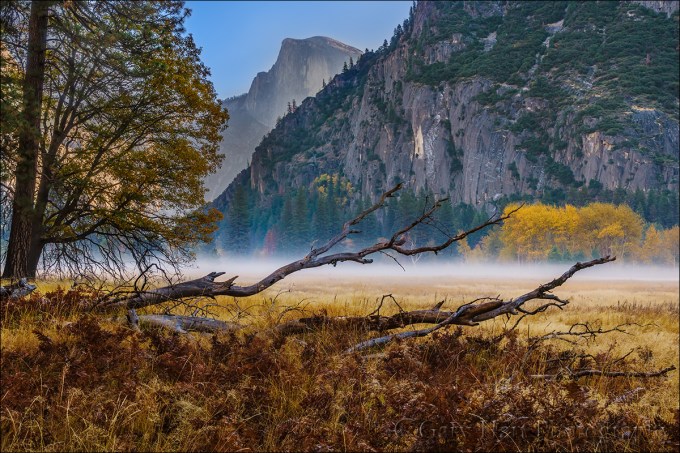
Autumn Morning, Leidig Meadow, Yosemite
Sony a7R II
Sony/Zeiss 24-70 f4
1/15 second
F/11
ISO 125
A regrettable reality of my life is that the best conditions for photography are usually the absolute worst conditions to be outside. Fortunately, I’ve been hardened by decades of San Francisco Giants games at Candlestick Park, the coldest place on Earth. As a photographer, I continue to embrace my mantra for warmth at the ‘Stick: Too much is always better than not enough.
For me it’s all about layers: silk, wool, down, and Gore-Tex. I start winter mornings with wool socks, waterproof boots, silk long-johns (if it’s extremely cold), flannel lined jeans, wool long-sleeve undershirt, wool Pendleton or lined cotton shirt, vest, down jacket, gloves (I have a variety from thin to thick), neck gaiter, and a hat or band that covers my ears. I add and remove layers as conditions dictate, and don’t always wear everything, but I’m never too far from this stuff in winter. And if it’s raining or snowing, I add waterproof pants, a waterproof parka, waterproof boots, and a wide-brim waterproof hat to keep myself dry, freeing my umbrella to keep my gear dry while shooting.
The basic clothes I pack in my suitcase before each trip, but the gloves/hats/umbrella etc. are in a gym bag that is always in my car. In the car I also keep an extra pair of shoes and socks, towel, and garbage bag (to cover my camera when it’s on the tripod). With all this paraphernalia, I’m nice and toasty in whatever extremes the winter throws at me, and I can never use weather as an excuse for missing a shot.
About this image
On a very chilly morning in late October, my workshop group had wrapped up the sunrise shoot and was heading to breakfast when we passed Leidig Meadow beneath a thin veneer of fog. Knowing that the group was cold and hungry, I kept going, but in the cafeteria parking I polled everyone and found that while about half were ready for warmth and a hot breakfast, the other half wanted to return to photograph the meadow. They got no argument from me. In normal conditions this wouldn’t have been possible because Yosemite’s primarily one-way traffic flow would have required a 20-minute loop to return to this spot, and the fog would likely have been long gone. But this year, extensive roadwork had caused the National Park Service to make every open road two-way, and we were back at Leidig Meadow in two minutes.
Yosemite’s radiation fog can come and go in seconds (I crossed my fingers that it hadn’t dissipated in the five minutes since our original drive-by), so as soon as we parked the group grabbed their gear and scattered. Wanting a foreground that was more than just meadow grass, I ran for this downed tree that I’d seen on an earlier visit.
We only got about five minutes of quality shooting in before the fog was gone. All of my shots were some variation on this composition using the log anchoring the bottom of scene, and Half Dome framed by the nearby trees on the left and distant yellow cottonwoods on the right. To maximize my focal length and make Half Dome larger, I moved back as far as I could without losing my framing. The horizontal trunk was far enough away that I was able to achieve depth of field all the way to infinity when I focused there.
Workshop Schedule || Purchase Prints
A Cold Weather Gallery
Click an image for a closer look and slide show. Refresh the window to reorder the display.


Sanity check
Posted on January 7, 2017

Nightfall, Half Dome and Sentinel Fall, Yosemite
Sony a7R II
Sony/Zeiss 24-70 f4
1/2 second
F/9
ISO 100
Are you insane?
Albert Einstein defined insanity as doing the same thing over and over again and expecting different results. Hmmm. For some reason this makes me think of the thousands of aspiring landscape photographers with portfolios brimming with beautiful images that they can’t sell.
Despite a great eye for composition, all the latest gear, insider knowledge of the best locations, and virtual guru status with Photoshop, somehow they haven’t managed to separate themselves from the large pack of other really good photographers. Their solution to anonymity is more: more locations, more equipment, more software. (Perhaps you even know such a photographer.) Compounding the problem, many photographers have become so mesmerized by technology that they turn over control of the most important aspects of their craft to their camera, completely discounting the most powerful tool at their disposal, the one on top of their shoulders.
Knowledge vs. understanding
Just as a new camera won’t make you a better photographer, neither will simply upgrading your knowledge of the latest gear, or accumulating . Knowledge is nothing more than information ingested and regurgitated. On the other hand, understanding is fundamental insight into the workings of a process. While knowledge might enable you to impress table-mates at a dinner party, understanding gives you the ability to use information to create new knowledge—solve problems.
Many photographers invest far too much energy accumulating knowledge, and far too little energy understanding what they just learned. For example, I see many photographers relying on a formula for determining the shutter speed that freezes star motion at a given focal length, oblivious to the fact that this formula doesn’t consider other equally important variables such as display size and the direction the camera is pointing (yes, that’s important). Similarly, simply knowing that a longer shutter speed, bigger aperture, or higher ISO means more light is of limited value if that knowledge doesn’t translate into an understanding of how to manage light, motion, and depth with your camera.
Take control
Pretty much anyone can pick up a camera, put it in auto exposure mode, and compose a nice image. While the automatic modes in most cameras “properly” (conventionally) expose most scenes, they struggle in the limited light, extreme dynamic range, and harsh conditions that artistic nature photographers seek. Worse than that, relying on the automatic exposure modes eliminates a photographer’s best opportunity for creativity—the ability to control a an image’s depth, motion, and light.
Too many aspiring photographers are stuck creatively because their unwavering faith in technology leaves them with a critical deficiency in two fundamental, related photographic principles:
- How a light meter determines the exposure information it gives you. This seems so basic, but auto-exposure and histograms have fooled many into thinking they understand metering and exposure. (Don’t get me wrong—the histogram is a wonderful tool for the photographer who truly understands it.)
- How to use the reciprocal relationship between aperture, shutter speed, and ISO to manage photography’s three variables: light, depth, and motion. This is the universal tool that enables photographers to handle the limiting factors of every scene.
Books and internet resources are a great place to start acquiring these principles, but the knowledge you gain there won’t turn to understanding until you get out with your camera and apply them. When these principles become second nature, you’ll be amazed at what you’ll be able to accomplish with your photography.
Insanity is in the mind of the beholder
If landscape photography already gives you everything you want, by all means continue doing what you’re doing. But if you’re having a hard time achieving a creative goal, I suggest that the solution is likely not doing more of what you’re already doing. Instead, start by reevaluating your comprehension of fundamental photographic principles that you might not have thought about for years. You’ll know you’re there when you have complete control of the light, motion, and depth for every scene you encounter, know how to get the result you want, or understand why it’s simply not possible.
Do I really think you’re insane for doing otherwise? Of course not. But I do think you’ll feel a little more sane if you learn to take more control of your camera.
About this image
The image at the top of the post is from a visit to Yosemite this past December. I’d guided my workshop group here for the rise of a nearly full moon, crossing my fingers that clouds wouldn’t obscure our view. The clouds exited just in the nick of time for us to enjoy a beautiful moonrise into the indigo twilight. I started with fairly tight compositions when the moon was close to Half Dome, but in the still, chilled air shortly after sunset, a thin radiation fog formed above Leidig Meadow and I started looking for a wider composition that would add the meadow to the moon and Half Dome.
Before thinking about the scene’s light, depth, and motion variables, I spent a lot of time just assembling the elements of my composition. I decided to frame the scene with Half Dome on the left and Sentinel Fall on the right, positioning myself so a group of tall foreground evergreens, mirrored by towering Sentinel Rock in the background, anchored the center of my frame. I knew that would require a wide composition that would render the moon very small, but I moved back as far as I could to allow the longest possible focal length to avoid shrinking the moon to pinhole size.
By far my biggest exposure concern was dynamic range—the moon is daylight bright, while the rest of my scene was deeply shaded. Normally I trust my histogram in these high dynamic range situations, but in this case the moon was so small that I knew it wouldn’t register. Instead I used my Sony a7RII’s pre-capture “zebra” highlight alert that indicates the parts of my scene that are overexposed.
At just a little wider than 24mm, with no significant detail in my immediate foreground, I stopped down to a fairly diffraction safe f/9. I’m always at ISO 100 unless I can’t achieve the amount of light I want at my ideal aperture and shutter speed, and in this case ISO 100 worked just fine. With my f-stop and ISO set, I increased my shutter speed slowly, checking the moon after each 1/3-stop click for the zebras (if you don’t shoot mirrorless, you can set blinking highlights and check the moon for “blinkies” when you review the image on your LCD). Since I know my camera well enough to know that I could push my exposure at least a full stop beyond the point where the zebras appeared, then recover the highlights in the Lightroom raw processor.
This image looked quite dark on my LCD, and the histogram was way to the left, but after loading it onto my computer and pulling the Lightroom Shadows slider to the right, I recovered an unbelievable amount of clean (low noise) detail, even in the darkest shadows. I just continue to be blown away by the dynamic range of this a7R Mark 2 sensor that enables me to capture scenes I’d never imagined possible in my previous (Canon) life. In this case I probably could have brightened the image further in processing, but I wanted a more moody, twilight feel.
Workshop Schedule || Purchase Prints
Yosemite Less Traveled


My 2016
Posted on December 31, 2016
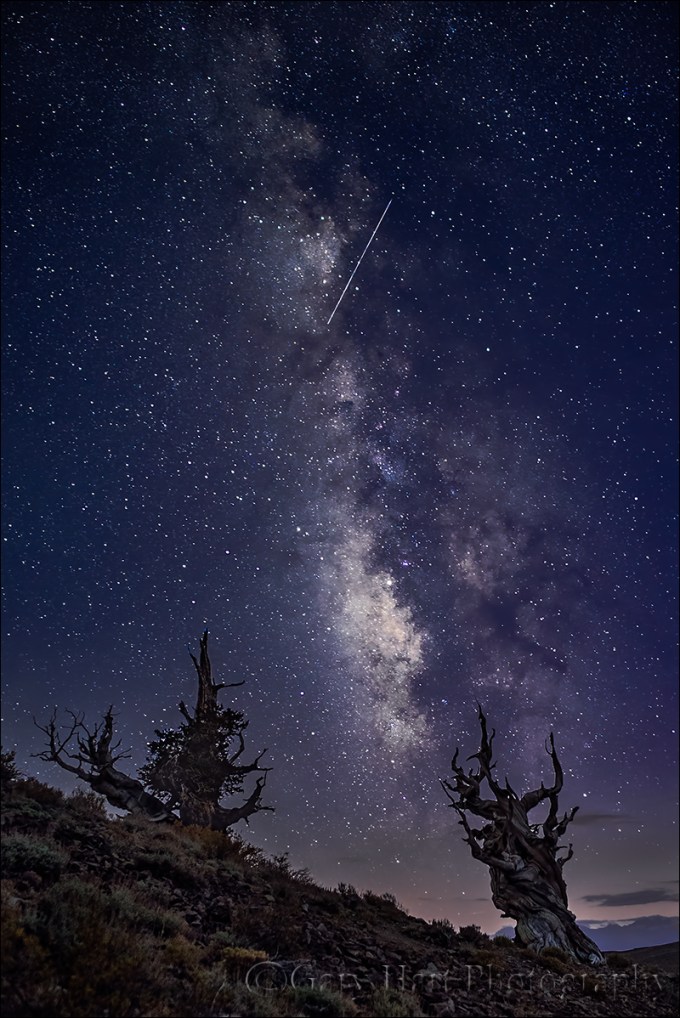
Milky Way and Meteor, Bristlecone Pine Forest, White Mountains, California
Bristlecone Night, White Mountains, California
Sony a7SII
Rokinon 24mm f1.4
20 seconds
F/2.0
ISO 6400
Tonight the calendar clicks over to a new year, ready or not. Most are ready. The general consensus is that 2016 has been a difficult year. Our warming planet lost too many creative souls, and was rubbed raw by contentious elections in every hemisphere. But here we are knocking on the door of 2017.
I’m lucky to have photography and the dose of perspective it provides. Whether it’s a double rainbow above the Grand Canyon, fountains of lava on Kilauea, or a meteor slicing the Milky Way above 4000-year-old trees, our terrestrial problems just seem a little less significant when I’m behind my camera.
As I review 2016’s contributions to my portfolio, I have to admit that the year wasn’t a complete loss. To me these images are so much more than photographs, they’re a reminder that I was there to witness each of these gifts from Nature.
So, without further adieu, here’s a selection of personal highlights from this emotional, transformative, contentious, unforgettable year.
2016 Highlights
Click an image for a closer look and slide show. Refresh the window to reorder the display.


Happy New Year, everyone. Here’s to a great 2017.
– Gary
Workshop Schedule || Purchase Prints
The best lens for the job
Posted on December 28, 2016
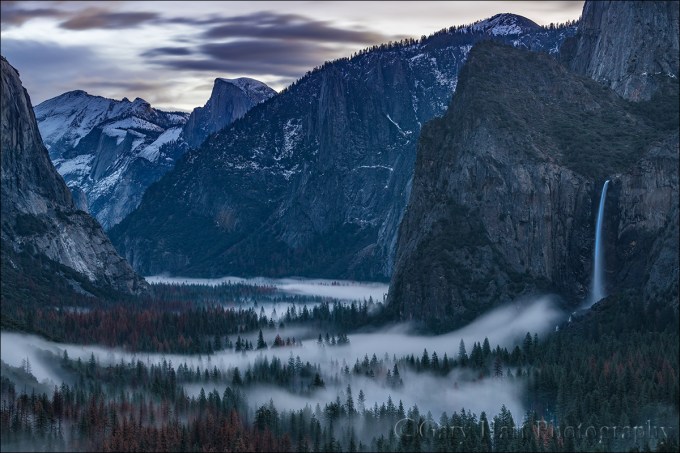
Dawn, Tunnel View, Yosemite
Sony a7R II
Sony 70-200 f/4
25 seconds
F/8
ISO 200
Probably the workshop question I am asked most is some variation on, “What lens should I use?” While I’m happy to answer any question, this one always makes me cringe because the implicit question is, “Which lenses can I leave behind?”
What many photographers fail to realize is that the “proper” lens isn’t some absolute determined by the scene, a secret known only by the best photographers, it’s a creative choice made by each photographer who visits. While prior captures often imply a general consensus on a scene’s primary composition, that pretty much turns out to be the first composition everyone sees—just the compositions creative photographers should avoid. When I tell you the lens to use, I’m imposing my creative instincts rather than cultivating yours. “Okay, right, I get it. But seriously—what lens should I use?” Sigh.
Suck it up
The best landscape images usually require some sacrifice, so if you’re making lens choices based on what’s most convenient, maybe landscape photography isn’t for you. I’m not talking about risking your life to get the shot, or exceeding your physical limitations, but I am talking about a willingness to experience a little discomfort for your craft. That means venturing out in miserable weather, rising well before the sun, or (gulp) skipping dinner. And yes, it even means lugging a little heavier camera bag than you might prefer.
My general rule is to, at the very least, carry lenses that cover the full-frame focal range from 20mm-200mm. There are some trade-offs in the number of lenses you choose to achieve this. Some carry just one or two zoom lenses, sacrificing speed and image quality for comfort, convenience, and mobility; others go hardcore, lugging an assortment of fast, ultra-sharp primes. I’m in the middle, extremely happy with the combination of quality and compactness I get with my three Sony f/4 zoom lenses: the 16-35, 24-70, and 70-200.
In addition to my three primary lenses, I never go out without my full frame Sony a7RII and 1.5 crop Sony a6300 bodies. Because a 1.5 crop body increases the effective focal length of each lens by 50 percent, with these two bodies I can cover the focal range from 16mm-300mm. I also have a few specialty lenses that may or may not stay in the car (but never at home), depending on the scene, the room in my bag, and how much hiking/climbing/scrambling I’ll be doing: a Tamron 150-600 for extra reach; a Rokinon 24mm f/1.4 lens for starlight; and a Sony 90mm macro.
So seriously, the lens you choose for a scene is part of the creative process that defines you as a photographer, a personal decision that I’m happy to assist, but reluctant to dictate. In fact, it’s a rare scene that’s worthy of capture with one lens that’s not worthy of capture with another. And another. (And I promise that the surest way to need a particular lens is to leave it behind.) I’m not suggesting that you lug Hermione’s purse to every shoot; just try to remember that your images will last far longer than your discomfort.
Case in point
I do a half dozen or so workshops in Yosemite each year, plus a number of private tours. That means I spend a lot of time at Tunnel View. A lot. But I don’t photograph there much anymore unless I think I can get something I don’t already have, which means I do lots of watching other photographers. One thing I notice is how few photographers use a telephoto lens here. Given the breadth of the view, and the volume of existing wide angle Tunnel View images we’ve been conditioned by, reflexively reaching for the wide angle lens at Tunnel View is understandable. But approaching any scene with a preconceived idea of the best lens limits the array of creative opportunities the scene provides.
One chilly morning at Tunnel View earlier this month, my winter workshop group enjoyed the snowy granite, wispy fog, and pristine air only possible after a winter storm. Of course we had all of the standard wide angle compositions at our disposal, but when the fog and pastel sky moved me to pull out my camera, it was my 70-200 that I chose to pair with it. I tried a few compositions, before settling on this one that was just wide enough to include Half Dome, Bridalveil Fall, most of the fog, and the only clouds remaining from the storm. Not only would a wide angle lens have shrunk what I felt were the scene’s most significant features, my telephoto lens was able to exclude from my image the bright, empty sky above Half Dome, and most of the dead, brown trees scarring Yosemite Valley.
Because this image was captured 20 minutes before sunrise, the scene my eyes saw was much darker than what my camera captured. Photographers able to see with their camera’s vision rather than their own love photographing in the sweet light only possible at twilight. In this case not only did I benefit from a shadowless foreground, the 25-second exposure smoothed the clouds, fog, and waterfall ethereal quality.
I won’t pretend that this is a groundbreaking capture (far from it), but if I’d have walked up to the scene with a wide angle already mounted instead taking it all in before choosing my lens, I don’t think I’d have been nearly as happy with my results.
Workshop Schedule || Purchase Prints
A Tunnel View Gallery
Click an image for a closer look and slide show. Refresh the window to reorder the display.


 Eloquent Images by Gary Hart